Template of topic 380525, post 1
This page addresses “walking” type segments in Australia. Generally speaking, though, walking-type segments have very specific purposes.
Template of topic 380209, post 4
Template of topic 380209, post 5
Waze is for driving only
Driving with the Waze app open is a satisfying way to give back to the community of drivers around you. But when it comes to getting out of the car, it’s time to close your Waze app.
Waze is the answer to finding the best route for routine and ad hoc driving. That is it’s only aim and it does it well. Waze is, and never will be, intended for use in walking or cycling - and doing so may cause damage. It’s for this reason, the mapping of walking type segments on the Waze Australia map is generally discouraged,
The Waze app looks at the speed you are driving along the road to help other drivers see if the road is flowing or still. But if you’re walking or cycling by the side of the road with Waze open, you may be feeding slow speeds back to Waze and impact drivers around you.
There are however, several scenarios where the use of these segments types is valid and are outlined below. Locking of walking type segments to level 2 or above is an indication that they have a specific purpose and should be discussed with the adding editor or an area manager.
When should I use walking segments?
Footpath
- Footpaths are the only routable walking type, and are addressable with house numbers.
- Footpaths must be connected to routable segments via a virtual node to be useful.
- If you find a footpath disconnected from a routable road, connect it.
- Never use footpaths for ordinary hiking or cycling tracks.
New editors looking to help should avoid mapping walking type segments. Footpaths can also be used to directly connect drivable roads together by walking. This is almost never desirable in Waze, as it can lead to bad routes where someone is navigated to the wrong place because of a mapped Footpath connecting that place to their actual destination.
At one time they were planned to be used to provide simpler pickups for Waze Carpool, but Waze Carpool has been closed down permanently and was never available in Australia. The following examples show how it was intended to work for Carpool, but could also illustrate how it gives the wrong outcome for ordinary navigation.
If a footpath is closest to a destination or starting point, users will be routed to/from where the footpath connects with a drivable road. They are helpful in getting the user to/from a place that is far from a routable segment. For example, a business that is only accessible on foot and commencing the walk from a specific routable road is required; connecting carparks for a place that are physically separated, such as by a train line.
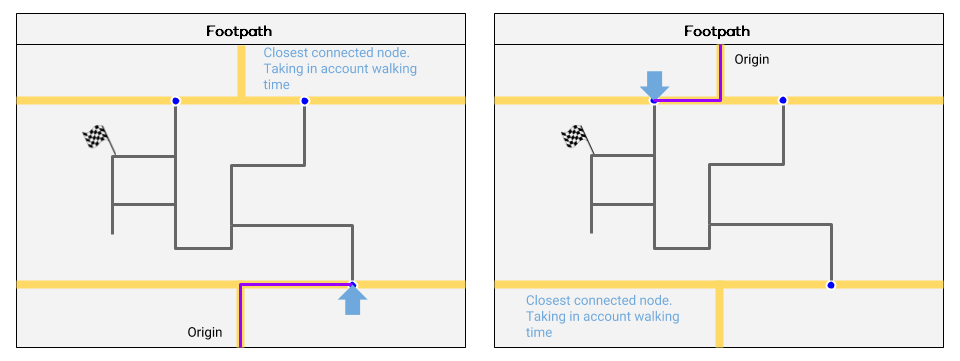
This example, reproduced with thanks to the Belgium Wazeopedia, illustrates how Waze will route using footpaths.
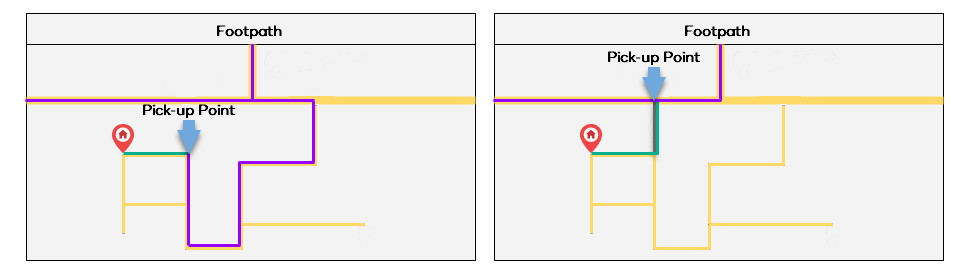
In this example, without the footpath (grey), the driver (purple) must drive much further, when instead the rider (green) could take a short walk to a more convenient pickup point if the footpath is mapped.
Non-Routable Path / Stairway
The non-routable walking segments are generally for aesthetic purposes and added to the map as a visual orientation aid for drivers - such as a footbridge over a highway. Further, the start of nationally significant walking or hiking destinations may be mapped to indicate entry points only.
They are otherwise actively discouraged from use in Australia. New editors looking to help should avoid mapping walking type segments.
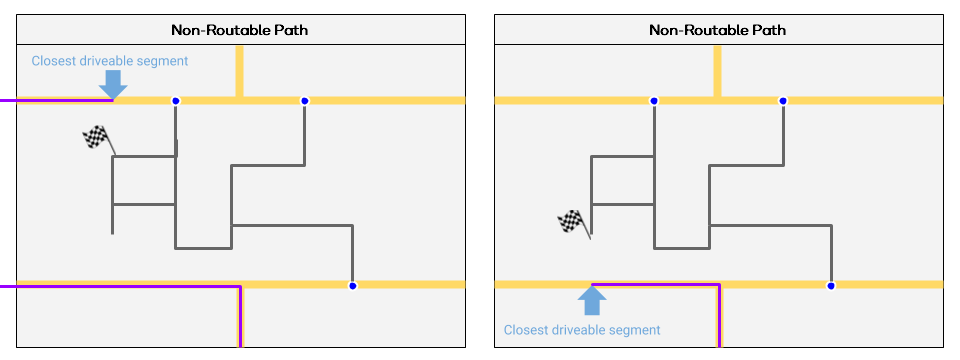
This example, reproduced with thanks to the Belgium Wazeopedia, illustrates how Waze will route using non-routable paths.