
Frontage roads serve as access to freeway segments of a highway and to businesses, driveways, or other properties that exist along the freeway. They are often referred to as frontage roads, feeder roads, access roads, outer roads, parallel roads, or other local vernacular. In SCR, they are referred to as frontage roads for clarity and consistency and the terminology aligns closest to common usage by state highway departments. While seen mostly in Texas, they may be seen across the region.
Freeways with frontage roads are viewed as one right-of-way by highway departments. As such, both the general-purpose lanes (freeway segments) and frontage roads share the route name. For routing purposes in a mobile application like Waze, they must be treated as separate roads with their own properties. However, this can lead to some confusion, especially with drivers unfamiliar with these roads. Most drivers understand an instruction to I-20 W to mean they are getting on the freeway and a turn to a frontage road to mean a different road separate from the freeway.

Naming
Highways with freeway segments should be named in accordance with USA guidance on road names. Name frontage roads with the name of the route with Frontage Rd appended as a suffix. For example, I-20 Frontage Rd. This will provide clarity to the driver that they are making a turn to a highway’s frontage road and not to the freeway itself. Drivers whose routes take them onto the freeway segments will receive the appropriate turn instruction to the freeway that follows. Alternate names should be used where necessary and should include variations of the route name as used in addresses along the route. For example, W I-20 or US Hwy 80. Doing so will allow routing to destinations to work properly.


If the highway segments have a localized colloquial name, that name should be used on the frontage roads in lieu of the route name. For example, Lyndon B Johnson Fwy Frontage Rd or Gulf Fwy Frontage Rd. As there are many stretches of highway named as memorials or for local leaders, localized names on freeway segments and frontage roads should only be used where businesses that line such segments use the local name as opposed to the route name in the address or where signage so indicates. Consistency in such naming is imperative and care should be taken as to where local names begin and end, usually at city limit lines or boundaries between ZIP codes. Alternate names should be used where necessary using variants of the route name or local name, as described above.
In cases where the frontage road itself carries a localized name, that name should be used without Frontage Rd appended as a suffix.
It is understood that such naming is inconsistent with what a driver may see on posted signage. In many places, signs for the same road vary by intersection, an issue created by public works departments that in no way changes the name of the road. In addition, frontage roads are rarely signed as such, despite being what they are. This naming convention allows for one consistent name to be used for the frontage roads through a given city. Visual instructions and TTS overrides may be used where necessary to match road signage without disturbing the integrity of the road name on the map (see below).
| If... | Then... | Format | Examples |
|---|---|---|---|
| Frontage road runs along numbered route that has no localized name | Primary name is the numbered route plus Frontage Rd. No cardinal directions as suffixes. Alternate names are variants of the numbered route name which may include cardinal directions. |
[route name] Frontage Rd | I-20 Frontage Rd US-287 Frontage Rd |
| Frontage road runs along numbered route with a localized name | Primary name is the localized name plus Frontage Rd. No cardinal directions as suffixes. Alternate names are variants of the numbered route name which may include cardinal directions. |
[route name] [local name] Frontage Rd | Lyndon B Johnson Fwy Frontage Rd Gulf Fwy Frontage Rd |
| Frontage road runs along numbered route but has its own name | Primary name is the localized name. Frontage Rd does not get appended. No cardinal directions as suffixes. Alternate names are variants of the numbered route name which may include cardinal directions. |
[local name] | Interstate Dr W N General Bruce Dr |
| Frontage road runs along unnumbered route with a local name | Primary name is the localized name plus Frontage Rd. No cardinal directions as suffixes. Alternate name can be the same as the main road's primary name. |
[local name] Frontage Rd | Preston Frontage Rd |
Visual Instructions at Frontage Roads
Highways with frontage roads should have shields assigned only to the primary road (the freeway segments) and not the frontage roads. This is to differentiate them as separate from the freeway or other highway segments they serve. For example, the name I-10 E should have a road shield assigned but the name I-10 Frontage Rd should not. Road shields may be used in visual instructions for turns onto frontage roads, allowing the driver to see both the highway shield and the frontage road designation indicating the turn is not for the freeway itself. This is especially helpful at junctions where a shield is absent or there is no LGS. At a minimum, these visual instructions should be placed at major intersections along the given frontage road (intersections with mHs and MHs). Take care not to create redundancies, such as displaying a shield for I-10 where signage also reads IH-10. The name IH-10 on the sign is the same as the road shield displayed for I-10 in the app.

In the case below, both the shield and text appear on the LGS, so both should appear on the VIO in WME. While redundant, the city designated this stretch as E IH 30 so we want to match the sign here. Notice that the primary name of the segment remains I-30 Frontage Rd despite the difference in the LGS here. The TTS can also be overridden to read what the LGS shows without breaking the consistency of the road name.

Matching the sign is important even where there are apparent inconsistencies. In this example in Dallas, Lyndon B Johnson Fwy is the localized name of freeway segments and the name is used on business addresses. At other intersections with the frontage road, LGSs read some variant of that name, but not here. Just match the sign making use of visual and TTS overrides. The instruction Waze shows and speaks has no bearing on the primary name of the segment and vice versa.

Notice below how there is no LGS at the intersection to turn right. No LGS certainly does not mean that there should not be an instruction. Here, the frontage road carries its own name, Interstate Dr W, and the visual instruction given shows the I-40 shield in addition to the local name of the frontage. The driver gets visual confirmation they are at I-40, and if continuing onto the freeway, will receive a follow-on instruction leading to the ramp.

Do not include the control city in the turn to the frontage road but rather on the ramp segment.

It is imperative that each junction’s instructions be examined carefully and treated separately from others along the same road or even at the same intersection. It is common to find inconsistencies in the way a street is named, abbreviated, or suffixed within the same city. Where desired for clarity to the driver, the text portion of the visual instruction may be set to match the signage. For example, LBJ Fwy or Pres. G. Bush Tkpe. TTS may be also overridden to account for such cases. Do not cut or create new segments to name a segment matching the sign. Rather, perform such changes in the visual and TTS instructions. Recall that the primary name of a street is that name which appears most often and is the most consistent throughout a city’s limits. Therefore, if the LGS displays as Central Expy **Serv Rd** while everywhere else is Central Expy, then Waze should match at those places.
Unlike on other surface streets where signs for control cities can be placed with the turn instruction, control cities should not be included in turn instructions to frontage roads. Control cities should be placed on ramp names and are part of instructions such segments leading to the freeway or highway segment, following national guidance.
Addresses Along Frontage Roads
Because of the nature of frontage roads being to serve businesses along them, cities in the region have taken to naming and addressing them like other streets. As such, it is common to see an address read 123 N Interstate 35. This often creates unique routing errors when the addresses are not correctly input or when segments do not have the correct naming on them.
Many addresses along a frontage road are setback from the road, necessitating the use of a residential place point (RPP) for proper navigation. When created, take care to input the correct name in the street field. Street names such as I-30 Frontage Rd are invalid for addressing with USPS, Amazon and other services making use of address data and are not used by residences and businesses. Therefore, the street name of the RPP should match what is used by the business or residence. Businesses along a frontage road often use a variety of variant names in their addresses. Because RPPs require a nearby segment with the same primary or alternate name to work properly, it may be necessary to add these variant names to frontage road segments as alternate names. In some cases, the list of alternate names can become lengthy. For example, one restaurant along a frontage road might use the address N I-35 while its neighbor might use Interstate 35 N. Because of the difficulty in predicting what the user might enter, make certain the RPP for the place reflects the same as its associated place point and ensure both variant names are included as alternates to the road segment. Ideally, the entire stretch of road through the same city should carry all variant names.
Lane Guidance on Frontage Roads
Lane guidance along frontage roads is set and displayed the same as on any other type of segment. Unique to our region are junctions which feature a Texas turnaround (see diagram at the top of the page). The introduction of lane guidance and Far Lanes in WME have not fully allowed editors to properly map these junctions, as configurations vary wildly and often distance between segments created issues with the display of lanes. In most places where lanes are set up, either lane guidance is not completely set up (often omitting the turnaround segment) or incorrect guidance is shown, such as displaying a left turn arrow with a Continue straight text instruction.
With Far Lanes 2.1 and the introduction of the push/pull feature, this unique issue is resolved. Drivers in the region should understand that the junction of a frontage road to a side street includes the turnaround, AGC, and other segments all the way through to the other side. This is best done in WME using paths.
In the example below, lane guidance approaching the intersection from the north includes all five lanes the driver sees overhead. The paths begin with an entry segment immediately before the turnaround and include all segments through the intersection. Near turns are set on the entry segment and far turns are set and pushed so they display in the app through the turn maneuver. Included here also is a prefered lane guidance for traffic accessing the freeway on-ramp.
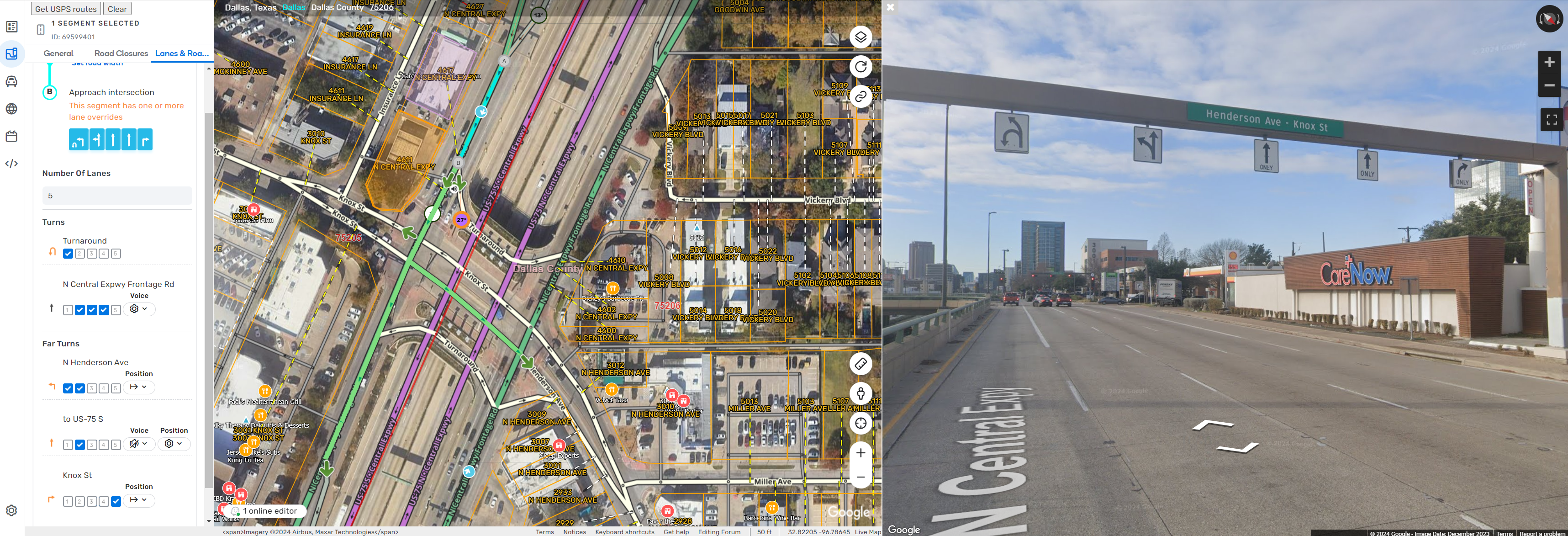
Paths should be started on the segment immediately before the first segment that makes up the junction. Often this is the segment where a turnaround or right-turn AGC follows. Paths should be set up beginning from this entry segment to both the right and left turns (or the turnaround if not first in the sequence). After setting up the appropriate lane guidance, the paths making up the far right and left turns should be “pushed” to indicate they are all part of the same intersection. Preferred lanes to continue straight through the intersection (in cases where lanes drop off), are placed on the entry segment’s near turns; far lane paths to continue straight are currently not supported. Preferred lanes to far turns opposite the intersection, such as a freeway on-ramp or turn into a business, can be created and given a silent continue straight.