View GPS points in the Waze Map Editor
Waze collects and utilizes anonymous user data from drivers to help improve the map while respecting their privacy. Within the Waze Map Editor, this data appears as GPS points on a specific layer. These points allow editors to observe the direction and volume of traffic in a given area, providing them with accurate information when they are editing the map.
GPS point data is updated weekly. Because of this, it may take up to two weeks to see the GPS info when a new road is added, depending on traffic volume.
GPS points data is stored for up to a few months. Therefore, depending on traffic volumes and the data retention policy (similar to data on the Editable Areas and Drives tabs), the GPS layer data could be a few months old.
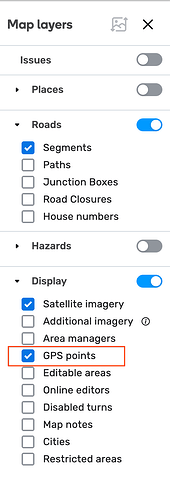
To view the GPS points layer, you’ll need to enable it
- Log in to the Waze Map Editor

- Click , in the top-right of the map display
- Turn on the Display layer
- Select “GPS points”