I was responding to a UR regarding missing roads in Hopeville Pond State Park (Permalink). In looking at the park map from CT DEEP, there are a number of unpaved roads. If you turn on GPS Points in WME, you can even see a decent approximation of them.
What is the best practice for adding these in? Can I draw them based on the GPS Points (I know they don’t always tend to be 100% accurate)?
Thanks for your assistance!
The core roads in the park are already mapped - which roads are you referring to?
In looking at the two URs the reporter submitted, and the map, it looks like the roads in the image below (roughly indicated by the red markings). The ones on the east being the unpaved ones and the west the paved ones. I am only about 10 minutes away from the park, so I may go drive them and “pave” them using the app after the holiday weekend.
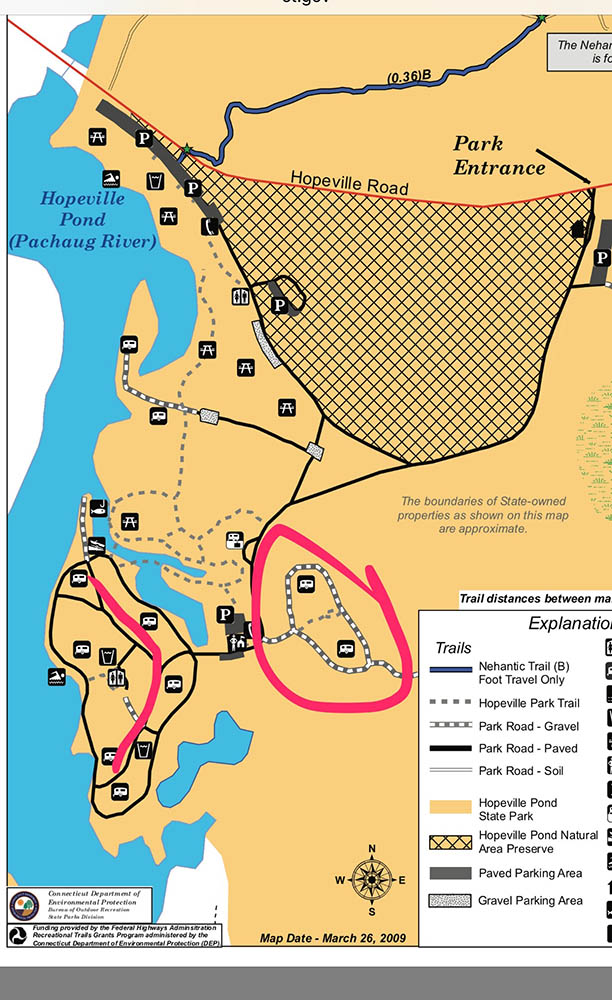
Good instincts. Based on the GPS tracks alone, I would map the green roads - probably as PLRs (with the Unpaved option marked) because it looks to be the access to the camp sites, and they wouldn’t want to encourage through traffic. I wouldn’t mark what’s in red as the northern sections looks to be a GPS error & the southern section appears to be a continuation of that error.
If you can put BOTG, that would be great. If you do take a trip, I would also check out the blue line (it’s on the park map, but shows no GPS trace).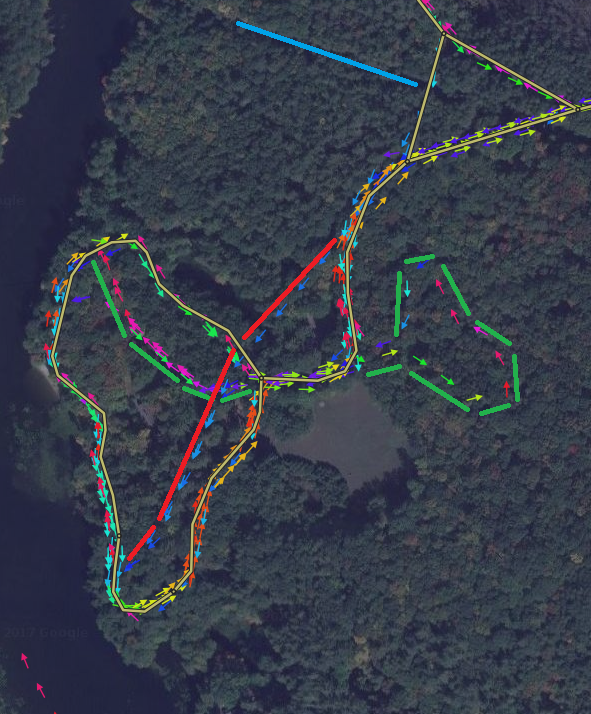
Thank you. I added them in and will try to go drive it next week to get the rest.
Was able to get there this afternoon. I got the blue line mapped, but the camping areas were gated so the red area will have to wait…
Because I’ve never “paved” a road in the app before… Does the road just show up in WME eventually so I can connect it and fill out the city, etc.?