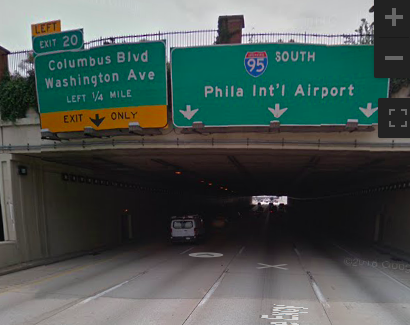
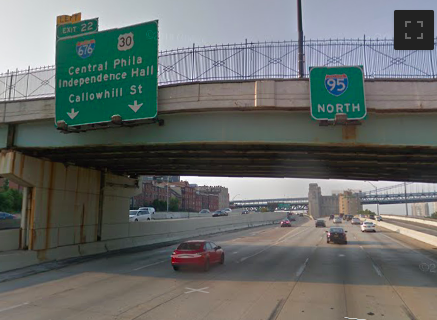
I submitted a map issue in the waze app and they referred me here via an email follow-up. I don’t go into Philadelphia very often, but whenever I do, I frequently make a wrong turn on the way home to NJ because waze doesn’t tell me which way to go at this one fork (I think it’s where 676 and 95 split apart - though I’m not sure) and my instinct tells me to keep left where waze is assuming I’ll go right. I reported a map issue in the waze app right after I passed that fork in the road.
Can I find where I reported the map issue so I can confirm the spot on a map?
How can I get waze to tell me which way to go in that spot?
Was your trip about 9:45 pm last night? If so this might be your report.
If so what junction are you asking for the keep right?
The keep right, if appropriate can either be set up by the geometry of the segment or by using a turn instruction override. Since it is on a freeway, you will need a Rank 5 or higher editor (with editing rights in Philly) to go over it with you and then they can provide the downlock for the correction (if necessary).
Also based on above, is this the junction that you are asking about?
Do you remember about when you sent the report? Reports don’t have the usernames, so we’d have to find it another way, and if the report was closed more than a week or so ago, it is probably removed from the map by now. We can see what we might be able to do once we determine where the issue is.
OK, yeah, that’s the trip. It was last night. I just went to street view. I’m 99% sure that it’s exit 22 (676/30) that I frequently accidentally take instead of 95 north. I never expect an exit on the left and by the time I realize I have a decision to make, I don’t have enough time to figure out if the “exit” is the right or left and my default is to assume the exit is on the right. Each choice is multiple lanes, so neither looks like an exit. The sign doesn’t have the yellow thing across the bottom saying “exit only” like I usually associate with an exit (though in street view I see there’s a tiny yellow “left” just above the green, only slightly larger “exit 22” sign). The sign below that is huge and to me, it looks like the way to go to stay on the “main road”. I’ve made that mistake at least twice, probably 3 or 4 times. I know I’ve gone the correct way twice now this year, so I’m sort of getting used to it. Still, I think it needs a verbal “keep right” and maybe even an earlier “use the right 3 lanes” notification.
Here’s a couple screen shots. I’ll use the southbound Exit 20 as an example. It looks like an exit on the left. Exit 22, at first glance, does not (to me anyway).
They use those white arrows for through traffic in the southbound example, but for the exit in the northbound example. And the exit sign overpowers the through traffic sign. That exit, despite having a blue red and white shield, empties onto a city street. Fools me more often than not.
So how do I do the turn instruction override? Technically, the exit is marked (though not in a consistent manner as other exits), so I guess technically, it’s not a map issue as I had suspected, but there’s just something about that spot that causes me to go the wrong way. And if I set up this override, let me see if I can guess how it would work… when we I approach that spot, regardless of whether I’m supposed to take exit 22 or keep right, the override will always tell me to either keep right or left there?
Since it took a while for me to get the notification that you posted I recommend that you join Discord and reach out to the PA SMs via the Pennsylvania Discord Channel on the NOR server.
That way you can see if they are on or try to set up a time to work through it
Here is the wazeopedia on the Turn instruction override. To insert one you will need verify that the TIO is required or it might just be an angle needed. For either of these you would need an unlock on the segment(s).
Honestly, that’s more work than I’m willing to put into this. I haven’t made the mistake the last 2 times I’ve been there, so I’ll just try to remember it.
After much discussion, Keep Right was added as suggested. PA State Managers will monitor the area for additional new complaints based on this addition and modify if necessary. Thank you.
Wow, really? I was beginning to think people here would think I was an idiot for making that mistake and that I was exposing myself as a numbskull.
Anyway, my wife is an avid wazer. She tries to get points all the time. When I told her this morning that I’d submitted a map issue last night, she was excited. (She was in the car with me at the time, but she was on the phone.) She said I’d probably get a ton of points. So out of pure curiosity (actually, it would make good teasing fodder, since she’s so into it and I’m just a casual user), do I get any points as a result of the change?
Now I’m worried that locals there will be annoyed and complain about the new “keep right”.
Yes you did get points for submitting the report. It is not a ton but this way you also won’t go the wrong way again so that is a win too.
If she is interested in getting more points, she can edit and the points she gets editing are added to her overall Waze points.
We always welcome new people to help make the map better.
I got an email saying I got a reply from juliansean, but it seems I was unable to log in. The response was in the email though. It said “The problem was unclear and volunteers didn’t receive a response, so we are closing this report. As you travel, please feel welcome to report any map issues you encounter. Thanks!”
So does that mean the update to the maps wasn’t implemented? What does “volunteers didn’t receive a response” mean? Does that mean that Waze didn’t tell them to keep right when they got to exit 22? What was unclear? I’m confused.
You have a different usa_**** name so we are not sure what is going on here. Am assuming the message was to a report in the app. Let me get the PA SMs involved again.
From above they made the change but may not have closed the Report