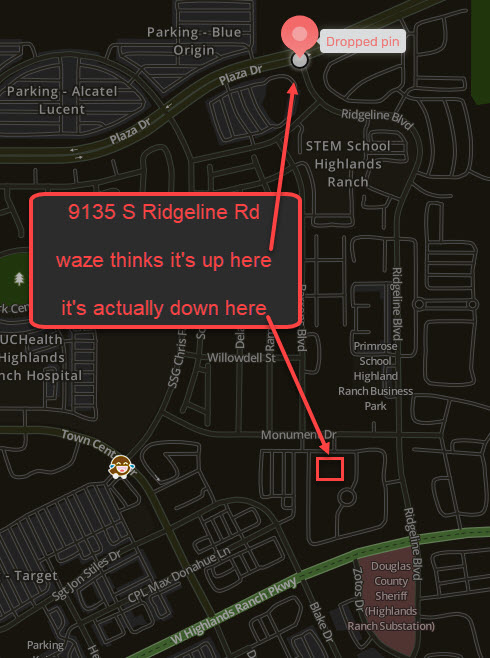
The address 9135 S Ridgeline Rd points to the wrong location. The building is actually about half a mile south of where Waze thinks it is.
Tried to paste a picture but it wouldn’t let me (it thinks the picture is like 373,000 characters ) but for some reason attaching it and choosing “place inline” does the same thing as pasting it from snagit
Thank you for your message. There is an issue with the Google Maps pin that is showing this address in the wrong location. That Google pin is also preventing us from adding a Waze place pin in the correct location. I have added a temporary address marker here, and I requested an update to the Google Maps pin.
In the meantime, there should be a correct Waze pin appearing within about 2-3 days. Hopefully we can add the permanent place pin soon, once Google processes their update. What is the business name here that you were navigating to? We can also add that as a name search for more navigation options.
Thanks for reaching out. The location you have indicated has the address 9135 S Ridgeline BLVD according to county records. I think you are getting Google Maps “guess” as a search suggestion since the address is not in county records.
Please confirm the address is not really 9135 S Ridgeline BLVD instead of RD.
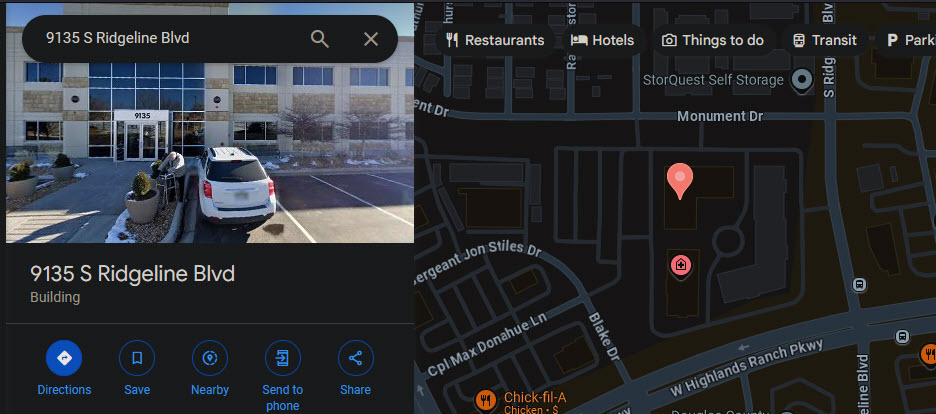
Actually, google shows the correct location for this address already. See attached image.
The business name is Family Care Center, Highlands Ranch.
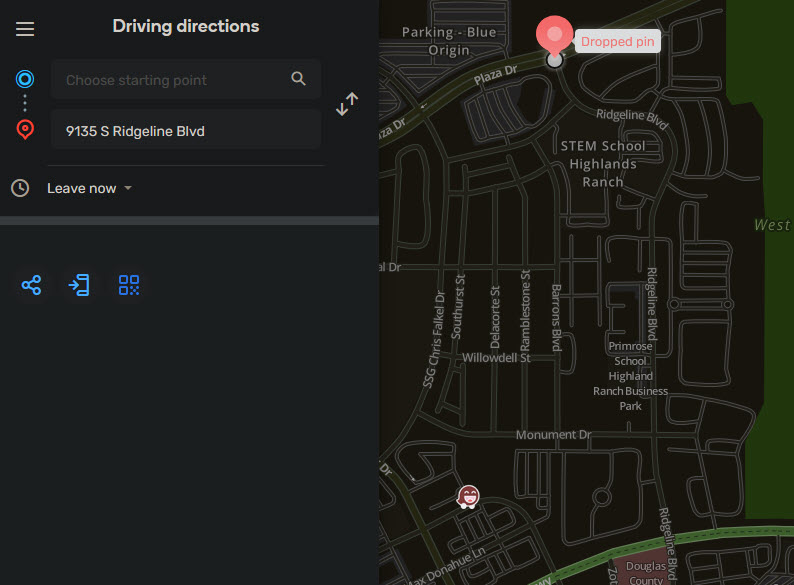
Chuck is correct, it is Blvd and not Rd. I made the mistake though, I didn’t type in Rd, I selected whatever the first option was when I searched, which was actually Blvd. I just assumed it was Rd when I made the post. Sorry. See second image.
I should have noticed that it was Blvd, not Rd. I also searched for that in Waze. The Google pin issue I was referring to is the fact that it won’t let us save a Residential Place Point (RPP) in Waze. This is a Google back-end verification that won’t allow us to save a pin that is too far away from a Google pin. While the GM search is showing the pin in the correct place, the incorrect search result you are seeing in Waze (on Plaza Dr) is from Google (another pin which is incorrect). So in order to save a RPP in the correct spot, we need Google/Geo to correct their pin first. As a last resort, we can add a house number pin on Ridgeline Blvd and the pin will at least route to 9139 (the building closest to the road).
I have added a Waze place point for Family Care Center Highlands Ranch.
Right on. I hope that google allows you to set the pin correctly soon. I’m totally unaware how any of that works, all I know is what I see when I search.
Thanks so much, I hope that I was able to help in some way!
Thanks Chuck, I will definitely try to do that from now on. It’s funny how that works - in the past I’ve searched for businesses/location names and it points to the wrong address, but when I enter the address it takes me to the right place. And now vice versa.
I am happy to report that the issue has been resolved, and a Waze address marker for 9135 S Ridgeline Blvd, Highlands Ranch, CO has been successfully added to the map.
Then, perform a new search and resave. If you don’t remove the old results from your navigation history or Saved places/Home/Work, then you will continue to be routed to the old coordinates.
Please submit another report if this does not resolve your issue. Thanks!
 ) but for some reason attaching it and choosing “place inline” does the same thing as pasting it from snagit