We all know gas prices are a major pain point right now, and the Waze community has a unique tool to help. We want to make sure every driver knows they can find—and update—the best prices in real-time.
To help you spread the word, we’ve put together a fresh set of graphic assets covering both the Search and Update flows HERE.
Feel free to use these to show your followers how easy it is to save.
Once you’ve posted, drop the links below—we’d love to see how you’re sharing the Waze magic!
Thanks and have a great day,
Anat S., on behalf of the team.
Hola Anat.
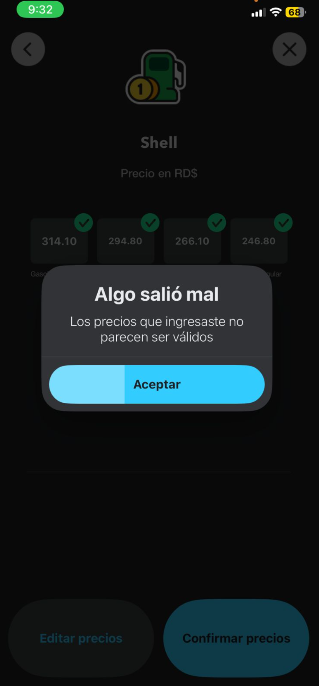
We can’t update gas prices. It always returns an error. I believe it’s because the actual prices are outside the range configured for the DR for gas prices.
Thanks for sharing.
Has this bug been reported through the Beta community?
If so, I’m happy to help push it. If not, please first post it and then share it with me.
Hola Anat.
I don’t think it’s a bug.
Several years ago when we requested that fuel prices be shown in the DR, they asked us the price range users would be allowed to use when updating prices. Prices of gas in the DR are way more than the top bound of the range we declared.
I believe we used a price range of 160-260, but fuel prices are over 300 a gallon now.
I see, thanks for clarifying (I don’t know this process as well as community managers who manage local communities =] ). I’ll email you with the details on how to update the price ranges.