So I travel the route up and down I-271 between Route 422 every day and the problem is this. There are local lanes and express lanes, in the center, of both the northbound and southbound directions. I choose not to take the express lanes and stay in the local lanes, although Waze tries to push me to the express lanes. I have tried several times staying as far to the right as possible, when nearing the express lane on-ramps, to tell Waze I am staying in the local lanes but it still shows me as going to the express lanes. If I zoom in on the client it shows me in the local lanes sometimes, the express lanes others, and my concern is when reporting hazards etc it is reporting them in the wrong set of lanes. Today I zoomed in and it definitely showed me traveling in the express lanes heading north, but when I pulled up my drive in the editor it shows me traveling in the local lanes? Is there a change that needs to be made to the on-ramps or something to detect when people choose not to take these? This permalink takes you to the one it wanted me to take, and thought I took, even though I stayed in the local lanes. Thank in advance for your help, trying to make Waze a better place for all in NEO.
Funny you asked that, another sent me a PM questioning whether or not civilian GPS could be accurate enough to see the difference. I tested it with my Garmin today and the Garmin clearly stayed in the local lanes and when I was being navigated, Waze “drifted” into the express lanes but when I was later driving with Waze, but not navigating, it showed me staying in the local lanes. So to me it confirms it is some sort of logic issue with Waze when navigating, not an accuracy issue.
Sorry, I meant another GPS app on the same device that is running Waze. I have no doubt that GPS is accurate enough to make a distinction (when using a good receiver, with good ephemeral data, a good antenna, good antenna orientation, and good satellite visibility). But a GPS receiver in a phone with obscured satellite visibility and who-knows-how-much latency in calculations vs. rendering (plus whatever other tradeoffs the manufacturer made in order to cram that much functionality into what is primarily a communication device)-- maybe not (or maybe not, given the variability of RF equipment, on a specific unit at a specific point in time/space).
Note that the satellites are always moving, so to even begin to compare receivers you’d need to be at the same place at the same time and in the same vehicle with the antennas in the same place/orientation, etc. That’s why running another app on the same device at (roughly) the same time would help pinpoint the source of error(s) in this situation.
Okay, so I tested this this morning running both Waze and Apple Maps at the same and Apple Maps clearly followed my in the local lanes whereas Waze dove over into the express lanes, although I didn’t actually go there. The one thing I noticed on the maps is the local lanes in Apple Maps had a pretty good gap between them and the express lanes in the middle, which is the dirt between them, whereas Waze showed them virtually next to each other and maybe that’s part of the issue.
So here it is, and as you can see Waze wanted to go left, I stayed right and interestingly it shows my route as staying to the right. But Waze definitely thought I was in the express lanes as it also prompted me 5 miles later to move back over to the right to get into the local lanes for my upcoming exit, so it must be a logic thing, as Waze actually could see I didn’t follow it’s path but never “recalculated” and adjusted the route based on my staying right in the local lanes?
OK, thanks for posting that-- unfortunately, it doesn’t show the interesting part of your journey (the “5 miles later” part) and instead shows that waze was actually tracking you quite well into the local lanes. What we need is a UR (and tracks) where it’s giving you instructions based on erroneous location.
So if I understand correctly you want me to map error it when it is telling me to get back over into the local lanes when I am already in them>? Is that correct? What is a UR? Thanks for trying to help figure this out
UR-Update request. When you hit the map problem button on your phone, type a description of problem and it puts the flag on the Update map on the server.
Yes, you got it-- when you do that, it should save your track as well as the route that waze thinks you are (or should be) on. That might give us some idea of what’s up (and will give us something to forward to more knowledgeable folks for advice).
Oh, you also you might want to select wrong directions for the map error type (I’m uncertain as to whether the other selections for a map error will cause the route and track to both be saved).
Thanks for your willingness to generate debugging info.
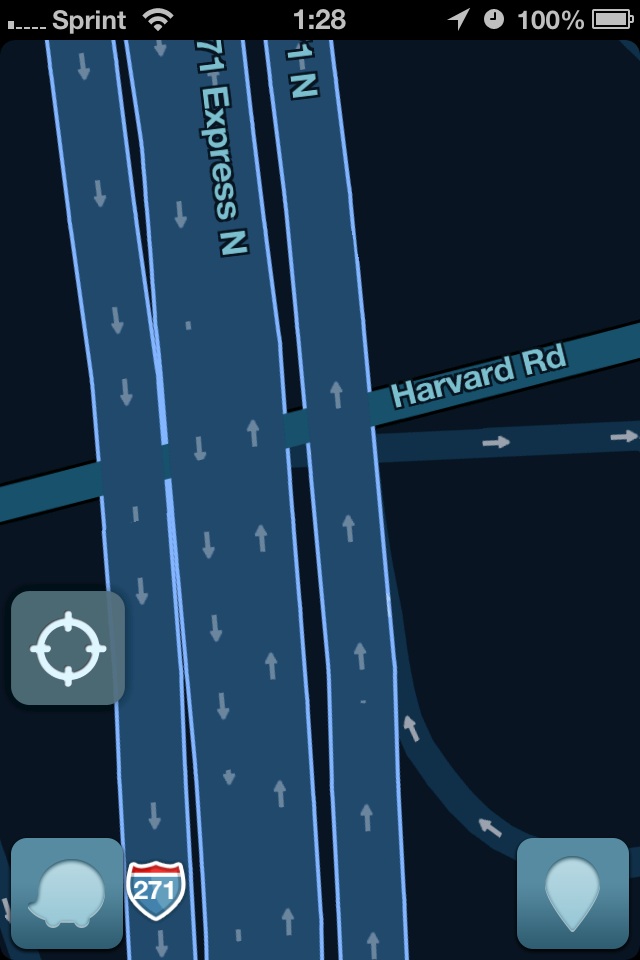
Okay, so I still haven’t been able to capture it trying to tell me to get over into the local lanes when I am already there, but I noticed something today that seemed odd to me. Perhaps this is the resolution of the client, but see the image I took of the client and then compare to the permalink of the same area. The two inner express lanes, one going North and the other South, and then the two outer local lanes are very distinct with some decent distance between them in the WME, but on the client they appear as one big lane, with occasional small break offs. The client was zoomed in all the way, is this the lane resolution one would expect for clearly distinct segments? Just to be clear, the local lanes there are three or four of them at times and the express lanes are two, but regardless as independent segments I would expect them to be shown as such? Thanks in advance for your comments
I was told at one point that the resolution of the client is significantly lower than what’s visible in WME. I guess the question is how/what does it decide to render when two roads are essentially coincident. It could be that they’re both actually displayed in the client but that one obscures the other.
Maybe a Waze Champ can chime in just so we know on the resolution issue. Dare I say the other map apps I have like Google, Apple, TeleNav all show the lanes as distinctly different choices so the mobile devices can handle that resolution, maybe it has to do with limited data transfer or something.
I am using an iPhone 4S with the latest version. When you say what settings, what exactly are you referring to? When I took my screenshot I was zoomed in as far as the client would let me be, navigation has show all items on, what should I be looking for? Also, the two express lanes for you still show as one fat single center lane as far as I can see. Thanks.
I noticed you were in “3D” mode, so I wondered what else you might have set – I was thinking that 2D was the default setting, but I may have set mine to that way-back-when after being annoyed by the odd perspective the 3D was giving.
Note how they directional arrows appear in mine. I just checked-- that lack of arrows appears to be an artifact of the 3D setting (another reason to hate it). Plus, the segment names in 2D mode are aligned with the actual segment – making it possible to show the name for both of the directions of the express lanes – vs. always horizontal in 3D (I guess?) which probably also makes it difficult to display when the two lanes/roads are essentially coincident (vis-a-vis the resolution of the app).
Try a switch to 2D-- I think you’ll be much happier.
I’ll definitely give it a try, I don’t think I changed that so I think 3D is the default view. Will report back tomorrow with findings/opinion. Thanks.
I was able to capture it today, finally. So south of this about 6 miles it told me to go left to get in to the express lanes but I didn’t, I stayed in the local lanes. As you can see from the traces, it did identify that I stayed in the local lanes, but at this point it still told me to go right to get back into the local lanes despite the fact that I was already there.
I can ignore the incorrect instructions, my question is if I had marked a vehicle on the shoulder during this period, would it have shown and been applied to the local lanes or the express lanes? Not sure what is going on here. Thanks.
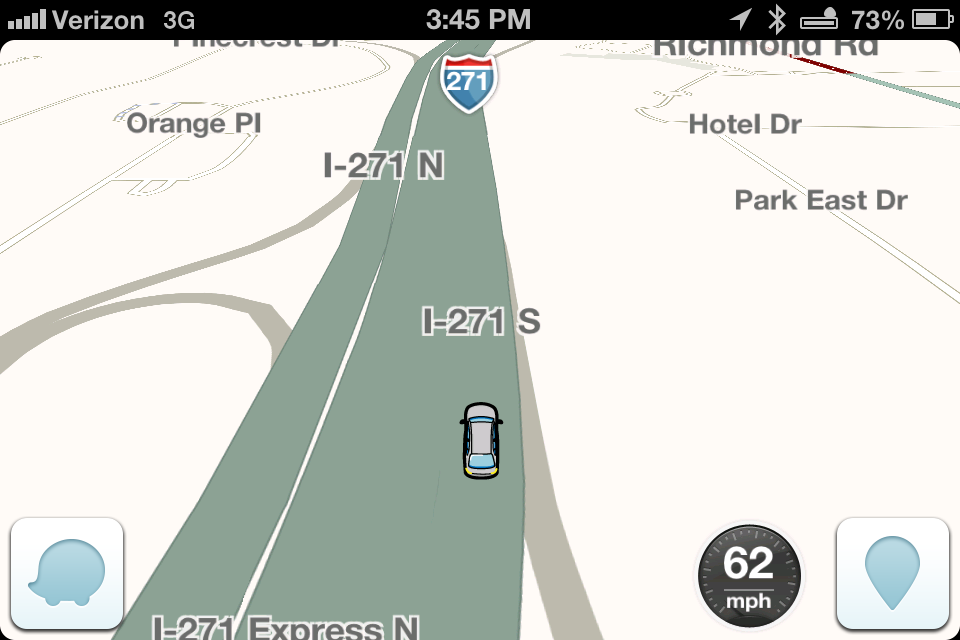 Okay, so I still haven’t been able to capture it trying to tell me to get over into the local lanes when I am already there, but I noticed something today that seemed odd to me. Perhaps this is the resolution of the client, but see the image I took of the client and then compare to the permalink of the same area. The two inner express lanes, one going North and the other South, and then the two outer local lanes are very distinct with some decent distance between them in the WME, but on the client they appear as one big lane, with occasional small break offs. The client was zoomed in all the way, is this the lane resolution one would expect for clearly distinct segments? Just to be clear, the local lanes there are three or four of them at times and the express lanes are two, but regardless as independent segments I would expect them to be shown as such? Thanks in advance for your comments