Nothing happens when I click on the bubble for the map problem.
I think it’s supposed to open a dialog box in the edit window. But the cursor just spins and nothing happens.
Any tips?
s3
Nothing happens when I click on the bubble for the map problem.
I think it’s supposed to open a dialog box in the edit window. But the cursor just spins and nothing happens.
Any tips?
s3
Have you got GPS switched off. That usually helps
Sent from my Dell Streak using Tapatalk
Yes. GPS is off.
I still can’t click on map problems and so am unable to even know what’s wrong with the map.
Arrrrggghhhhhhhh
s3
Clicking on Map Problems layer should add a section to the View panel and put a series of red and orange balloons on the map indicating where the problems are!
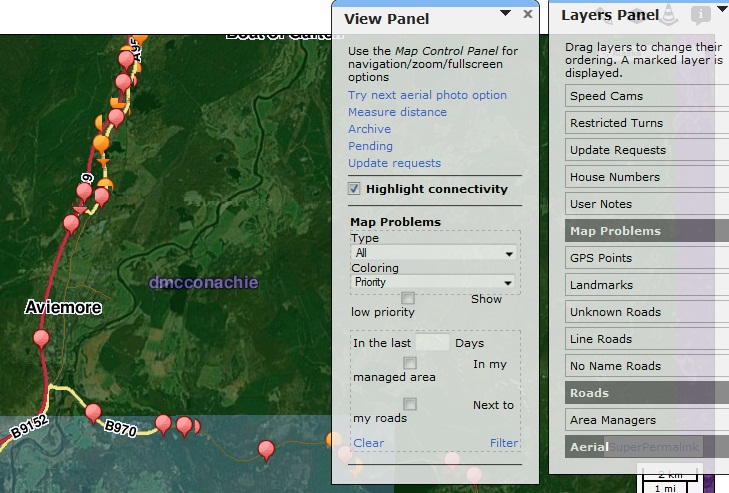
I can see the balloons but can’t tell what problem they’re highlighting, so can’t fix it.
I have hundreds of those balloons right now.
s3
Click on a balloon and make sure you have the “View Panel” open
But nothing happens when I click on balloons. That’s what I’m trying to figure out. I get the little spinning icon, then nothing.
The GPS and other distracting layers are off.
s3
From what I have gathered on the forums, it works a little differently depending on the browser you are using. Someone said Chrome was the best but I have used Safari and Firefox too. I don’t think I even thought of trying IE but who knows. Good luck.
I’m using Chrome.
I find cartouche doesn’t work at all in Opera. I might give Internet Explorer a try.
I don’t have firefox on my machine . . . and I’m not about to install it either.
s3
I found a similar problem with the “pending” link. It took me a while to notice that I had a scrollbar pop up on the bottom of the browser. Cartouche was opening the panel, but putting it way off to the right.
Maybe your map problem dialog is off-screen?
It should be the edit panel that changes and opens up. This isn’t happening. And nothing’s opening up anywhere else on the screen. 
s3
Can someone explain the bubbles and the issues they cover please? I am completely stumped by them so far.
Cheers
Kieran
If you want to remain healthy, forget about the bubbles.
Basically, waze scans over the roads and picks up on errors - like unconnected roads; junctions that don’t quite work etc. If you click on the bubble it’ll tell you what the issue is at that point. And it might even suggest a fix. If you’re lucky, it’ll be one that you can apply, or waze will even apply it if you click on the solution.
Or you can apply your own fix. Or sometimes it’s not even an issue anymore. So when you hit on resolve, the bubble should go away. . . or change number (which means you’ve created another issue with your fix).
s3
. . . and the dumb thing is, that even if the issue that created the bubble is long gone, the issue’s still there. . . and you have to manually remove it.
This map used to have lots of spaghetti. I removed most of that. Now I’m looking at the problems and there are lots of bubbles where the spaghetti used to be. Should’ve resolved itself.
They can scan and find problems, so why can’t they scan and realise that the problem no longer exists.
s3
I have many errors in my patch with the numbers 50 (sometimes 52) and 60.
The 50s errors seem to relate to GPS tracks which I assume are to do with spaghetti. To resolve these errors I just click on the bubble, click on resolve, and the presto, it’s gone.
But this is tedious. . . especially when each one takes at least 3 mouse clicks (why oh why is cartouche so click-intensive). Clearly, the error has already been resolved, but yet it’s cluttering the map so you can’t see the real error.
Is there a quick way to resolve large amounts of them at a time?
The next common error is 60 (route disconnected). When I click on the bubble it zooms the map right out, and then when I hit resolve it says the bounding box is too big. Clearly this is a very large-scale error. But what can I do about it?
s3
Silly question maybe but you are actually checking the problem itself rather than just pressing resolve!?
I have just discovered that the map problems layer does not work in Google Chrome! I switched on Firefox and hey presto all of the map errors and a full breakdown of the issue showed in the view panel.
Hopefully I can burst some of those balloons now! 
For other problems you have to fix them, or the bubble won’t go away.
But for 50, 51 and 52, usually the problem doesn’t actually exist anymore. There’s no road where the bubble is (which I assume is because there once was spaghetti there), so when I hit resolve, the bubble disappears.
Easy enough, but having to do it thousands of time is no fun.
I wish the same way the scan showed up these issues and put the bubble, it should be able to rescan and realise that there’s no longer and issue and remove the bubble.
It should do that for all problems - but leave the option for the AM to resolve manually, so he knows that the fix he’s applied works.
As for 60. . . I still don’t know what it means.
s3
I couldn’t get it to work in Chrome either. I could see the bubbles but couldn’t click on them or resolve them.
So I’ve had to resort to using Internet Explorer for it.
s3