Hi guys. I am new to here and is wondering if there’s any rules on mapping road signs, especially when each lane in Hong Kong roads can lead to very different destinations?
I note that exits (with number) for trunk roads are well mapped, but in some cases it is less driver-friendly. A case in point - Prince Edward Rd E - left two lanes go to To Kwa Wan, Hong Kong; right two lanes go to Kowloon City, Mong Kok, Hong Kong (W). Since all roads before and after the dividing point are mapped “Prince Edward Road E” it does not alert the driver to get in lane early.
Hello grub_s, welcome to Waze editing and Waze forum!
I agree. Usually when I see such confusing case, I would split them into two ramps segments and set the segment name as the wayfinder sign (the sign that you’d expect driver see in reality when looking for direction). You may add the original road name as alternate name of the ramp segment. The situation goes even worse when there’s a three way split :lol: You can take this as an example.
If you notice similar case and you’d like to edit, feel free to request a downlock in the HK Editor Request forum. I’ve downlocked your Prince Edward Rd E example to Auto(1) for you to get some practice.
To understand better, you may take a look at the Junction Style Guide Wiki for more details (Scroll to :arrow: “Freeway/highway forks” Section and start reading downwards). Bear in mind that this page is written by US editors. Since we drive on the opposite side of the road in HK, don’t forget to swap all the “left” and “right” in your head when you edit according to this guide. :mrgreen:
When editing splits like this, please take care of the angles of the split you are departing from the incoming segment. The angle determines whether Waze app will give (for example) “keep right” instruction or a “turn right” instructions. I would highly recommend you install WME Junction Angle Info script. It lets you check the angles and determine what the “Waze selected” instruction would be selected by Waze. Always think from the driver’s point of view, whether the driver would expect this as a “keep right” or “turn right”, and then adjust your angles accordingly. The threshold is around 45° so don’t bend the split too much. In some rare case, you may need to use Voice Instruction Override (VIO) to force Waze giving the correct instruction you want it to.
Welcome to Waze community. I hope you enjoy using Waze and make friends here. chengkeith did a good job to refer to to some references for the map editing.
What you requested we call ‘lane guidance’ or ‘lane selection’. We have been requested this feature ages ago and hopefully Waze will give it to us. It is a complicated issue for Waze to get it sorted so I believe it will not be in near future but we will try our best to give pressure to Waze. I’d say it is a must feature as a navigator.
Hello all! Lane guidance / selection is quite useful especially for Hong Kong’s complicated road system. Getting in the right lane is night and day considering the elaborated use of solid lines and also traffic congestion. I see that the latest Google Maps app is offering that.
Anyhow, back to “Destinations”, road signs and destination marking on lanes sometimes give different information. Which one is the norm when it comes to editing Waze?
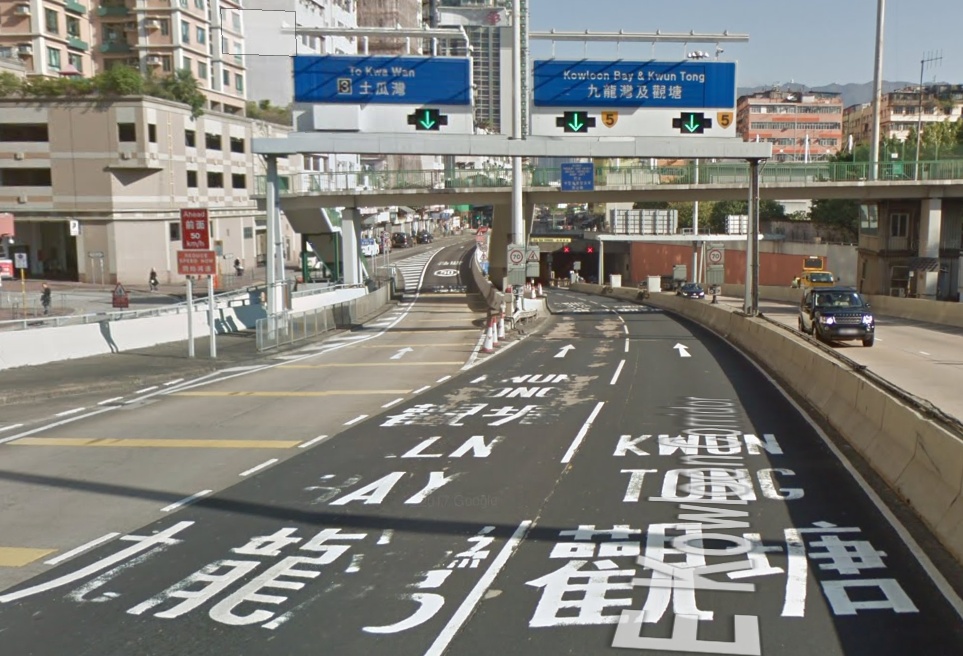
See below photo for the To Kwa Wan entrance of Kai Tak Tunnel. The overhead signs stated “Kowloon Bay and Kwun Tong” for both lanes, whereas on the ground, the left lane is marked to both destinations but the right lane is marked for Kwun Tong only.
In general, I will use the text on the blue sign (we call it Wayfinder) (“Kowloon Bay 九龍灣, Kwun Tong 觀塘”). As driver (user) myself, I read the wayfinder sign more often than ground markings, also, signs can be seen from far far away, giving more time for drivers to change lanes (if needed).
After talking some generic (blow water) stuff, let’s look at this specific example. :mrgreen: The problem in this example is that the two lanes entering the tunnel can have two different destinations. The left lane can reach “Exit 2A: Kowloon City” and “Exit 2: Kowloon Bay” but right lane cannot, but the wayfinder sign overhead did not indicate the difference.
When dealing with these junctions, I always ask myself what are all the different destinations that the driver might want to go. :roll: For example, those drivers who are heading towards Kwun Tong, it doesn’t matter to them whether to enter tunnel using left lane or right lane, both can go to Kwun Tong, so Waze do not need to instruct the driver to stay in any of these lanes. In order to achieve that, you don’t need the ramp segment for “Kwun Tong 觀塘”, just keep it as Freeway “{5} Kai Tak Tunnel” on the right hand side all the way. This will ensure Best Continuation and that Waze will skip giving instruction at this node
As for the remaining two routes, namely “Exit 2A: Kowloon City” and “Exit 2: Kowloon Bay”, we want the driver to enter the tunnel on the left lane but not exit at Exit 3, all I can think of is to have one keep-left ramp segment for “Kowloon Bay 九龍灣, Kwun Tong 觀塘”, it matches both the sign and the ground marking as shown in the photo. No dispute la, right?
By the way when splitting Freeways into ramps, please remember the ramp stubs should be 5m long. Longer length will make the Freeway appear broken in the mobile app (visual appearance looks bad), shorter length will cause routing problems (don’t ask me why :geek: ). I usually draw 5.1m-5.3m I consider that acceptable. To immediately see the length of the segment (without saving), you need to install WME Toolbox.
Last but not least, if I have not shared to you before, please do install the WME Junction Angle Info script, it helps you check for Best Continuation and you can easily see whether Waze will give (say) keep left (dark green)/turn left(light green)/exit left (blue)/no instruction (white) at any node.

 In order to achieve that, you don’t need the ramp segment for “Kwun Tong 觀塘”, just keep it as Freeway “{5} Kai Tak Tunnel” on the right hand side all the way. This will ensure