Mastering the HOV Feature - Use It Wisely! 
What is the HOV feature:
*Remember, the lock levels for traffic events and closures are different in each country. If you have questions, reach out to your community manager.
The HOV feature was created to prevent the suspension mechanism from triggering when there are two segments that are parallel and close one from the other (like in the case of HOV lanes) and that could thus wrongly reopen the nearby closed segment.
Closure Suspension Logic
Waze uses a suspension logic to confirm the validity of closures.
- Suspension Criteria: Suspension Criteria: A closure is automatically suspended by Waze when a significant number of vehicles enter the closed segment within a short time period. This is based on user behavior, such as wrong turns and the number of drivers passing through.
- Unsuspension Criteria: A suspended closure is automatically unsuspended by Waze when very few vehicles enter the segment within the same short time period.
- Permanent Closures:
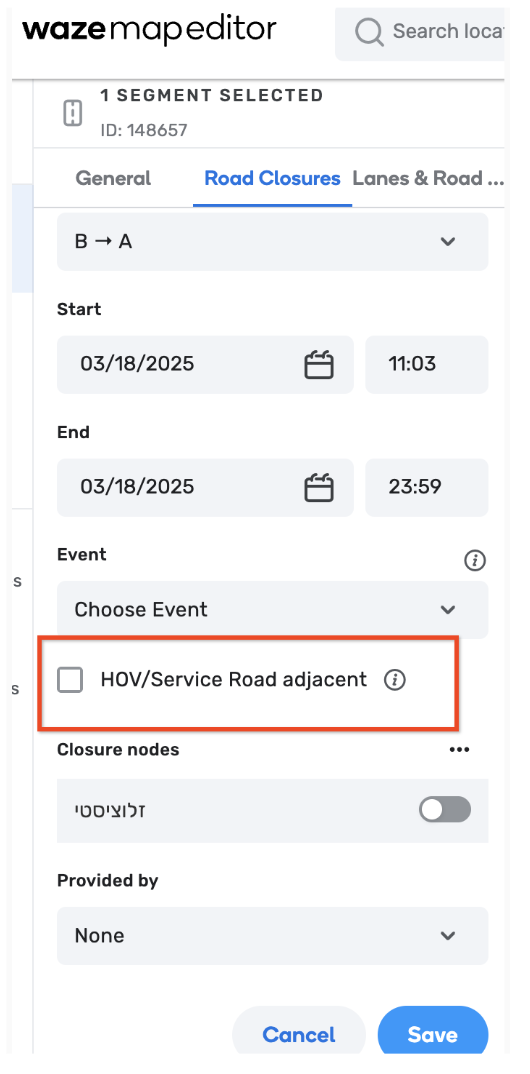
HOV/ Service Road adjacent WME feature: Closures marked “HOV” in the WME are never automatically suspended. Based on that, this feature should be used with increased caution
An example: The system will repeatedly check for traffic and may suspend or unsuspend the closure during the planned closure period depending on traffic conditions. Let’s look at an example on a closure scheduled from 7 pm to 10 pm:
Closure Timeline
- 7:00 PM: Closure is monitored. If traffic is observed, we wait until we see no traffic..
- 7:15 PM: The closure was set to start sooner than needed, but after 15 minutes, we observe there is indeed no traffic, and the closure becomes live.
- 8:30 PM: Traffic is observed, the closure is suspended.
- 8:35 PM: There is no traffic in the past 5 minutes , the closure has resumed (unsuspended) and is live again.
- 10:00 PM: Closure ends and is removed from the system.
When to use (and not to use) the HOV feature?
Using the HOV feature the wrong way can mess up routes, cause traffic jams, and even make things unsafe. This feature can have undesired impact on the road if used in the wrong place (in some extreme cases, it can even create huge trouble on the road).
Check out below some guidelines on when to use this feature, and most importantly, when to refrain using it.
When to use
- If two segments are parallel and close one from the other, like an HOV lane, and for which we highly suspect the traffic on the nearby (non closed) segment will trigger a wrong suspension on the closed segment.
- In some corner cases where the closed segment is still accessible to residents on the street of the segment (so they won’t cause the suspension to wrongly suspend it)
When not to use
- As a way to compensate for a lack of trust in the suspension mechanism. Indeed, the suspension mechanism needs relatively a lot of crossing traffic before it suspends a closure, and also will unsuspend in case traffic is no longer observed (see the example above in “closure timeline”).
- This is crucial for highway closures with HOV lanes. Please be super mindful for using
For any questions or problems related to this feature, please contact waze-closures@google.com