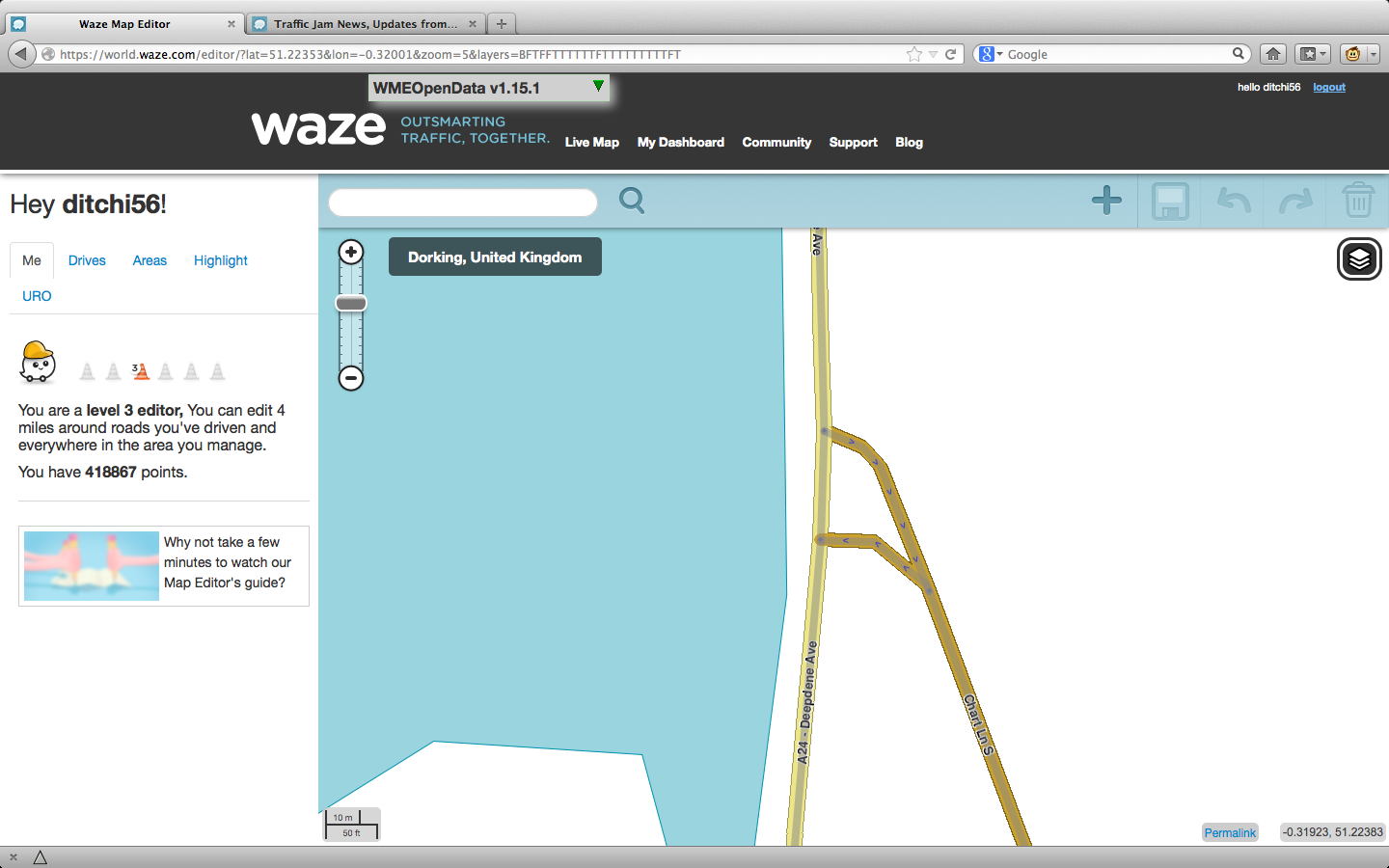
I have a UR which I can’t solve. The user has driven up a minor road and turned right onto a major road. Waze map splits the minor road into two one-way sections just before the T-junction with the major road.
I would expect the route instructions not to mention the split, since there is no choice at that point (both sections being 1-way). Then I would expect a turn right instruction at the main road.
What seems to be happening is the reverse: Waze is giving an unnecessary turn-left instruction at the split, and then no instruction at the T-junction.
So far as I can see, the map is correct. So what’s going wrong? Bug in the router which map editors can do nothing about? Or can the map be changed to get the right instructions?
Two screen shots attached, so that this will still make sense if someone edits the map. One, the WME map as it is now. Two, driving directions on Livemap as it is now.
If you look at the junction for the join for the two one way sections, click the off road from the main road. You will see the two direction turn arrows. Doesn’t look right as one points down the lane, the other points back up on itself.
Be worth pulling the junction node off little and removing any unneeded nodes in both road sections.
Be worth remapping that inbound lane as it looks, perhaps, bigger/longer than need be…
Can’t check the aerials on the phone, but could this be a candidate for simplifying the junction into a single two-way segment rather than the seperate one-ways? There’s a LOT of junctions out there that got the one-way Y treatment (presumably during remapping) where the only thing seperating the two legs of the Y is a narrow patch of hatching or the tiniest of island - I’ve even seen the odd one or two where the junction is simply so wide that the left and right turning traffic flows are so far apart it appears to be a Y junction in the GPS tracks, and has been mapped out as such.
The northbound segment partially overlaps the southbound one at the point where they split, so the red arrow that appears to be pointing back up the southbound segment relates to the northbound segment instead. Similarly, clicking on the 2-way segment below the split gives a green arrow which appears to be pointing up the southbound segment.
Could this be causing it? Even though the northbound segment is the only legal route, since its geometry is the same as the southbound one until after the junction node, does the routing engine treat it as being a straight ahead direction first, then sees the route deviating to the left, and gives the turn left instruction at that point?
Having now looked at it on the PC, I’d suggest remodelling it as a simple single-node t-junction with two-way arms - the wye is small enough for it not to be confusing to drivers on the ground if they don’t get told explicitly which side of it to head along, especially given the road geometry and signage…
Generally that is the way to do it. Many of these junctions are parts of the old basemap import and work just as well as single T junctions as explained by twister
Of course where the split is significant then it should be left as a split but generally if you can get away with it, unsplit it.
Also too late now, but was there reverse connectivity there?
I have had that cause the same thing for me on several occasions, as it thinks there is another choice, even though there actually isn’t, I have had this at several split roundabout entries, removing the RC worked and stopped the extraneous instruction.
Too late to be sure, but I don’t think so.
I have the script enabled which colours nodes with reverse connectivity so I ought to have spotted it had it been there.