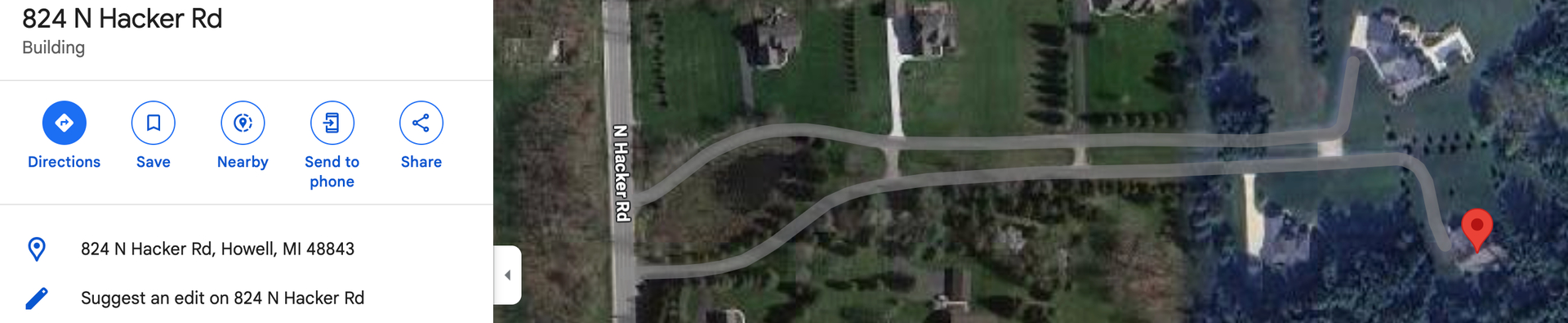
Hello, I am wondering if someone can help me with an address? 824 N Hacker Rd. Howell, MI 48843. I was able to successfully add the private driveways that take you all the way down the driveway entrance very close to the house, however when you navigate to this address, Waze still directs you to Foldenauer Dr, which is the road behind the house, and you cannot access the hosue from there. I tried make a “Place” update request several times to connect to the private driveway, but so far nothing has works. Thank you for anyone that can help.
Please remove any instance of this address from your history and favorites by long-tapping (tap and hold) the previous entry » Remove drive. Then search for the address. If you don’t remove the old results from your navigation or favorites, you will continue to be routed to the old coordinates. Please reply back if this does not solve your issue. Thanks!
I also notice that “N Hacker Rd” is the name of the road on Google Maps, but on Waze it is listed as “Hacker Rd” without an Alternative Name of “N Hacker Rd” listed. This means that if you are searching for “N Hacker Rd” then you are getting the Google Maps result, which will continue to route you to the wrong place.
I hope this helps,
Major
Google Maps
Waze

Thank you! I will give that a try.
Thank you, interestingly enough, google maps works perfectly after I added the private driveways. Thank you for the advice.
1 Like
Success!!! I removed it from my drive history and now it works. Thank you both.
1 Like
Hi Jason - I added N Hacker as an alt name for better routing. While we do not use zip codes in our search, we do want to match USPS address road names.
Simply - as said - Waze will match to a google result if there is no specific match in Waze, but there is one from google.
1 Like
Thank you!