With this version we released two suggestions from the most wanted script functionalities to be added to the WME and valuable bug-fixes.
Below you can find a summary of the release:
Known issue:
The name of the tab “Lanes & Road Width” is partially displayed (beginning trimmed).
Community Suggestions from the scripts poll related to Compact mode:
We enabled buttons to display existing road types.
We added icons for suggested main categories in places, when the category is not set.
New features/enhancements:
We are happy to announce that today the Project KoiFish has been opened in WME prod to L5+ editors.
This a new map suggestions feature, that gives editors super powers that will help impact the quality and accuracy of the Waze Map even more. In the first stage, these Map Suggestions will surface potentially missing segments in WME. You will be able to resolve these suggestions by adding new data to the Waze Map or by sending feedback to Google Maps operators.
You can read more details about it and leave your feedback in this Forum thread.
WME Left panel alerts: added a button which turns off the snapshot mode.
The team updated text for the closure status messages.
Merge Venues panel related changes:
Side panel alerts for merge places: notifications are displayed now in accordance with the new design approach.
Also we enabled indications for polygons and nodes.
Style adjustments made for the Merge popup and its elements (padding changes and alignments for text and buttons).
Header menu: style updates for the save changes popup enabled.
Updates related to build statuses: now we have a possibility to add a custom message to the build status. Apart from that the new RRS icons are enabled.
Bug fixes:
We’ve released 19 bug fixes:
“Enter” button doesn’t apply address’ changes.
Edited: This fix will be enabled with the next release. We need to do additional testing//2. Junction box selection breaks UI and freezes the page.
Script tab disappears after selection of a map entity.
‘Closure nodes’ from other event’s closures are shown in case of closure duplication.
Closure editor: tab scroll appears when opening Event dropdown.
Closures: segment’s direction isn’t displayed in case it has a closure added.
The keyboard shortcuts for copy permalink to clipboard & Set permalink to the URL and reload are not working in this version. I tested this with no scripts or extensions running.
To reproduce this
1.Press the keys that are set as your shortcuts for the above listed shortcuts.
2.There is no box that says PL copied. Or if you tried to refresh no refresh happens.
3. If you paste the PL after “copying” it no PL with be pasted.
That’s been the case for a few WME releases. Read more.
I created a uservoice post for it (click here). Please upvote if it impacts your editing workflow.
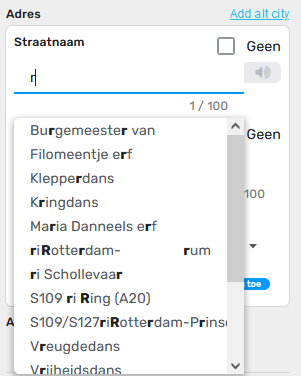
The peculiar thing is that when I type a lower case r, it does show capital R in bold as well. If I add more characters they disappear though. And it doesn’t work for every character, but from my short look into this, the f also has the same thing.
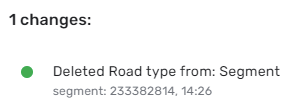
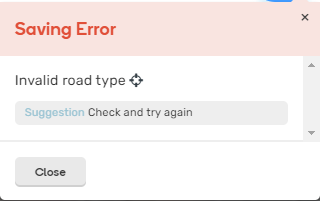
Hi, the following behavior seems to be a bug. When using the road type buttons on the same type of road and then try to save, WME returns the error “Invalid road type”.
Confirmed, it seems the reason is if you select the same type, WME considers the button to act as a checkbox instead of a radio button, therefore tries to remove the road type.
When you edit/add house numbers on one street, you are unable to enter the HNs mode again (including the same segment) until you do a full page refresh (F5). Additionally, elements on the map can’t be deleted - existing segments, newly created segments for split, map comments (these are tested). The final image shows the Trash icon is active after the refresh.
The HN keyboard shortcut bug is still present. The shortcut can be used to add numbers, but most of the time doesn’t work to enter HN mode. Instead, it activates the button “Select entire street”. This was reported earlier (a long time ago).
Hi, when I correctly informed this is already reported in WME Beta as Bug an forwardet to staff. (Should be this thread if you have WME Beta Access https://www.waze.com/forum/viewtopic.php?t=367179 )
Have tried to reproduce this without Toolbox Addon is active? I can’t reproduce it without toolbox.
Regards
Hi, I think I have tested it in the past with clean WME, so I hadn’t now. But it seems you are correct and WME works fine now. I am using the browser extension for the Toolbox, I might test with the script, if it still exists. I’m not using it extensively, but I need many of its features. Thank you!