Update: the team has released a hot fix, v2.159-2 for the bug that segments were not saved (disappeared), when panning the map.
Known issues:
The new left panel: blank left panel field is displayed for the logged out user.
UI: Unknown button is shown in case of multiple segments selection
Segment: in the Routing section: No spaces in the message about the “Routing road type”.
The new left panel: Map shifts a bit when toggling the drawer or when we select the node in case we use the street view option.
URs: “Show on map” and “See in Street View” are overlapped.
MPs and URs remain on the map even if the user turns off the Issues layer.
The Practice Mode banner isn’t removed after logging in.
Venues are still on the map when the user turns off the Places toggle. Community suggestions:
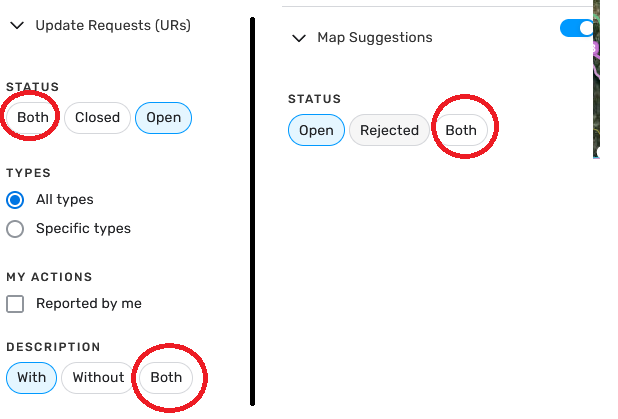
Issue Tracker: Ability to filter URs with vs without description.
Ability to convert a residential place to public - enabled!
New features/enhancements:
Style improvements: some UI adjustments of spaces between Header menu items added.
Header Menu: style updates added to buttons, for example buttons are responsive, when we hover over them.
Header: design of the Notification button was updated.
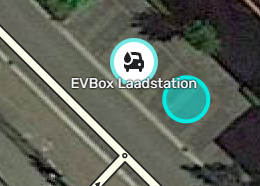
EV charging stations: Dropdown identifier (⌄) added to Brand/Operator/Network dropdown.
Map suggestions: Set the default search filters for Map Suggestions to show only paved, high priority roads.
Issue tracker: released slight design changes in chip buttons.
Issue tracker: design changes added to icon buttons on issue header. Bug fixes:
We’ve released 18 bug fixes.
City Field suggests far away cities - fixed.
New place disappears after save, reload is needed for the place to appear again - fixed
Deleting one Duplicate External Providers deletes all - fixed.
Bug: (shift Z) Display of disallowed turns is broken - fixed
Very small size of the place icon if the place is added via PUR as a “new place” remains - fixed.
Map suggestions: Address validation sign disappears in case user changes other parameters - fixed
Adding “disallowed” for road restrictions applies to all vehicle types - fixed.
Horizontal and vertical scroll bars appear when opening a notification tab - fixed.
Railroad crossing is locked for L4 users - fixed.
Header: Toolbar layout - huge empty gap appears when using wide screens - fixed.
Save Changes: the change count is not pluralized - fixed.
Road shield list is changing based on issue tracker filter area - fixed
Major traffic events are not encoded when generating permalink - fixed.
Issue Tracker: Search by country works only after the second attempt - fixed.
Issuer Tracker: we updated the issue racker toggle behavior, it acts now like the layer switcher:
Issue Tracker: Issues Filter menu items to exceed available space with PT or ES settings - fixed
Turning off layer switcher groups doesn’t turn off all the child togglers inside the group - fixed.
18.Map layers menu: Removed the Map suggestions toggle from the map layers menu.- fixed
Default setting for UR filtering is WITH description, I suggest BOTH as the default and let the editor change it to With/Without/Both
Over 90% of URs are without descriptions
I’m having trouble creating map comment areas. When I begin to create one and click/drag the screen to extend it, the operation for adding a map comment ends. I have to begin it again with the same behavior happening. I am able to create map comment areas just as long as I don’t click/drag the screen
Please see the following (I’m using Firefox without any script):
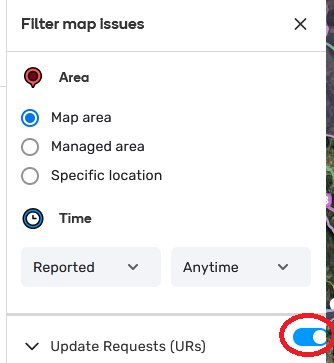
On the new issue tracker, the on/off button is shown too much to the right … Also, if possible, try to put it on the same line of the text (at the present moment, it is shown slightly on top)
to make coherent, the “both” button on URs and MSs should be put first. Also, the “Open” button is not in the same order on URs and MSs
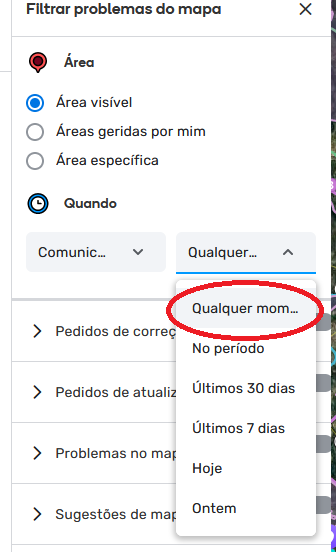
When we select the pt_PT language, the localized text for “Anytime” - “Qualquer momento” - is not fully shown.Is possible to implement a kind of tip when we hoover the mouse on top of it to shown the full text?
I can still reproduce this issue in prod and beta. At least meaning that if I toggle the group off, the child layers stay visible until I either click the map refresh button, refresh my whole WME window, or I toggle some other layer that triggers the map to refresh. https://youtu.be/MipK8CGFGCs
Same, but I think I’ve narrowed it down to when you drag/move the map. I can click a whole bunch and draw roads really fast, but the second I inadvertently click and drag, or even do it on purpose, the road completely vanishes.
Could you please send the link to the location, where you have reproduced the issue? I have tried in the testing environment and can’t reproduce the problem.
In the new Version i been having a lot of issues creating segments, when i start creating a segment it starts properly but as soon as you make the first click for a turn or just to create a geonode, the street disappears and is been happening since the new version started.
Thank you for the report. We understand that this issue is causing inconvenience, and our team is actively working on a hot-fix to address it ASAP.
In the meantime, we recommend using the following workaround: Create and save a portion of the segment, and then continue drawing it from there. Additionally, you can use shortcuts to initiate the segment drawing process.
Sorry for the inconvenience. We keep you updated!
Nataliia