New Editor version 2.168

Hi MoraisSPbr,

Welcome on board! :tada:

Thank you for your feedback. Regarding the filter, when you select “reported by me,” it only shows the URs that you have reported, without including any previous results.

In the future, it would be greatly appreciated if you could send screenshots in English. It can be difficult to recreate the steps without a clear understanding of all the field names.

If you have any further questions or need assistance, please let us know. We’re here to help!

Best regards,
Nataliia

Hi,

We have some concerns to reopen the roads…

Basically, if you select a two-way segment and one-way segments at the same time for closing, the closing does not go in both directions and you cannot reopen.

I have the case here: (but it reopens at the end of the day)
https://waze.com/fr/editor?env=row&lat=45.06289&lon=6.40833&marker=true&zoomLevel=19&segments=412215131!2023-06-15 14-01-16.png|902x717

I will send more examples as soon as possible or if @onryou does it before ^^

Or this link for example :
https://waze.com/fr/editor?env=row&lat=46.19185&lon=6.23892&zoomLevel=17&segments=318857573,65443770,318857574,342662014,342662013,177172959,65443820,151273580,65440075,292377738,65442278,65441042,65441041,65442161,65442162,324521530,324521529,324521531,28

For the Tour de France :grimacing:

We can neither change the schedules, nor delete the closures

1 Like

Hi InstantT,

Thank you for the report. Can I ask you to record a video for this issue, please? I can’t recreate it on testing environment on my end.

Regards,
Nataliia

For this one : https://photos.app.goo.gl/LR7nSAPj1htE8VgA7

For this one :
https://photos.app.goo.gl/WrYcUesFV4fe3DHm6

Hi Nataliia :smiley:

1 Like

Thank you InstantT! I have filed an internal issue for this, the team will review the problem.

Regards,
Nataliia

When selecting multiple segments in a road and changing the speed limits, the changes don’t work correctly when the segments are in opposite directions. When I set the speed for A-B, the number for A-B goes blank, and then when I set the speed for B-A the display becomes correct for A-B but goes blank for B-A. If the blank display is ignored and the changes are saved, some segments get changed in one direction and not the other.

It can be corrected by setting the speed again for B-A, resulting in the saving of 3 changes instead of 2. Clearly this is a bug, and is repeatable. If all segments are in the same direction, it works as expected.

I think this is caused by some mismatch in the way that multiple segments are linked, with the individual A-B directions being temporarily ignored so that the whole road shows as A-B and then the change of speed is applied to the wrong side on some segments. If one direction temporarily has multiple speed limits, the speed is not displayed for that direction, even though they should all have been changed in their own A-B direction.

One major improvement would be to have a button to reverse the A-B direction of an individual segment, without changing any of the turn restrictions, voice directions, speed limits, etc. This would mean that speed limit editing was easier in future. Nobody really needs a particular A-B or B-A direction, do they?

WME does give a warning when multiple segments aren’t in the same direction, but it doesn’t offer any fix, or even highlight which segments don’t agree with the overall A-B display.

Another improvement would be to have an option on each segment to link the speeds on both directions, so that only one needs to be typed in. I suspect it’s very rare for a two-way road to have different speed limits for each direction in the same segment. I’m surprised that Waze wasn’t designed with the speeds linked and an option to unlink them.

I believe this has already been reported by @iangpowell in another Waze forum, but as a lowly level 1 editor I can’t follow the link to that - I’m using the same subject line. https://www.waze.com/discuss/t/changing-speed-limit-on-multiple-segments-in-wme-sometimes-fails/22249

Hi Navvy2,

Thank you for the report. Could you please kindly record a video for this case?

Also, could you please attach links to the segments where you attempted to make changes?

It would greatly help us in understanding and investigating the issue more effectively.

Regards,
Nataliia

Hi Natalia!

Ops… but the fields positions in the screen aren’t the same in all languages ??? :open_mouth:

I selected the specific City: Brazil > São Paulo > Osasco (or others, only nearby me: Carapicuíba, Barueri, Cotia, São Paulo)…
Showed me the “local” URs… seems ok…

BUT… IF I select / check the MY ACTIONS: “Reported by Me”… then NOTHING were showed me: NO RESULTS… empty… and this isn’t true… ! :frowning:
Exists URs of mine in other areas! nor in the selected city… nor in other neighbor areas… but they exists! :frowning:

As you said “without including ANY previous results”… I understood that these options of check-boxs ignore all other definied filters previously ??? Then we have a BUG here… or not… ? :open_mouth:

I encountered a weird problem about RPPs. I have a road where navigation to right address doesn’t work anymore with house numbers due to weird numbering (Numbers 716a to 716n over several kilometres distance). App or Livemap give destination at the previous junction(s) leading to the road so in some cases 2,8km and in other cases 4,3 km before the real destination which in this case is quite untolerable error.

I got it working with those in 2020 but something has changed after that since now navigation doesn’t work anymore. So I thought I’ll try RPP’s now. Problem: Constant errors with some house numbers, “The highlighted place has an invalid house number”. Funny part is that the house numbers in question like 716n have been added to the map successfully but it’s still not valid for some RPP’s.

Then it got even funnier when I noticed I could create those problematic one’s to the other side of the road. After you could move those for some distance but eventually you get the error again.

So, how is RPP in some places only allowed to be created to the other side of the road? And why even then you cannot move it to real location? Example here, try to move it next to house number 716g, I can’t do it, complains about that invalid house number when trying to save. And tried without scripts also, no effect to the problem. Same happens in Prod&Beta.

I know I could add an entry point to correct this but then I would only be correcting the symptom, better to fix the problem behind it instead.

I encountered a weird problem about RPPs. I have a road where navigation to right address doesn’t work anymore with house numbers due to weird numbering (Numbers 716a to 716n over several kilometres distance). App or Livemap give destination at the previous junction(s) leading to the road so in some cases 2,8 km and in other cases 4,3 km before the real destination which in this case is quite untolerable error.

I got it working with those in 2020 but something has changed after that since now navigation doesn’t work anymore. So I thought I’ll try RPP’s now. Problem: Constant errors with some house numbers, “The highlighted place has an invalid house number”. Funny part is that the house numbers in question like 716n have been added to the map successfully but it’s still not valid for some RPP’s.

Then it got even funnier when I noticed I could create those problematic one’s to the other side of the road. After that you could move those for some distance towards the right location but eventually you get the error again.

So, how is RPP in some places only allowed to be created to the other side of the road? And why even then you cannot move it to real location? Example here, try to move it next to house number 716g, I can’t do it, complains about that invalid house number when trying to save. And tried without scripts also, no effect to the problem. Same happens in Prod&Beta.

I know I could add an entry point to correct this but then I would only be correcting the symptom, better to fix the problem behind it instead. And besides, isn’t “you’ve arrived. destination is on your right/left” said depending on entry points location relative to destination, that could be wrong if RPP isn’t in a right place.

After a discussion earlier today on the topic of splitting segments connected to a junction box, I discovered that this (of course) had already been suggested long, long ago. On <https://waze.uservoice.com/forums/59225-map-editor-suggestions/suggestions/42643498-segments-leading-to-a-junction-box-should-be-split&gt; the suggestion is even marked “closed” because it should already be available since January 2022.

My question would be: To whom has it been made available? Logic would dictate, it be made available to all editors L4 and up, as they could also just delete the entire JB and make a new one. But I can’t split those segments, and neither can my L5 SM. Or has it been axed again already? Or is it a bug?

If you have WME Beta access, please take a look here.

Sorry, I don’t. Yet. I guess I’ll have a look into the application procedure. But the above is still confusing, even if there is an answer to this conundrum, hidden somewhere, where most aren’t allowed to look and those who are, aren’t allowed to tell…
|

Even for production issues, the Beta forum is where Bugs get submitted.

In this case, what you are describing is happening to others and has been for months (February is when the thread started). The challenge is that it does not happen to everyone. Ideally someone from your community can chime in on your behalf, with examples. I will provide a link to your post in the thread.

The initial comment:

He is also unable to merge segments when one of them is within the junction box.

Thanks for the info! This is all highly recognizable. I spoke to several R4+ editors and the story is different every time. I have never been able to split or merge segments linked to a JB, one editor told me that it’s a mixed bag with him – sometimes he can, sometimes he can’t. Yet another one told me that he is able to cut and merge most of the time. This erratic character is bound to be a complicating factor in finding a cure for this bug, so (contrary to standing Waze policy) I will avoid the term “soon” in this context. :wink:

Hello

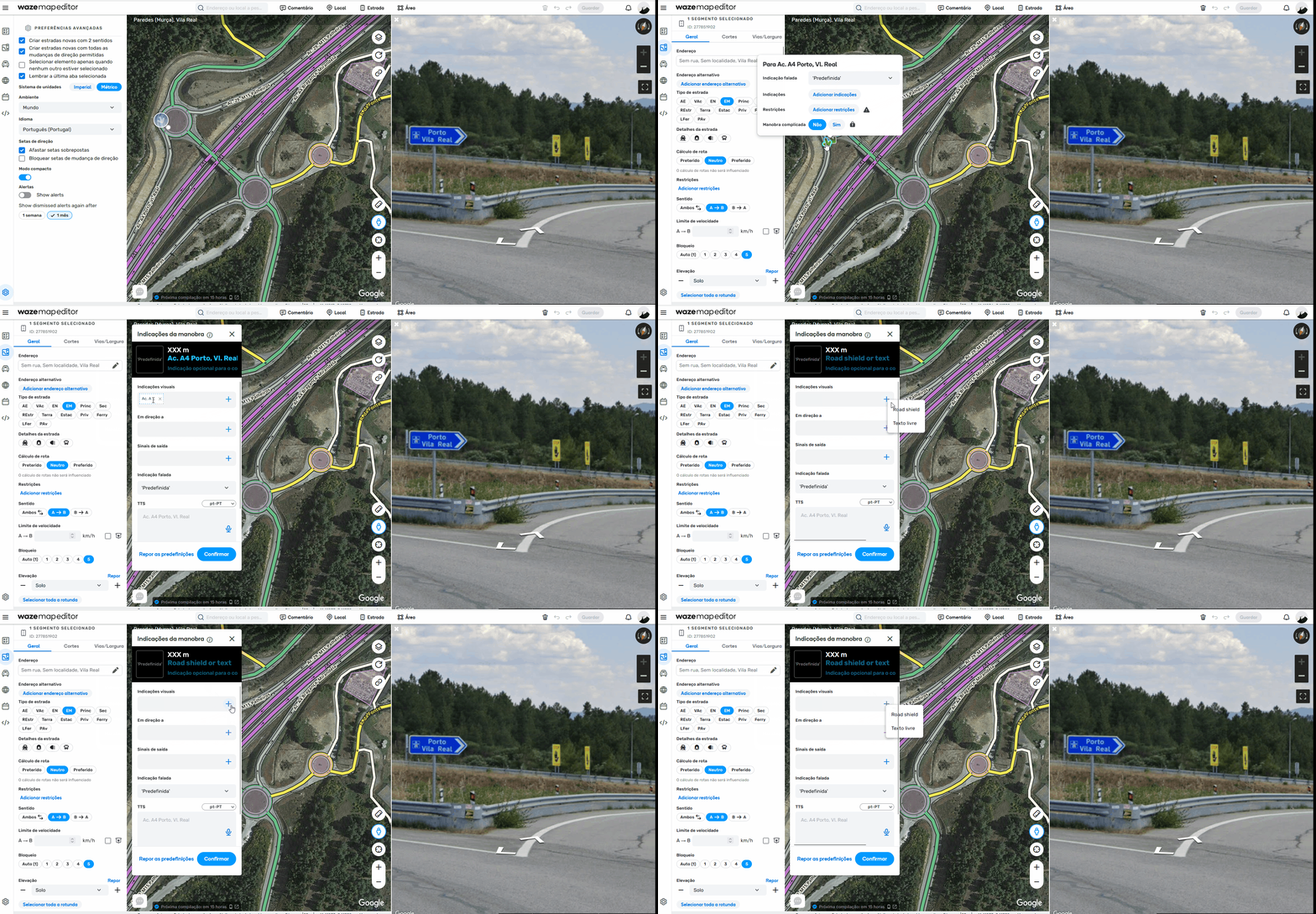
Don’t know if this was already reported: when adding a RoadShield, the small window that allows to select Free text or RoadShild seems to appear on the bottom of the main window scroll bar. See GIF

I was using FF without any scripts.

Best regards

I am not seeing this issue on NA Server ~ Chrome. Maybe it is a FF issue, which is not really supported.

I tried it in Edge and you are right … it is not happening :roll:

Apart the mentioned issue, in order to make it coherent, on such RS window we have a “clickable link” to «Restore defaults» and a button to «Apply». It should be both a button, right!? ( @Nataliia_Staff )

Hi Linguasaltitante,

An interesting remark. I am checking with the team this.

Regards,
Nataliia