Issue Tracker: Selecting URs / PURs and MPs on the map does not always select the card in the list.
Issue Tracker: The number of PURs, URs, MSs and MPs is not fully displayed at the moment.
Segment: in the Routing section: No spaces in the message about the “Routing road type”.
The new left panel: Map shifts a bit when toggling the drawer or when we select the node in case we use the street view option.
The Practice Mode banner isn’t removed after logging in.
MPs and URs remain on the map even if the user turns off the Issues layer.
Header Menu: header items menu slightly covers the header…
Railroad crossing/ Camera is locked for L4 users. New features/enhancements:
Issue Tracker:
PURs: with this release we enabled the possibility to display the venue name and the city name in the issue card.
Added option to filter URs as "Resolved by me"and “Commented by me”.
Note: There was an issue reported in WME beta that with changes the filter “Last commented by me” returned incorrect results. The team has added a backend fix and it should already be working. We ask you to recheck the behaviour on your end with live-comments.
URs description filter: default value now is set as “both”.
The team updated the work of the issue tracker filter: now map suggestions in the are displayed more precisely based on the requests.
Other changes:
We have added the Map Editor Icon (Favicon) to the WME Editor, in order to differentiate the tab for each web page Waze products.
The behaviour of the Update House number buttons has been updated. Tooltips with explanations have been added for smaller screens.
Bug fixes:
We’ve released 10 bug fixes.
Closure Nodes disappear until I select refresh - fixed.
Map reload button brings back to the permalink URL - fixed.
Left panel disappears while selecting the venue - fixed
Issue Tracker: Can’t remove city - fixed.
Issue Tracker: URs do not show up after zooming up from 12 and back down without refresh
Issue Tracker: The bar for the Alerter “To see items in your feed…” should be adjusted - fixed.
Enable tooltips for tabs in the left panel “Edit the map tab”.
Junction Boxes - switch route: arrows are displayed but count is missing - fixed.
Junction Box Path Highlight: Highlighter not working - fixed.
Could you give us some idea of a time path for this issue? It seems to be very stubborn, but is there any solution on the horizon? Or should we just learn to live with this loss of function mid to long term?
I’m aware that this issue has been unresolved for quite some time now and understand its importance. Therefore we are hopeful to see the fix in the upcoming versions.
After saving a new segment it disappears. Like all “stupid” users I tried twice, but yes after clicking the Save button the new segment vanishes.
Other segment remains visible; so yes I’ve got the roads map layer checked.
I think this behavior started with the introduction of the Issue tracker.
Perhaps this functionality uses so much resources that showing the places isn’t done.
Issue tracker selection: Map area.
Example video from China but same issue occurs also while editing in the Netherlands.
Made a post on the general WME forum regarding node types at the end of a road segment. It’s not specific to this WME version release but could you please still take a look: Phantom node VS real node at the end of a segment?
Working for me for now. Seems like one of the scripts was removing the save button from WME. I have turned some off and seem to be able to edit for now.
I’m newbie here… I see the link of this thread in the newsletter…
3 - here for me the option WITH description was selected and I not noticed this before… Only now I changed it to both !
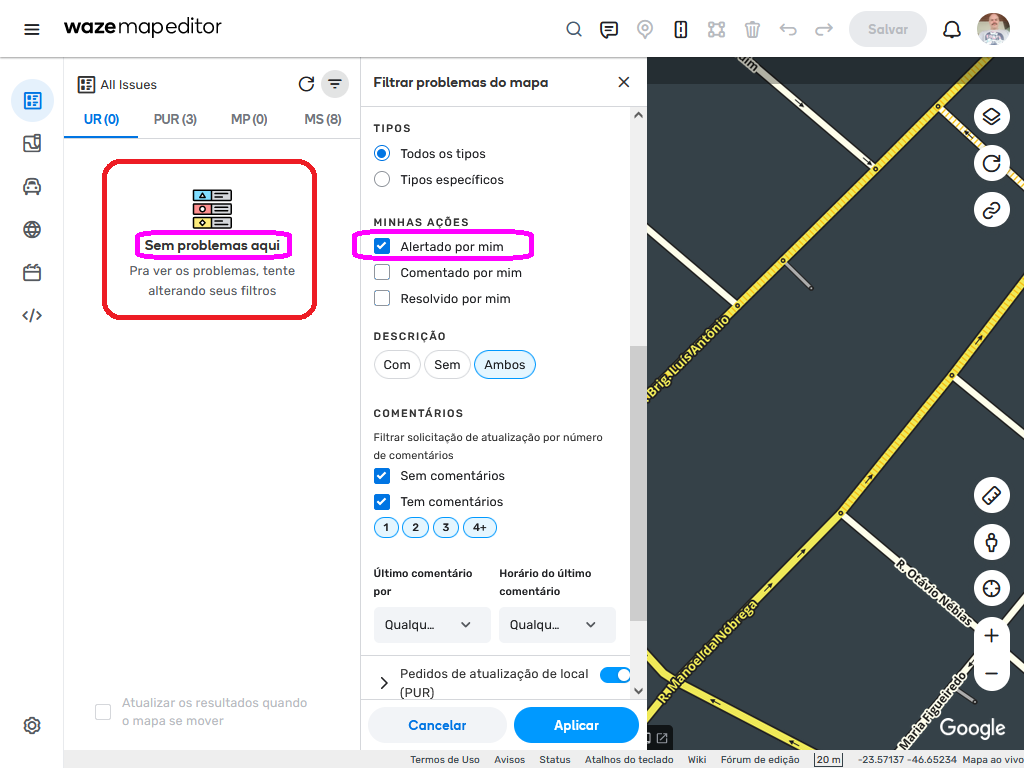
2 - about the MY ACTIONS section… it works only with the Editor full AREA selection ?
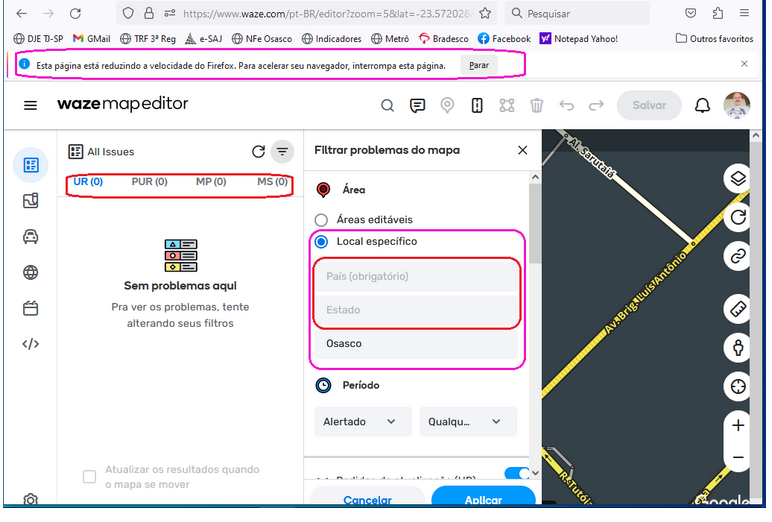
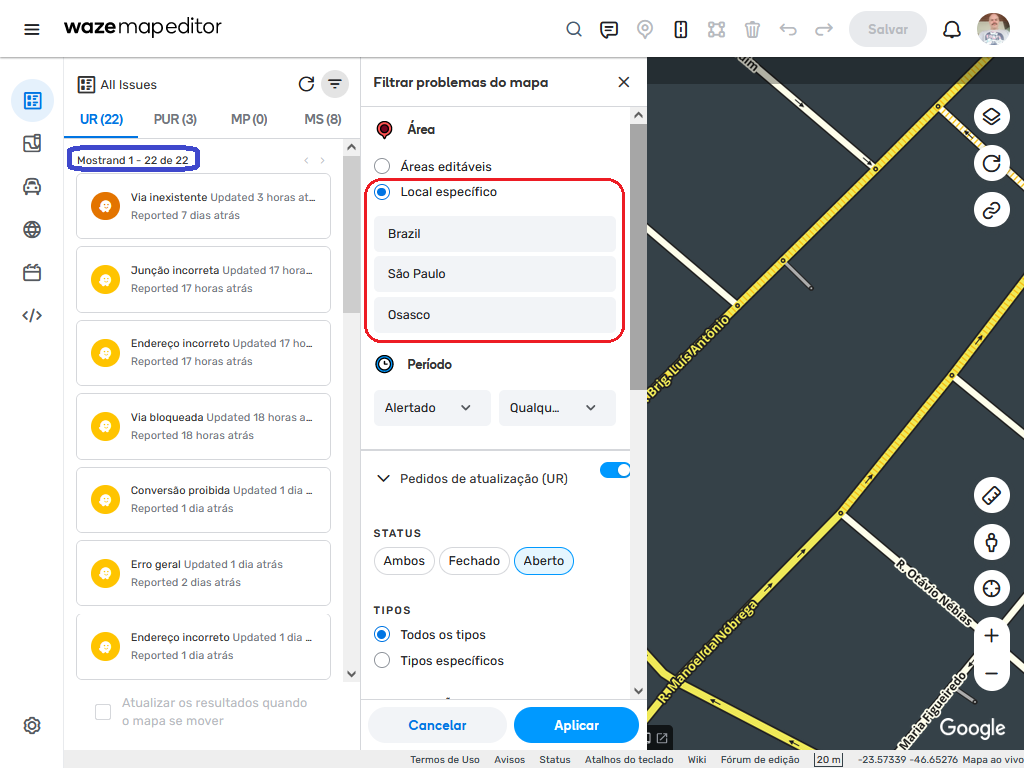
If I select my City (Brazil > São Paulo > Osasco) but like to see ALSO my own reports / URs… without restrictions / filters of location / city… unfortunately the result changesd to EMPTY, no reports!
I think the MY ACTION section, when selected, should be the first level filter… and then, only after this, merging the results of other filters, as ALL other of my selected city !
File 1
File 2
Shows me 22 UR “opened”…
When I select to ADD / Include (also ???) ALL of MY OWN URs / reports… the results changes to EMPTY !
File 3
File 4
Is this a BUG ??? Or this is WAD ?
Ahhh… In the Firefox and Chrome (windows 10) I noticed frequently the alert about page slow / down my system…
File 5
the same alert occur, are displayed, when editing NAME of places… or ADDRESS, when reprocessing search, loading results on each key pressed !
It’s horrible… the WME can not wait we pause a bit typing… to, only then, redo the search ?


 I see the link of this thread in the newsletter…



 Or this is WAD ?