The problem continues.
Permalink: This entire area managed by a Lvl3.
Thanks
denysdgcf:
Any problems with Koi Fish?
Lvl3 and Lvl4 editors are unable to moderate suggestions.
The following message appears:
Thanks.
Hi Denysdgcf,
Does the issue still present? Could you please share the permalink to the suggestion you have a problem with?
Thanks in advance,
Nataliia
Hello Natallia,
Our editores @sulstore e @albariPR, both lv4, will find some examples.
Thank.
The problem continues.
Permalink: This entire area managed by a Lvl3.
Thanks
Thank you Denys, we are checking this, I will keep you posted if I have any news.
Regards,
Nataliia
denysdgcf:
Any problems with Koi Fish?
Lvl3 and Lvl4 editors are unable to moderate suggestions.
The following message appears:
Thanks.
Hi Denysdgcf,
Does the issue still present? Could you please share the permalink to the suggestion you have a problem with?
Thanks in advance,
Nataliia
I noticed the same here:
Thank you everyone. The team rechecks right now possible reasons behind the problem with the Koi Fish suggestions. I will keep you posted when have any news.
Regards,
Nataliia
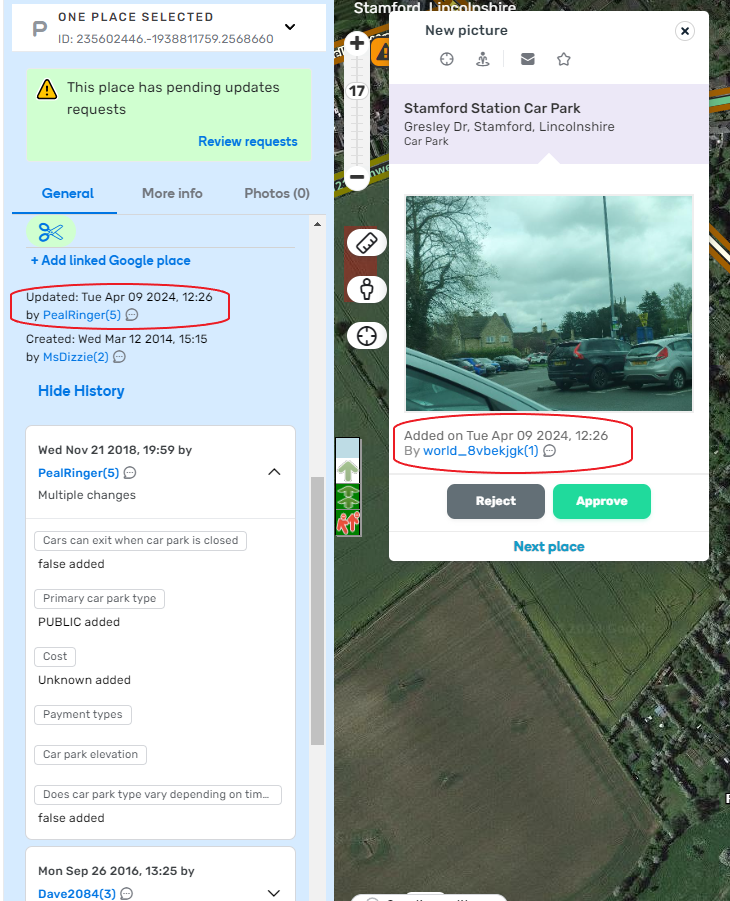
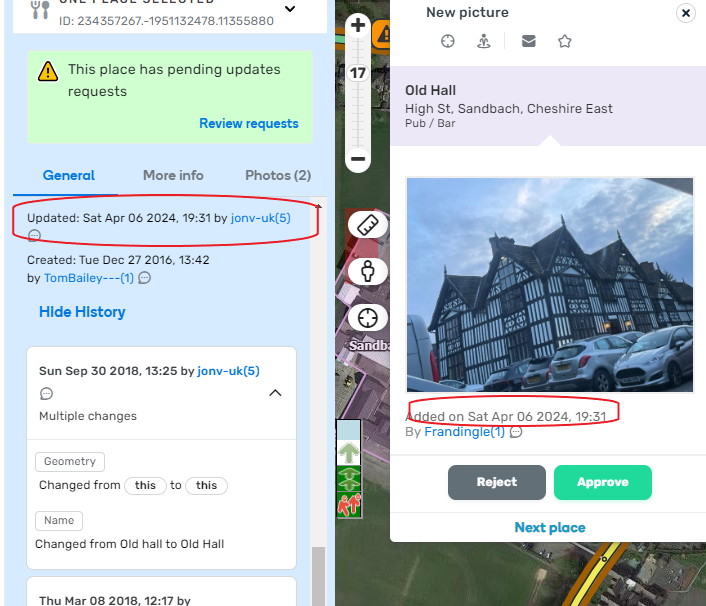
There’s a bug where the Last Editor name & date is incorrect when a Pending PUR is in WME
The Last Editor time & date is showing as the time + date when the PUR was created. The Last Editor name is showing as the last person to edit the place
Thank you everyone. The team rechecks right now possible reasons behind the problem with the Koi Fish suggestions. I will keep you posted when have any news.
Regards,
Nataliia
Hi Everyone,
Could you please recheck if the issue with permissions to edit Koi Fish suggestions has been resolved on your side?
Thanks in advance!
Nataliia
Nataliia_Staff:
Thank you everyone. The team rechecks right now possible reasons behind the problem with the Koi Fish suggestions. I will keep you posted when have any news.
Regards,
NataliiaHi Everyone,
Could you please recheck if the issue with permissions to edit Koi Fish suggestions has been resolved on your side?
Thanks in advance!
Nataliia
L3 and L4 confirmed it is working now!
Thanks.
There’s a bug where the Last Editor name & date is incorrect when a Pending PUR is in WME
The Last Editor time & date is showing as the time + date when the PUR was created. The Last Editor name is showing as the last person to edit the placepermalink[/url}PUR 1.png
permalink 2
PUR 2.png
Thank you Jon for this report. I have filed an internal issue for this case.
Regards,
Nataliia
dinohoo:
It’s almost impossible to see the current location and suggested location markers on the map from a PUR, looks like the background “vanished”.
No scripts were running, TM disabled, running on MIcrosoft EdgeScreenshot_2.png
Screenshot_1.pngHi Dinohoo,
Could you please add links to the PURs you mentioned? I want to recheck them on my end.
Regards,
Nataliia
Hi Nataliia,
Here’s one that I found, same behaviour as described earlier.
InstantT:
Hi,
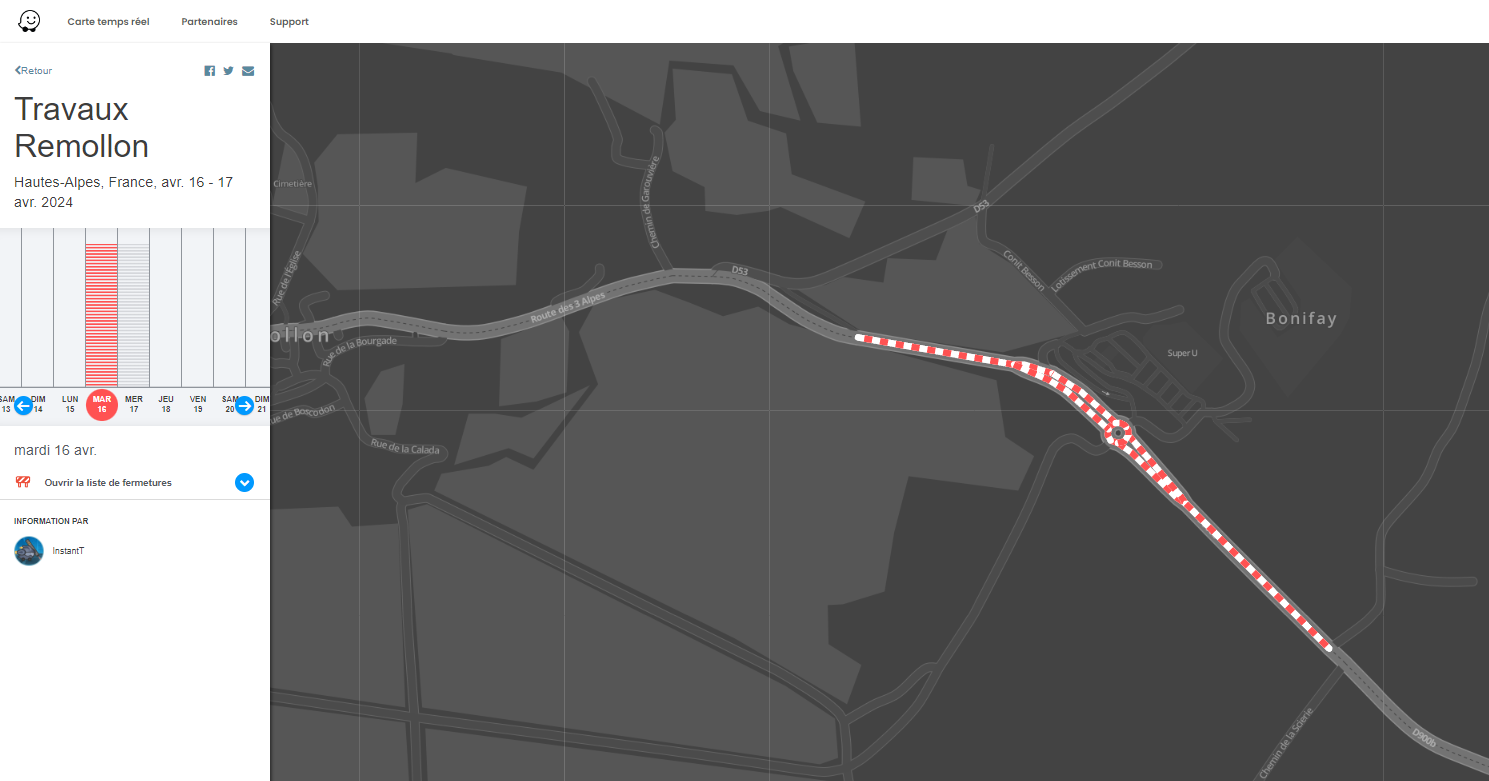
For the RTC on the turns, it’s great but when they are associated with an event, it’s not yet that ^^ it zooms out a little
https://www.waze.com/fr/events/travaux-pont-riou-bourdou-FR-2024-04-13
Hi InstantT,
Could you please specify, what is the problem? Is the icon too small?
Thanks in advance,
Nataliia
Hi Nataliia,
The event is in France ^^(unavailable attachment: 2024-04-09 22-09-55.png)
If the event doesn’t have RTC on the turns :
Nataliia_Staff wrote: ↑Tue Apr 09, 2024 3:30 am
InstantT wrote: ↑Mon Apr 08, 2024 3:29 pm
Hi,For the RTC on the turns, it’s great but when they are associated with an event, it’s not yet that ^^ it zooms out a little
https://www.waze.com/fr/events/travaux- … 2024-04-13
https://beta.waze.com/fr/editor?env=row … 002.576183
Hi InstantT,
Could you please specify, what is the problem? Is the icon too small?
Thanks in advance,
Nataliia
Here is a video showing the issue
In the video, I have added a test closure to a segment here
When I click on the event page, the event map is zoomed into the area of the closure
When I add an RTC on an arrow here and then click on the event page, the event map opens up zoomed way out, even though the RTC arrow is the next segment over.
NOTE: the event is called Test and setup for only in my test area.
Hi,
On the editors page there seems to be a string which is not text or seems not translated yet: https://www.waze.com/user/editor/J0kerNL
https://prnt.sc/NSXHbrvNSvQT See attached screenshot
Here is a video showing the issue
In the video, I have added a test closure to a segment here
When I click on the event page, the event map is zoomed into the area of the closure
When I add an RTC on an arrow here and then click on the event page, the event map opens up zoomed way out, even though the RTC arrow is the next segment over.
NOTE: the event is called Test and setup for only in my test area.
Thank you John! This video is really helpful. I will file an internal issue for this case.
Regards,
Nataliia
Hi,
On the editors page there seems to be a string which is not text or seems not translated yet: https://www.waze.com/user/editor/J0kerNL
https://prnt.sc/NSXHbrvNSvQT See attached screenshot
Hi J0kerNL,
Thank you for the report. We will review this issue with the team.
Regards,
Nataliia
The History of the edits should have some reference to the editor that suggested the edit

In this case, I have con information that this was an approval of a suggestion (and by whom) and it seems as if I did myself the edit
Can this be added?
The History of the edits should have some reference to the editor that suggested the editCaptura de ecrã 2024-04-10 174150.png
In this case, I have con information that this was an approval of a suggestion (and by whom) and it seems as if I did myself the edit
Can this be added?
This is a known issue right now. According to the release documentation.
How will suggestions appear in the history of a segment?
For the first phase, the segment’s history will include the changes with credit to the user who approved the edit (the moderator). If the edit was rejected, it will not appear in the segment’s history.
For future phases, we are planning on adding the username of the suggester as well:
I think I’ve found a bug, when I attempt to change a street name (to include an acute accent that was missing), it would not accept the change because it accepts the current street name that shows on the suggestions box. I don’t know when that started to ocurring, but I’ve found it in this version
https://i.imgur.com/vO38xM0.png
No matter if I click at the Apply button, press ESC key, Enter key or whatever other actions I can take, it will take the suggestion every time, avoiding me to fix the street name
Street Permalink: https://waze.com/pt-BR/editor?env=row&lat=-23.37467&lon=-51.95665&marker=true&zoomLevel=19&segments=158691886,350803888,350803887
Correct street name: R. Eufrásia Carmono Bustos
Hi Gabriel25893,
Could you please attach the image once again? I’m having trouble opening or saving it on my end in a readable size.
Thank you,
Nataliia
I think I’ve found a bug, when I attempt to change a street name (to include an acute accent that was missing), it would not accept the change because it accepts the current street name that shows on the suggestions box. I don’t know when that started to ocurring, but I’ve found it in this version
https://i.imgur.com/vO38xM0.png
No matter if I click at the Apply button, press ESC key, Enter key or whatever other actions I can take, it will take the suggestion every time, avoiding me to fix the street name
Street Permalink: https://waze.com/pt-BR/editor?env=row&lat=-23.37467&lon=-51.95665&marker=true&zoomLevel=19&segments=158691886,350803888,350803887
Correct street name: R. Eufrásia Carmono Bustos
I think you’re facing a similar problem I had when I needed to turn capital letters into small ones. The editor kept forcing the already existing name.
This might be helpful for debugging as well. The workaround I used:

It’s still a bug, but you can handle it.