We’ve just released a new version of WME prod, v2.236.
Below you can find a summary of the release.
Known issues:
Remove my own suggestion: The status of the suggestion may temporarily display as “Awaiting Removal” after clicking the “Save” button. This can be resolved by refreshing the page.
Venue categories: not allowed to delete the last category under the venue.
Issue tracker - URs filtering: incorrect behavior when selecting the “Has Comments” chip.
Compact mode: Road Details: The selected chip appears pale when hovering.
Unify Suggestion Filters: Add the “Closed” prefix to the closed status chip. Currently, it only shows as “Added to map.” We are addressing this issue right now and will update you when it is resolved. New features/enhancements:
Unified filters for Suggestions: We’re excited to announce the launch of this new feature that allows you to filter both KOI Fish suggestions and editor’s suggestions simultaneously.
UI improvements: Now, when logging in using mobile devices, the user information box is centered vertically and fully visible in both vertical and horizontal modes.
RTC on turns: we changed the permissions check and right now we verify only if the editor can add/edit closures on the segment.
Orientation on first login: We have added a notice message to explain why the map opens on the current location.
Orientation on first login: We updated the settings so that the following layers are now checked by default for users who log in for the first time.
Permanent Hazards: we added a deleted state for the deleted hazard that wasn’t saved yet.
Suggest an Edit: Style changes have been added to the banner that indicates a suggestion can be added.
Bug fixes:
We released 12 bug fixes:
Fields not showing correct values when editing multiple segments with reverse directionality- fixed.
Link in Map Comment over multiple lines not clickable correctly - fixed.
Can’t edit the city/country for Junction Boxes - fixed
Closures: ‘Provide by’ section is not carried over when ‘Repeat Next Day’ is selected - fixed
Koi Segments: Nearby segments do not appear in the map until you refresh the WME - fixed
Search result details are cut and not fully visible when the text is long - fixed.
Merge venues: Card for new venue is not properly displayed - fixed.
The number of active layers has increased, making it challenging for scripts to run - fixed
Script tabs not loading at the top of scripts panel - fixed
Venues - Layers: venues with PURs remain invisible with the venue layer turned on. - fixed
Venue categories: To assign the main status to a category, you need to delete the other available categories and move the desired one to the first position. - fixed
I can speak from first hand experience that not all issues in the beta bugs forum, local issues, etc, make it to the release notes. The issues you are asking about seem to be intermittent where you said “In my experience it wasn’t clear how to reproduce it.” and “The Street View handle seems to be missing sometimes.”. This makes it very hard to determine causes.
Your best bet is to follow up on this in the beta bug forum rather than the release thread.
The bugs are known and confirmed by Waze staff. They don’t need to appear in the release notes as long as they are fixed. But one doesn’t seem to even bother to do this or give an update on the status. As an IT person myself, I have other understandings on bug fixing.
One seems to focus on fancy new stuff at the expense off the existing, buggy stuff or the features the community is really asking for or one promised ages ago. The looks seems to get a higher priority than functionality and stability.
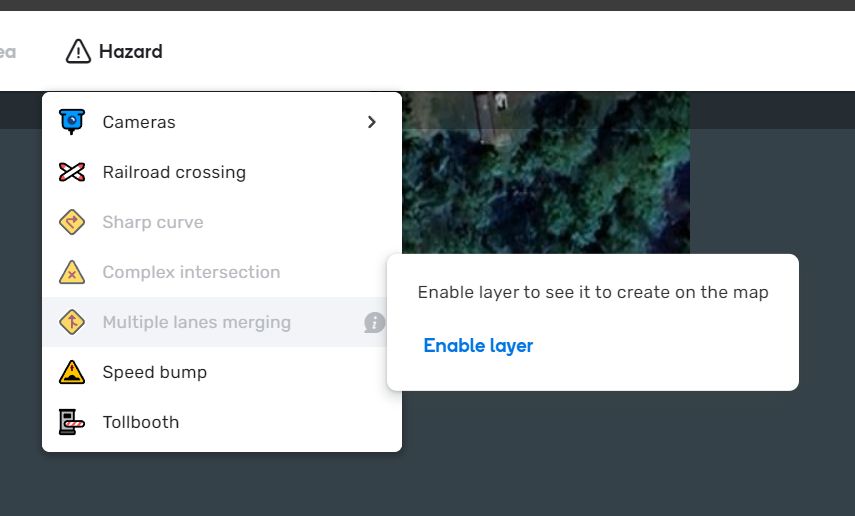
As a heads up, hazards will be disabled until moving the mouse right to the ‘i’ message bubble and selecting “Enable layer” (individual controls for different permanent hazards don’t exist yet in the layers menu). Selecting “Enable layer” does allow you to add hazards.
I find it a bit strange to be pointing fingers at “people who don’t bother” when you yourself haven’t bothered to respond to staff or Russ in the beta bug thread you linked since February: https://www.waze.com/forum/viewtopic.php?p=2438500#p2438500 and where you also completely ignored the reporting/posting guidelines of that forum.
Being in IT and “having other understandings on bug fixing” does not dispense you from giving others what you demand from them. And perhaps if you bothered to follow up in the bug thread rather giving a higher priority to complaining in release threads, this would be dealt with already.
As turbomkt said: Your best bet is to follow up on this in the beta bug forum rather than the release thread.
Thanks for sharing your feedback and frustration. We understand how discouraging it can be when issues you’ve reported haven’t been addressed in a release.
I want to assure you that we do review every bug report carefully. However, due to the volume of reports and other competing priorities, we need to prioritize based on several factors:
Severity: Does the bug break core functionality or significantly impact the user experience?
Reproducibility: Can we reliably reproduce the bug on our end? Does it happen every time? This is crucial for our engineers to investigate and fix it.
Impact: How many users are affected, and how severely?
Workarounds: Is there any workaround available?
We’re also constantly working to balance bug fixing with developing exciting new features. We’re strongly focused on improving WME performance, building a Script Writers SDK, enhancing Suggest an Edit, and adding more features to the Issue Tracker and more exciting features. These projects aim to bring significant value.
While our resources are finite, and we can’t fix 100% of bugs, we’re committed to making WME the best it can be. Your bug reports play a huge role in that. In general, and to help us better address issues, please be as detailed as possible when reporting bugs, including steps to reproduce and any relevant screenshots or videos.
If you reported a bug in a beta bugs forum, the best place to track its progress is within the beta bug thread itself. Our fantastic beta coordinators, Russ and Harry, do amazing at keeping those threads organized.
Previously, as long as the hazards layer was enabled, hazards could be entered and were not greyed out. Now, even having the hazards layer enabled does not allow you to place a hazard, as the individual categories are greyed out (the bottom 5). Once the individual hazard category “layers” are enabled, they can never be disabled. If individual hazard category layer control isn’t an option, it doesn’t seem like there’s any reason to require the editor to enable the layer in order to add specific hazard types.
The preferred behavior would be to not require each individual category layer to be enabled, as this doesn’t seem to be an option available to adjust anywhere (aside from the “Enable layer” button when hovering on the information box for the greyed out hazards).
Hopefully I haven’t added confusion, please let me know if further clarification is needed
I seems that I’ve missed that thread from February. I did check the warning option on reactions thought and seem never to get mails from that. I’ve double checked my mail and never got one (in spam folder neither). My apologies for not responding then…
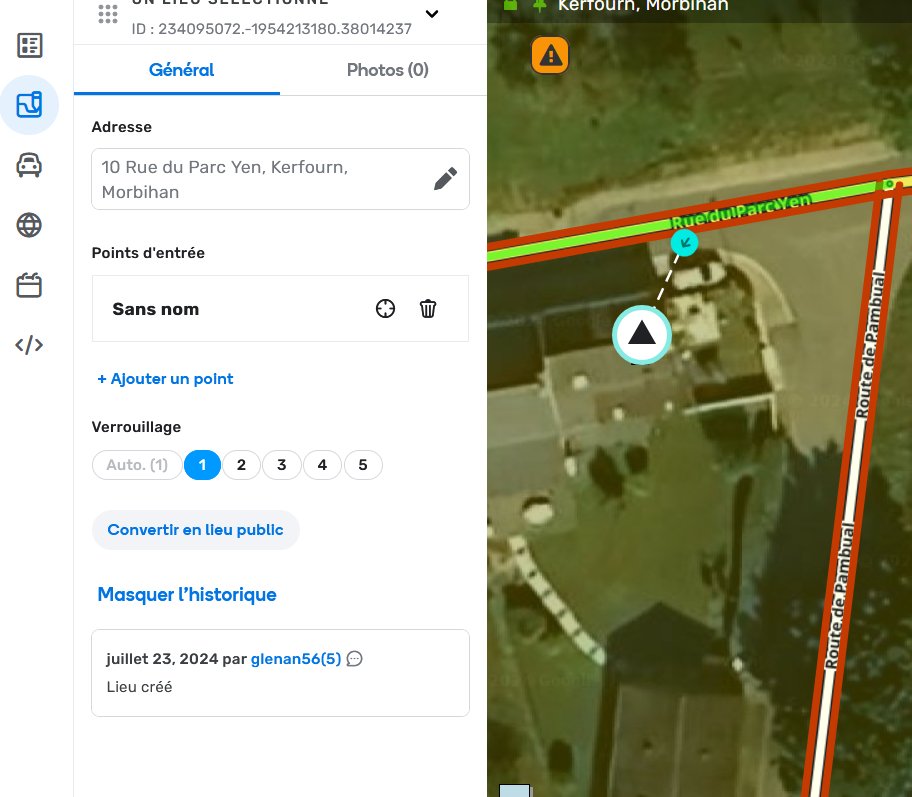
There is a serious issue in that it is possible to create multiple identical RPPs! For example, these three are all the same address: 75 Rue du Domaine-David, Mont-Blanc, Quebec.
There is a 4th one also that is not in the 1st screenshot. I had created this one several hours before the others.
This happens with or without scripts running.
When toggling the places layer on / off, these RPPs will appear one at a time or all three in the top image together. I have never seen all four at once.
WME does not complain about duplicates. It does not accept a new RPP with an existing address and simply modify the original one.
Also, these newly added addresses are not searchable in WME (as they usually were).
The RPPs created sometimes then disappear and each time the screen is refreshed, appear randomly.
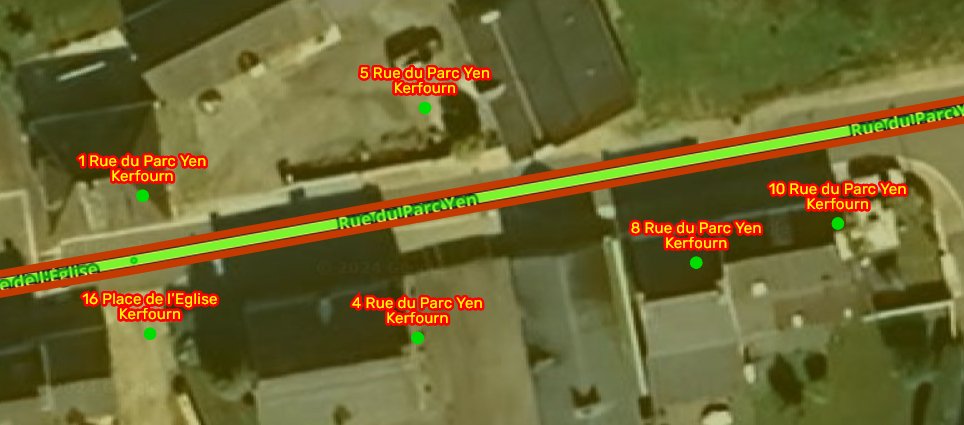
In France, I have the problem localized mainly in Brittany (departments 56 and 29) while in the department of Aisne (02), I have not yet observed this problem.
This is really very penalizing because no longer seeing certain RPPs we create them again and therefore create duplicates.
Same problem in WME prod (v2.236-18) and WME Beta (v2.239-12)
TamperMonkey Off : same problem
Chrome or Firefox : same problem
Seems to be new RPP which have problem. Old one don’t dissapear
We have a weird situation with a closure in India.
An editor closed one of the roads and then it was changed to the adjoining road. Then the closure status on WME went to “unknown” and now on app the wrong road is showing as closed while the wrong road is open.
This is still happening… it’s possible to add multiple identical RPP and while the “older” ones do toggle together, the newest one appears (or not) on its own.