Thank you for your valuable feedback! We appreciate you taking the time to test the new features and share your thoughts.
I understand your concerns and I want to assure you that we passed all the feedback to the team
Based on the feedback, which we received from the community, we’ve implemented a delay to reduce the frequency of this pop-up, making the editing process more efficient and enjoyable.
While we acknowledge that there’s still room for refinement, we believe these changes are a positive step forward. We’re committed to continuously enhancing the user experience and will address any remaining issues in future updates.
We’re also aware of the need for further improvements to the tooltip size and clickable areas. These enhancements are already being considered post- release.
We apologize for any confusion caused by our communication regarding these changes. We’re committed to transparency and open dialogue with our community.
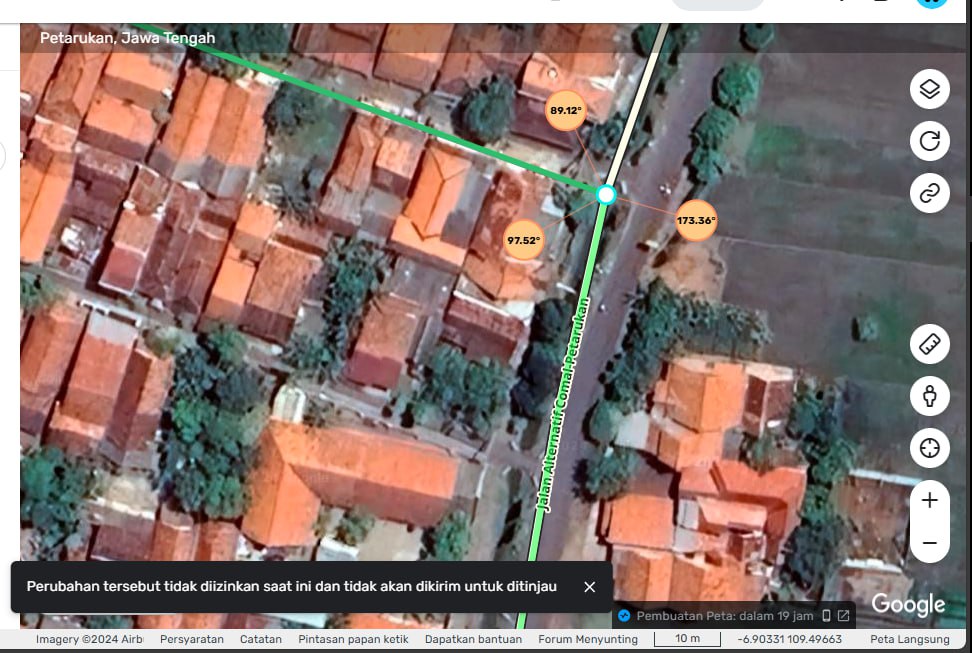
today we’ve encounter segments that need to edit by L2 editor. after unlock the road from L3 to L2, the editor still unable to edit. So I unlock it to L1, but the L2 editor still unable to edit it.
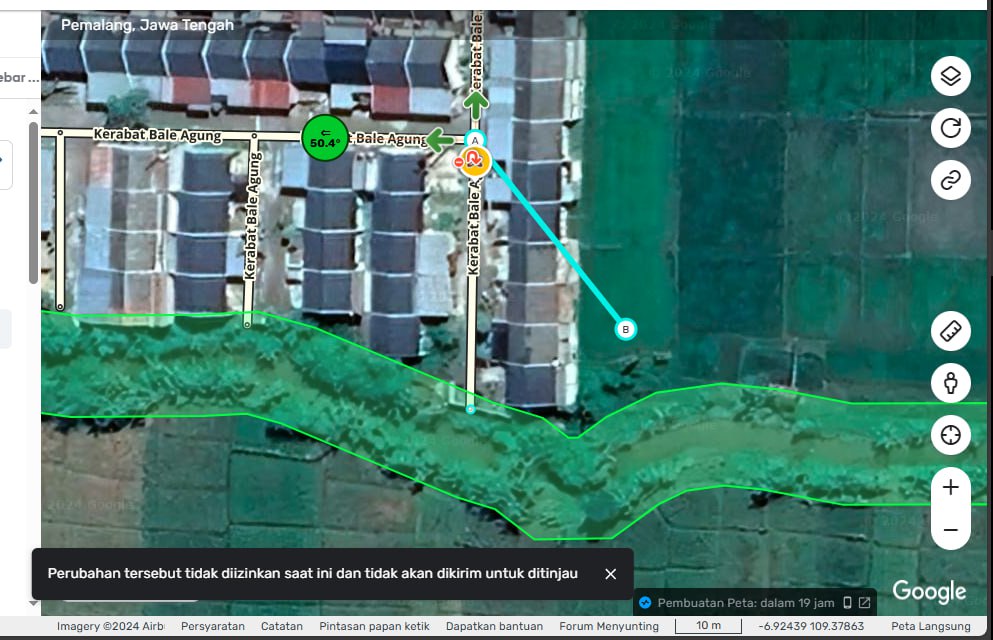
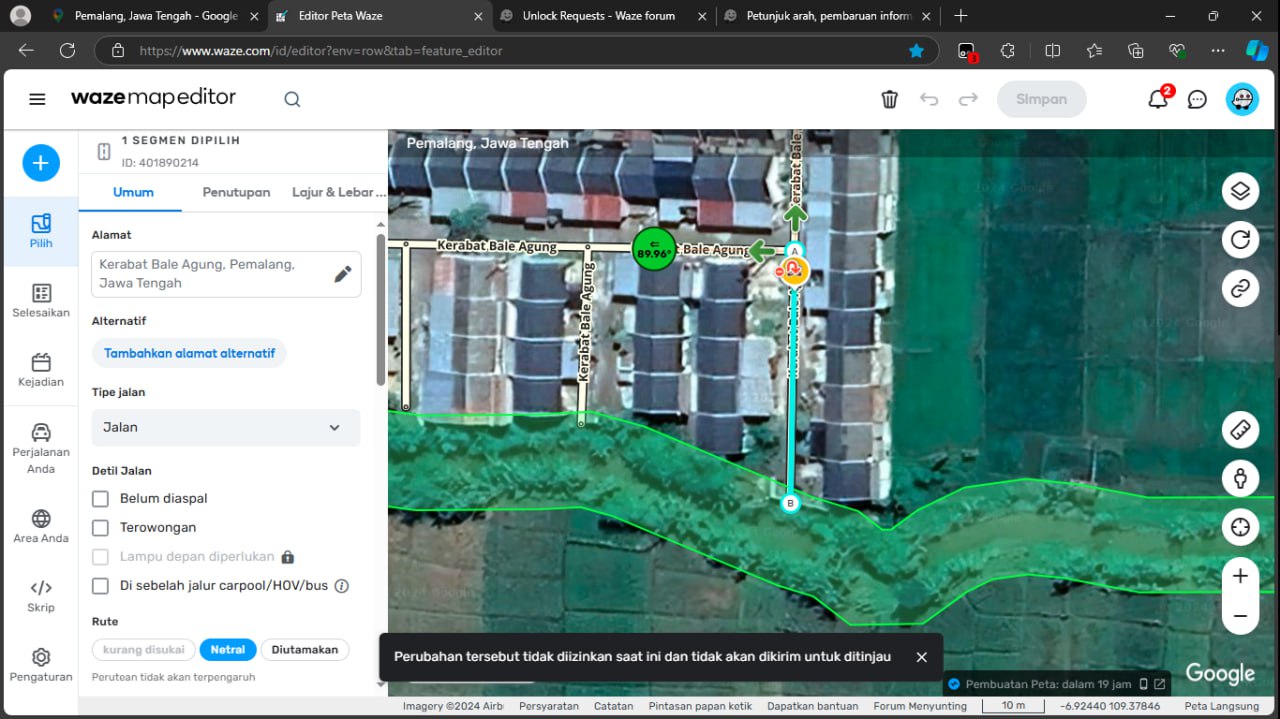
after check one by one, it was find out that the segments have railroad crossing RC hazard. although the segment is downlocked to L1, L2 editor unable to edit the segment unless we delete the RC first, edit the segments and then put the RC back. is this a bug?
if i am not mistaken, last time when RC is an object that has their own properties, it was lock Auto 5 and can’t lowered than that, i was wondering that this is the case with the difference only that we can’t see the RC lock level now since it is snap and part of the segment. I want to suggest that RC level is the road level, so we don’t have to delete the RC if the segment that has RC need to be edited
According to the release notes on camera’s~ Any segment with a camera on it would require the default lock rank to edit the segment. If you want a segment with a camera to be edited based on the lock level of the segment and not the default lock rank of the camera, you may need to request the default camera lock rank to be lowered to L1 for your country.
i am talking about RC not Camera. although perhaps it carries the same logic, but still i am going to wait staff reply on this. thank you for your interpretation and your kindness to share that.
be it as it may, unable to edit not because of lock but because the segment associated with an object must be specifically mentioned (juntion box is a good example of this)
be it as it may, editing the segment must be allowed regardless the RC lock (the one that is not allowed only to delete it (house number is a good example on this)).
be it as it may, following the same pharagraph, only editing the RC is not allowed (following the logic from this phrase “To edit or add a camera, you must meet the highest lock rank among the camera or the segment.”). if you look carefully on what the phrase saying, it isn’t saying editing segments that has camera on it, it is saying to edit or add a camera, but we are talking about RC here.
the message box in english more or less say, changes is not allowed and is not send for suggestion
(pardon if my english is bad)
My understanding is that they do carry the same logic now.
That said, I did not read the notes like that but you are correct. After testing this morning with my L1 account, I was able to edit the name of an L1 test segment that has a camera and one that has an RC on it, but I was not able to edit the camera/RC itself.
I also decided to test deleting an L1 test segment that had an RC on it and was able to delete it. I was given a pop-up warning that it would delete HNs and Hazards.
I don’t have L1 account to test but this morning the L2 editor changing the geometry of the segment that has RC on it and can’t do that. Are you able to do that?
Later I will ask him to edit the name and try to save it. Will let you know the result. thank you
I just tested and I can’t change the geometry, which makes sense since changing the geometry could cause an issue with the Hazzard, where the name won’t cause issues.
Hi,
I hereby want to repeat this report where so far no reaction was posted: https://www.waze.com/forum/viewtopic.php?p=2469166#p2469166
Is was wondering what I need to do in order to get this fixed. As mentioned it was a more than annoying bug during the ECC, but there are still some mayor events coming and don’t to loose as much time as previously due to this bug.
A status update would be nice.
Cheers,
Eddy
We (I and our L 2 Editor) has checked the behaviour of the segment that has RC on it and the RC recently created also
road properties are able to edit. we tested it out with change the name, change the restriction, change the road type, etc
changing the geometry is not allowed.
holding the node
when finished holding the node, the segment back to original condition
So as per your description also in previous post, it is save to assume that since changing the geometry of the road meaning change the location of the RC, it means without proper level to edit hazard, editor can’t edit that. the only problem now is the error message created by the WME is not clear enough. it takes trial and error to be able to understand the behaviour of the WME. it should saying something specific as “editing geometry is not allowed as this road has RC on it” or similar phrase like that other than just saying in english (the error message in indonesian) more or less say, “changes is not allowed and is not send for suggestion” (pardon if my english is bad) what do you think @Darya-Staff ? it is discouraging for new editor
the conclusion is
editing segment properties that has RC (maybe apply to all hazard as well) is allowed by downlocking the segment
editing segment geometry is not allowed (without proper editor level) since changing the geometry could affect the RC (maybe apply to all hazard as well) location inside the map
thanks jm6087 for your kind support to find out the real issue for us.
I’ve returned to editing after being out of the loop for almost two years. Popped in once in a while for specific things I ran across, but did not keep up on these threads.
Now that I’m back, I’ve been reticent to rush and report problems because I don’t know what has already been reported, or more importantly reported and accepted as just the cost of doing business. Many changes are not great to me, but that’s is surely a mix of design choices I personally don’t agree with combined with things just being different/new and I need to adjust to how things are. I get it, and I understand that.
All that said… a few things I’ve noticed since returning, so far… looking at the list of fixes and features in this thread I see no mention of…
Places disappearing (and occasionally reappearing) when zooming in and out, requiring a soft refresh to bring them back. This occurs with Microsoft Edge (no scripts) and with Google Chrome (many scripts), on two different PCs on different networks. Anyone else?
New segments not snapping to existing segment endpoints (when said existing segment is selected) is a recurring annoyance, is this accepted behavior now or is it being considered for fixing?
The popup menu that allows access to detailed turn settings when you mouseover a turn, seems to have the dynamic ability to open above or below the turn arrow depending on available screen real estate (this is good). However, it still has a large amount of excess whitespace buffers in that popup, so that on small resolution monitors (if the turn is relatively near the center of the display) it doesn’t all fit either above or below, making the dynamic positioning pointless because it just has to choose one and thus still have options that are out of view, requiring you to pan the display to get that turn arrow near the top or bottom of the page before doing the mouseover access again. Please squish this popup down, it’s more than twice tall as it needs to be (and has unnecessary width too), and I don’t understand why this lesson has not been learned by now.
For high-volume editors, these kinds of things that require constant unnecessary and avoidable repetitive mouse clicks and keystrokes really are a poor user experience.
If these have previously been mentioned and are in the pipeline already, my apologies.
I’ve checked with the team and this is more likely an intended behavior, if you are trying to chaned the geometery of the segment, or make split/merge. Anything which might affect a Permanent Hazard location or segment ID.
Please let me know if you have any questions.
Good to know it was not to push a design idea but to improve other functionalities first, that is perfectly understandable. Let’s just hope the UI can be improved now that the feedback is no longer delaying the suggest an edit feature improvements.
during migration from forum to discuss, it seems my post is deleted somehow and not migrated. i did say in that post that it is not the intended behavior that trouble low rank editor, it is the unclear message why the segment is not editable.
instead of saying “perubahan tersebut tidak diizinkan saat ini dan tidak akan dikirimkan untuk ditinjau” or more or less in English “changes is not allowed and will not be sending for review”, it is better to give specific error message for the editor “this segment has a hazard in it and your changes is not allowed and will not be sending for review”
because, it takes us trial and error to figure out what and why we can’t save the edit and if not from jm6087 hint, it may takes longer until we know what is happening actually.
Can we not have RRC and Camera hazards render at zoom level 14?
Railroad segments don’t even show at these zoom levels, and having these hazards show that far out just adds clutter to the map and they obstruct multiple segments and junctions, like in NYC
Thanks for the feedback! Could you please share screenshots for better visualisation of this problem? It would be helpful if you open such suggestion in Uservoice.