That is not a WME problem.
That is a feature from the Toolbox script, which you can toggle on/off by pressing “A” on your keyboard.
That is not a WME problem.
That is a feature from the Toolbox script, which you can toggle on/off by pressing “A” on your keyboard.
It’s a native feature and a native keyboard shortcut. Very easy to toggle by mistake if you don’t know it’s there, lol.
Yep! My mistake! The script only enables it back by default if you reload, to prevent the arrows from remaining like that even after closing and re-opening. But now I can’t find where it is anymore on Toolbox so I’m not even sure if it was Toolbox that did that - too many scripts 
EDIT: Found it (see screenshot) - And Toolbox actually can do the opposite of what I remembered by making arrows remain transparent if you check that box.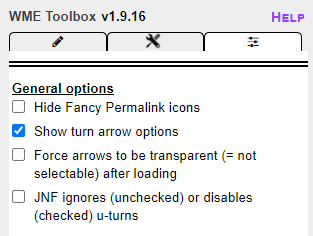
Hi Majid-Alyafeai,
Thank you for your report. We are checking this case internally.
Regards,
Nataliia
Is it planned that the geometry handlers are also going to be implemented on area places? Would be very helpful when you’re editing large natural features.
Hi Nataliia,
In the right side menu (Map Layers), If I turn off the GPS points layer and reload the page it will automatically turn it ON again.
The other layers such as (Places) it stays OFF as I kept it before reloading (which is normal), Honestly I didn’t check the other layers.

Hi Rompompom,
Thank you for your feedback, we will forward your question to the team.
Regards,
Nataliia
Thank you Majid-Alyafeai for this report. We will check the behaviour as well with developers.
Regards,
Nataliia
Anybody else having trouble adding a Red Light Camera to edit map? I can add a Speed camera and manipulate it, but when I click on it to change the camera from speed to RLC, the box opens but is slightly grayed out like it is behind the other view of Camera and Speed settings. I’m not able to select RLC from list to change it.
Please check this without Toolbox is on, more information you can find here: https://www.waze.com/forum/viewtopic.php?p=2216834#p2216834
Yep, that was it. I turned off my extensions, forgot Toolbax was in Extensions on Chrome. Then thought I had it turned off, but it took me to delete it for now in order to get it to save.
Thanks.
There is no way to remove a segment name or City in this version
The box “none” isnt’ clickable and deleting the text wont work either.
This problem is in beta and in production, without scripts

Love the new geonode behavior ! It it awesome!
I am not able to duplicate on NA server
I’m getting a strange behavior…
Sometimes it works sometimes doesn’t, in the same segments
I’m trying to replicate the issue and understand the triggers
In the same area:
Working…

Not Working

Hi, @Hugo_Moreira !
Segments with house numbers cannot check the “unnamed” box.
I believe this is what is happening in the second image.

Thanks Denys.
That sure explains the second examples.
Yet I’m still struggling to replicate the behavior in the parking lot segments. Those hadn’t house numbers, and now became editable
Hi Majid-Alyafeai,
We have rechecked with the team this case. So at the moment the behavior you described is WAD. It happens because we retrieve the old gps layer from your local storage, so when you reload the page we reload it again.
Of course, we understand that this behavior (toggle off gps layer, refresh, the gps layer is back on) is confusing and we have filed a request to keep the gps layer off if you disable it and refresh. It might take some time to get to this request as it is not currently affecting/blocking a critical functionality.
Thank you once again for flagging this.
Nataliia
Hi Rompompom,
Could you please file a suggestion about this improvement here?
Thank you in advance,
Nataliia
I confirm that it is happening in ROW. It is intermittent and not able to reproduce it all times.
I can’t add closures from my iPhone
(unavailable attachment: D56B42DB-50BD-4F1E-947F-748A1BEAF6CD.png)