New Editor version 2.94-8

Hi Everyone!

We’ve released a new WME version, v2.94-8

Looking forward to your feedback!

Quick Overview (more details below):

  • Revert ordering of comments - URs and Map Comments. - ENABLED
  • Display name labels on places: starting from zoom levels 18. - ENABLED.
  • Keep the submenu visible if menu items tooltip is visible in the toolbar menu. - ENABLED.
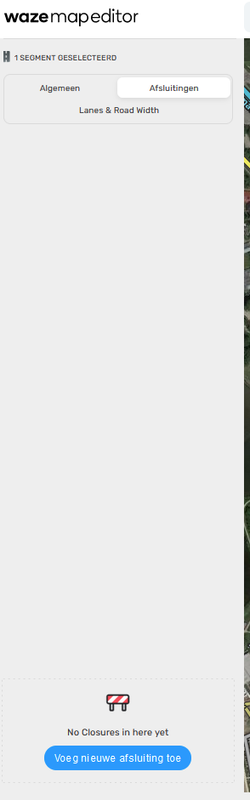
  • Add text about an empty state for when segment has no closures - ENABLED
  • Can’t move the junction node (for long segments) - FIXED.
  • “Listen to the street name" popup isn’t centered properly - FIXED.
  • Livemap option not working in profile (url/link not opening) - FIXED
  • The Send button vertically not aligned with the “Follow conversation” text to be a little more aesthetically pleasing - FIXED.
  • Places: the points and areas buttons are too big - FIXED.
  • Remove an additional separating border in individual comments - FIXED.
  • Roads/cities or GPS layers remain checked after refreshing, when they were unchecked initially - FIXED.

[doc]https://docs.google.com/document/d/e/2PACX-1vSjMSJ0UCXHEVF5tK7E18rD5lphTPTfthlHeFCaAZGPmCuqyu-GDB_8IH4YYw5g-Jo-jHr4qcCay6rH/pub[/doc]

This is the link to the release notes.

Thank you in advance,
Nataliia

1 Like

The button to add a closure has moved to the bottom of the sidebar, that doesn’t make sense to me. Is that intentional? Image below taken from a script free version in Firefox Private window.

Hi Rompompom,

Thank you for your comment. This is a known issue at the moment. It will be fixed in the next version.

Regards,
Nataliia

Why to we still have all the useless whitespace and boxes around comments in URs :!: We’ve already told you this is a waste and adds no benefit to the UI, all it does is make it more difficult to fit information on small screens, we keep telling you many of us work on laptops and screen space is a valuable resource.

This is what I last heard about that: https://www.waze.com/forum/viewtopic.php?p=2220275#p2220275

On the subject of adding closures - is it possible that, when clicking Add Closure, the cursor automatically jumps to the Description box ready for entry of text?

Hi Gareth!

Thank you for your feedback, cool idea.

Can you please add it to uservoice so we can review it internally? You can also share the link here so we can upvote it :slight_smile:

Thank you!
Maia

Hi Chris,

Thank you for your comment. Could you please give us more details?
My apologies in advance, if you have shared this. We want to make sure we understand 100% what you mean.

Many thanks,
Nataliia

Link to suggestion HERE.

2 Likes

The interface for lane width and lane guidance needs some improvement
https://imgur.com/a/DQMCAJ7

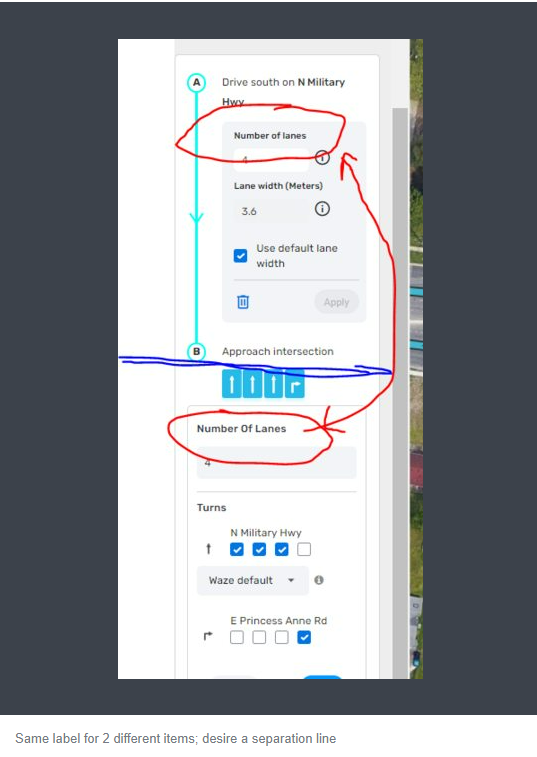
You have “Number of lanes” listed twice for two different things. 1) the number of lanes at the start of the segment (incoming used for lane width) and 2) number of lanes (outgoing used for lane guidance arrows).

Recommend having the lane width changed to “Incoming number of lanes” and lane guidance changed to “outgoing number of lanes”

Yes after you get used to the current it can be figured out but it is never a good practice to have two different items with the same label on a single interface.

Also the Displayed lane guidance arrows are just under the approach intersection which appears to refer to the lane guidance arrows vice the information above. Recommend having a visual indication of the shift from lane width to lane guidance. A simple bold line will suffice.

Hi Alan,

Thank you for your comment. Unfortunately, the attached screenshot appears blank on my end. Could you please resend it?

Regards,
Nataliia

I sent the photo in an email to Daliah and asked her to forward it to you.

1 Like

Here is Alan’s imageScreenshot 2022-03-05 054532.png

2 Likes

Hi Alan,

Thank you, now I can see what you meant about lane width and lane guidance needs improvements.

May I ask you to submit a uservoice suggestion for this? Share the link here after that so we can upvote it.

Regards,
Nataliia

Thank you John.

Regards,
Nataliia

Added as Waze Suggestion
https://waze.uservoice.com/forums/59225-map-editor-suggestions/suggestions/44879206-fix-the-lane-width-and-lane-guidance-interface

2 Likes

Thank you Alan. I upvoted it! :sunglasses:

Regards,
Nataliia

Oh my what is wrong with WME :shock:

I’m having so many issues drawing a new housing estate. Are these known bugs because I haven’t seen them mentioned on here or elsewhere:

  • When I draw a new segment the left panel is completely blank so I cannot add address, speed etc.
  • I also cannot delete it. Even a reload of WME doesn’t fix it.
  • I am unable to save edits. I can make multiple changes but the save button is still grey yet the segments are pink to indicate changes have been made.
  • On the odd occasion I can select a segment, the street field is greyed out.

This is where I have been working. I usually persevere with the odd bug but this has resulted in me having to turn it off and post this instead.

https://www.waze.com/editor/?env=row&lon=-1.43752&lat=53.45735&zoomLevel=18&segments=414700469

1 Like

If I try to edit the Turn Istructions the WME does not save the job, as you can see from the video. I also tried disabling all scripts and extensions, there is the same problem in the WME Beta.
Hi Richard,

Thank you for your comment.

As for first two items, this is known issue at the moment. There are a few workarounds.

Can you please check if one of the following steps helps?

  • Try zoom in and zoom out;
  • Unselect the places layer;
  • Clear cache or refresh the page.

Regarding the third bullet: could you try to record video, when recreate issue on your side again?

And the last bullet: also could you provide more details, please? May I ask you to take screenshots with greyed out fields next time?

Many thanks in advance,
Nataliia