A new WME version is out. Here are the highlights:
Housenumber layer - ENABLED
*Failure to create MTE (city can’t be added) - FIXED
*Unable to uncheck city “None” when adding alternative name - FIXED
*Cannot Select Segments under Area Map Comment - FIXED
*Need to temporary remove virtual node to join segments - FIXED
Change list also includes many bug fixes that were caught in beta ad never made it to production, so we don’t include them here.
Update translations
Internal changes
More about the HN layer
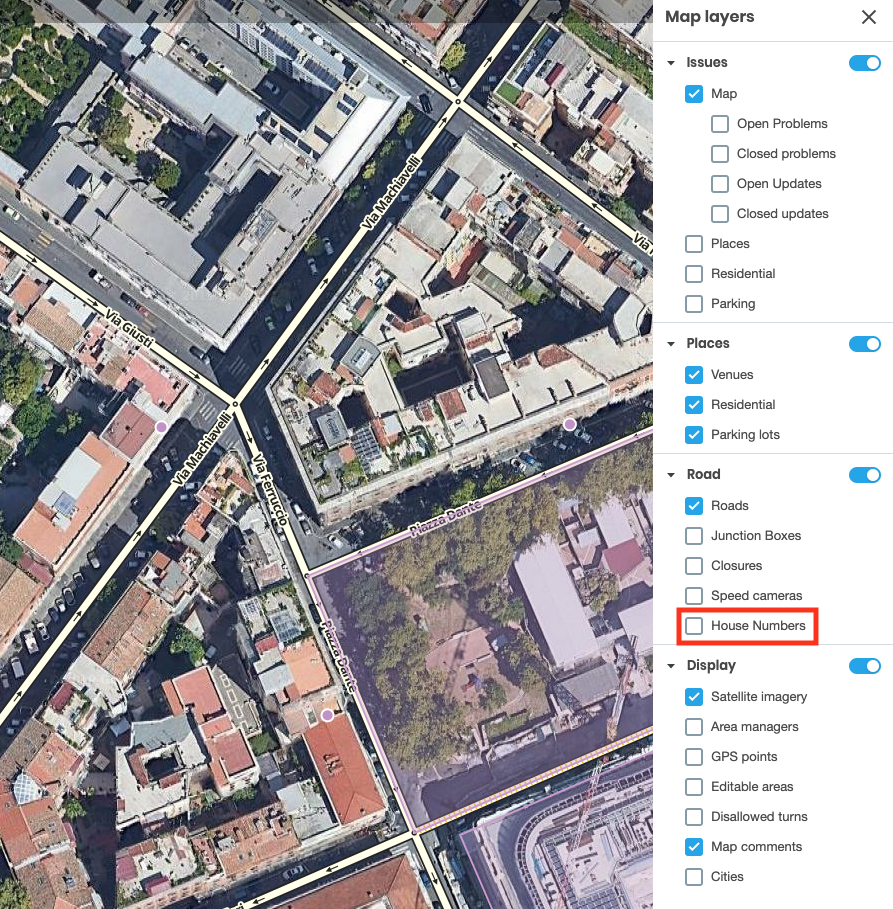
From now on you can enable the House Number layer from the side panel:
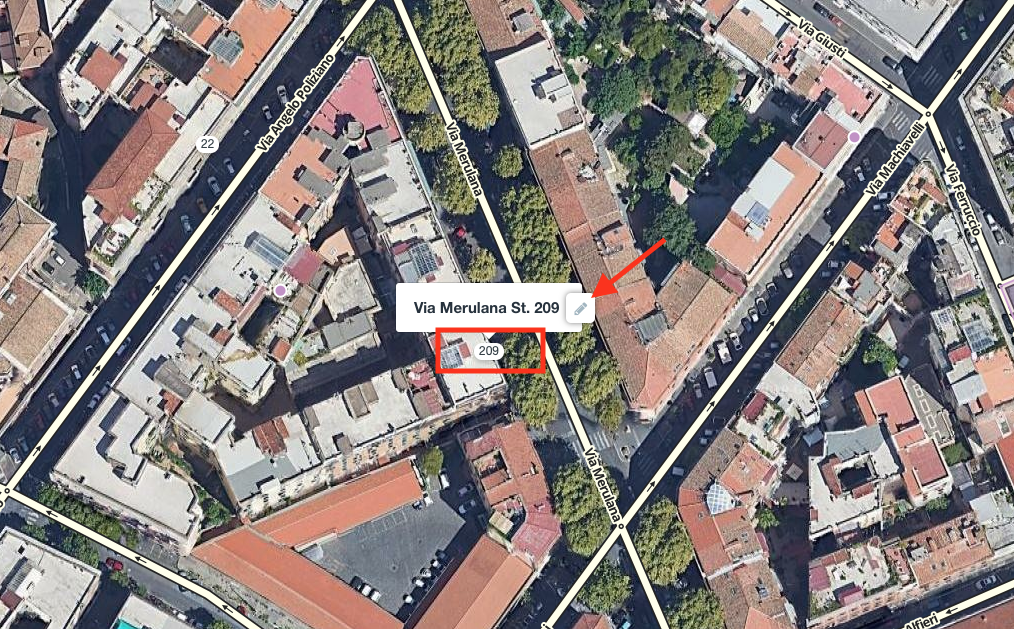
Once enabled the HN will be visible on the map, and by clicking on the pencil icon the house number edit mode will be accessed.
At the same time you will still be able to select a segment and “Edit house numbers” as you did till today.
Well, I used to. The changed to the road closure interface now mean that I have to guess where the trash can icon is supposed to be and if I tap in the wrong place, I get sent to the editing panel instead.
Until I guess correctly, I can’t delete a closure.
Translation: A kick in the teeth for most of the script editors, with many scripts broken. Therefore also a kick in the teeth for the thousands of experienced editors who rely on those scripts.
There appears to be another change in this version that isn’t documented in the release notes.
Segments with closures on them highlight in orange when hovered over or selected. Not a bad idea, except that the colour is very similar to the colour of a segment that has been edited but not yet saved.
So thank you Waze, once again, for introducing a useful feature that is devalued by a stupidly poor contrast level. Is there some internal requirement that all WME Devs should have 20/20 vision, with no form of colour blindness and are only allowed to work in perfect lighting conditions with minimum 28" FHD monitors? :evil:
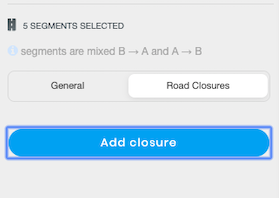
There seems to be a limit to the number of segments/nodes that can be multiselected for a closure. After about three or four selections, an attempt to open the closure panel seems locked. Clicking the button gives you this effect, but no access to the closure panel:
Will forward this feedback to the team to find a more distinctive colour for this.
I’ve updated in Scripters Hall (closed forum) with more details about this. There were some script breakers in the lastest beta versions that were fixed before releasing to production. We’re happy to work with the developers to continue finding solutions for this.
I was very unfair earlier. I’ve modified my original post and I apologise for it here. Between some frustrations with Waze and with Real Life, and some other stuff I’m dealing with, I definitely allowed my mouth to pull away without first engaging my brain.
Yes, this update has broken many of the scripts and I felt that Waze could have done more to alleviate the situation. But the fact is that the script writers were told of the major internal change. For myself, at least, I didn’t notice at the time and I haven’t had the time to check out the problems, so it’s entirely down to my own laziness.
In fact, I think that we could probably have done more to communicate to Waze that this update was going to have a major effect on the scripts and maybe something could have been done about that.
As Daliah said above, she has posted more information in Scripters Hall - including information she gave me at the Global Meetup that I was hoping would be spread a bit wider. I think we will probably be having some discussions there about how we can better manage how WME updates interact with the scripts. Given that HQ is willing to work with us on scripts, I shouldn’t be complaining unless I do my part to maintain the relationship.
Maybe I have a problem with this time of year: it’s almost exactly 3 years since I had a little rant. I probably need to lower my blood pressure again.
I believe there is a bug (beta & production) in street naming, at least I don’t expect it is by design. It very possibly could have been around for several WME versions, since the issue that brought it to my attention is not that common.
With all scripts disabled (or not), when I try to change a street to a new name that is:
Exactly the same, except capitalization, or
It is a “shortened” version of a name, such that a list of pop-up name(s) is displayed
Selecting ENTER, to move to another field, or APPLY, to keep that single change, will result in the name reverting the “pop-up list” name that is HIGHLIGHTED. It will not keep the new name in the window as long as a pop-up choice is displaying.
It was discovered when I tried to changed “Vfw Rd” to “VFW Rd”. It also occurs when I try to name a new “test segment” nearby as “VFW Rd” for it’s original name. Pressing APPLY changes it to the unwanted “Vfw Rd”.
Having fixed many basemap road names over the years, where the only update needed was internal capitalization, I’m pretty sure somewhere in the past, WME did not produce these same results.
My apologies if this is previously reported. I did quickly review the bug list. Same results in BETA, as expected. Found from post below, it is WAD. Sorry for post.
While they do look similar, their application is different enough that it doesn’t bother me since changes have to be made before closures can be edited. That said, however, I think there is room to differentiate the coloring particularly for those with colorblind issues that affect red and similar coloring.
Few thoughts on the new WME House Numbers feature:
Should be easy enough to add code to support placing the house number in the correct location based on country addressing standards: 1234 Main St versus Tolakkerweg 216
WME HN NavPoints shows where the stop point is set. This is a MUST HAVE feature that is missing in the WME implementation. Doesn’t matter much in city/urban environs but is a real benefit in ensuring correct navigation in semi-urban and rural locale.
The WME HN NavPoints script also uses four colours which includes an indication whether a HN was Waze added or editor added. I find the yellow highlight helps identify bogus HN.
It would be nice if we could also adjust the zoom level of when house numbers are displayed. When editing rural areas beneficial to be able to display house numbers when the map is showing a lot more area.
Thank you Iain! I’m glad we’re talking about this stuff. I think by letting each other know how things work and what hurts and where, there is often so many things we figure out we can be doing better together.
The community volunteer devs are not available 100% to fix it each time you break it.
Stop changing RTC related things with each release. The functionality stays the same each time so I’m not sure really why do you guys need to break it with each and each release.
Either implement the script as built in as an integral part as WME as you should have done from the begging of this functionality either stop breaking…or break once a year lets say