A new editor version has been released, with many exciting updates!
Change the localized datepicker in NA to start on Sunday- Enabled
SHARE FEATURE- Enabled
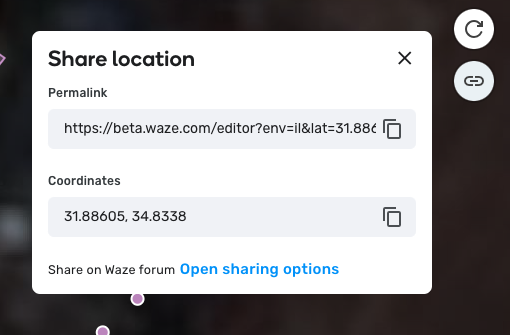
Share Location
Clicking the link icon will allow you to see the permalink and the coordinates of the segment.
Click the pages icon to copy a permalink or coordinates.
When sharing a permalink, you’ll also be sharing the opened layers you had when selecting the permalink. New Shortcuts
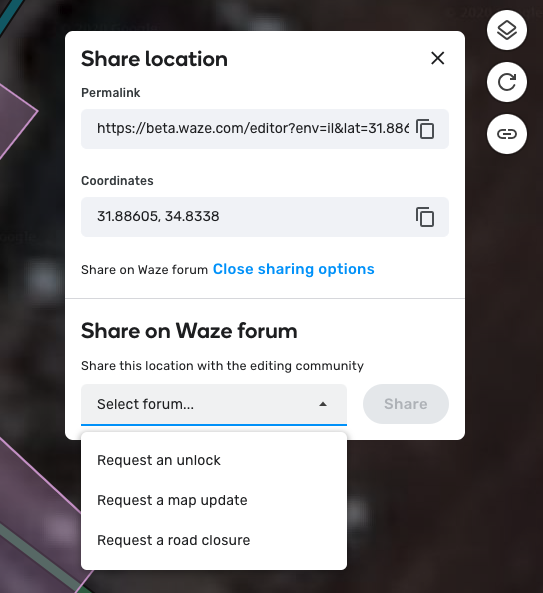
Share on Waze Forum
The goal of it is to make it easier for new users to get in touch with the community, when they don’t have permissions to make needed changes. We hope the share on waze forum functionality is a first step to improve this experience.
Clicking “share” will open the forum reported by your coordinators here and automatically populate the forum message with the selected permalink.
Important note:
If one of items (Request an unlock, request a map update, request a road closure) did not have a valid link , that item will not be part of the dropdown.
If your community needs to add/replace links, your coordinator can request it using this form. Please note the form answers will be reviewed on a monthly basis.
Hi,
I think I’ve been experiencing WME bug… Also with the latest version version:
Some of the segments cannot be properly edited (or deleted) and saved (getting “While you were editing, the elements you’re trying to save have been modified or deleted”), e.g. this one: Permalink.
How to deal with that?
I don’t like the new sharing button. Now it’s impossible to reload current view simply by clicking permalink icon. In the previous version, permalink button was the fastest way to fix various random WME or script bugs and operator errors without losing current position and zoom level.
Two hand, three-key combo is not useful replacement for one hand, one mouse button action, IMO. The reason I use reload quite a lot is that I don’t want to keep all extensions and scripts running all the time because they make my browser slow and unstable. I have experienced way too many Chrome crashes. So, nowdays I use scripts only when needed and that’s why simple scriptless reload is a must.
I wonder if the developers are all using keyboards with Alt keys on either side of the spacebar, and haven’t realised that this isn’t the standard layout for everyone…
I am not sure if this is WAD and also not exactly remember the previous behavior:
When you edit the existing closure and click on the start or end date, then the calendar component will open on todays date regardless on assigned date. But when you choose some date in calendar and then click again on date (before saving!), then calendar will open on the previous chosen date. I would expect this behavior also in the first case.
Does somebody remember, if this has remained from previous versions?
I am trying to change the name of a street by my house and the editor is not letting me do that.
In Mesquite TX the southern portion of Kim Lane is mistakenly labelled as Doris Dr from the intersection of Jessica to the 90 degree turn where it actually becomes Doris Dr. When I try to change it in the editor it tells me it won’t accept the change. I live about 5 houses from Kim Lane and drive it every day. I know my change is correct but the editor refuses to accept it. What can I do?
This isn’t quite the right place to post, but I have fixed things up. Kim Ln and Doris Dr meet at 803 Kim Ln and 1300 Doris Dr right now. This should take a couple of days to make it to the map.
Clicking on on the MP re-centers the screen on the “A” end of the requested closure, but does not open the Map Problem panel. This is happening scriptless in Chrome and Firefox.
Hi, there,
this new button working great for me.
Please, can u also add the old button od the bottom right? It was useful for me, because after click on it, the page directly refresh…?