Waze have opened the speed limit data option in WME in the UK, collecting data that they’ll use for the speed limit feature in the app. “So far it’s going great and we want to thank our amazing communities for their help - the community proved to be the most accurate data source yet again”
The idea is to add the speed limit to segments: After we collect data about enough segments (at least 10K) Waze can run a prediction algorithm which will add speed limits to all segments in the country. Once 90% of the highways speed data is verified by the community the feature can go live.
So, it’s critical that we get those first 10K segments as accurate as possible. Please don’t rush out and add speed limits to all the segments you can - take it slowly, and be sure to verify the limits in Street View. You may need to split segments with junctions at the points where the limit changes, but only if there isn’t another existing junction nearby.
You’ll only be able to add speed limits if you are able to edit the segment, as per usual locking rules.
Any questions or concerns, post them below. Thanks.
:ugeek:
PS: let’s not debate whether or not speed limits is a good idea, nor how it will be implemented in the app. Just stick to the map editing.
PPS: see this post for update about speed limits. (February 1st, 2016)
Note: Don’t get caught out by ‘Select entire street’, it does NOT respect speed limit for the selection criteria so for many roads you will have to do your selections the old fashioned way where a road has multiple speed limits.
Tip: If you are trying to decide when looking at GSV what the speed limit for a road is then look to residential side streets that are likely to be 30. If there are no speed change signs posted then the parent road is probably 30 too.
Tip: press ‘m’ to switch into multi-selection mode, without needing to hold down Ctrl key.
It’s possibly worth concentrating on those roads with exceptional limits, such as 20 mph outside schools or A roads that slow down throw towns and villages. Waze will be able to infer the long boring stretches of national limits from speed data and info from Google.
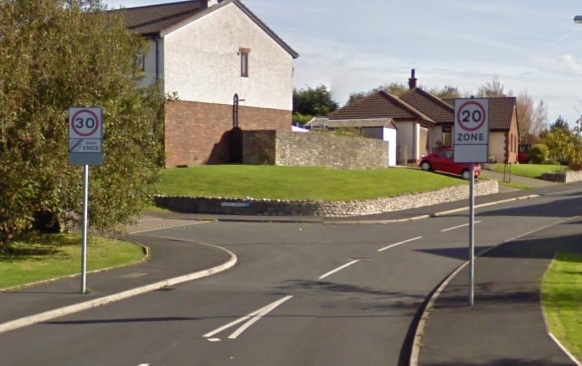
I’ve been trying to sort the 20mph speed limit in Heysham. I know some of Heysham quite well but not this bit so have been making extensive use of GSV, when I happened upon this beauty. Take a look at the GSV looking east down Meldon Rd (sorry I don’t know how to save screen shots in Waze). It seems that in some locations even the council don’t know how fast the road should be, so what hope do we have!
NSL - obviously we should use speed limits for private cars, so 60 mph on single carriageway, and 70 mph on dual carriageways and motorways.
Variable Speed Limits - set to highest limit used.
Private Property Limits - Supermarket car parks, hospitals etc often have limits posted of 5/10/15 mph. These are nearly always private/parking roads and not used for through-routing so I suggest these are not recorded.
Trouble is in London The London Borough of Tower Hamlets has put 20 Mph in for most side streets. But for the London Boroughs of Southwark and Islington they have 20 Mph all over. My problem is most side streets which are 20mph and I know they are with the lack of signs I will not be able to put in due to the Level 4 lock.
I look at this information as a step for getting Average speed cameras on to Waze.
I am working at the end of a Private Road which has a speed limit of 15Mph. Can’t show it on Waze but then Private Roads the speed limit is down to the landowner.
FWIW, there’s probably no value in adding speed limits to housing estates, culs-de-sac, roundabouts or ramps as their speed is likely to be below the posted limit, or they don’t have any speed data at all.
Let’s concentrate on those main roads, yeah?
In terms of meeting the threshold required for Waze to let loose their autodetection code, then I’d agree with the point about not bothering with segments that aren’t likely to have any speed data, but if the purpose of hitting this threshold is to give Waze sufficient manually confirmed data for their code to refine its predictive abilities, then shouldn’t we be trying to provide as broad a dataset as possible, including confirming the posted limits on roads where the collected data might cause the prediction code to think the limit was one/more steps lower?
My point is that there are a lot of minor estate roads compared to major roads, and we probably have enough examples of those roads by now. It’s also less important to get those ones correct, compared to the main roads where people can easily overspeed.
So the emphasis is on providing good quality data aimed at minimising the risk of the predictive code overestimating the real limit, rather than on the broader goal of minimising errors in general, gotcha.
Will Waze be providing any feedback on how close we are to the threshold, or guidance on which types of road they particularly would like to get more confirmed data?
No, but I can. We currently have 10k minor roads (Streets) with speed data, plus 6k of major roads.
So, we no longer need to race to reach 10k, cos we’ve already smashed it. I would like us to get 10k of major roads before talking to HQ, as well as making sure the speed limits we have put in are as correct as humanly possible. I can’t imagine that will take too long.
After Waze have run their magic algorithm, we’ll have the other 3 million segments to verify…
This is the area near where I work in East London the problem I have is lock levels. In the attached picture I have marked the whole area as 20mph since Tower Hamlets council did this about a year ago the only problem I have is the roads I have marked in Red I would do but the Level 4 Lock stops me from marking them as 20mph. The roads in Purple are 30mph roads.
So since we are not unlocking roads for us lower editors we can only do what we can do.
Screenshots are easy on a PC been doing them since I use to use Internet Chat rooms. Just find the “Print Screen” button on your keyboard. Mine is called “Prt Sc” press that when you have what you what to show on the screen. Then open the program “Paint” and use Paste or the Keyboard shortcut
Ctrl - V then what was on your computer screen will appear so you can edit it.
Only problem with attachments is the limit for the forum. Can’t remember what the size is. So I always crop the Print Screen down so to try and get under the limit. Hope this helps people.
In GSV, move around to the other side of the signs and you’ll see the same problem, which makes me think that some local wag has spun one of the signs around to amuse, bemuse and confuse drivers…
Or ALT+Print Screen just does the current window (useful if like me you have three big monitors at work as the screen shot would be of all three!)
Or on a mac CMD+SHIFT+4 allows you to the draw a box with the mouse or trackpad of the bit of the screen you want to capture (CMD+SHIFT+3 does the whole screen)
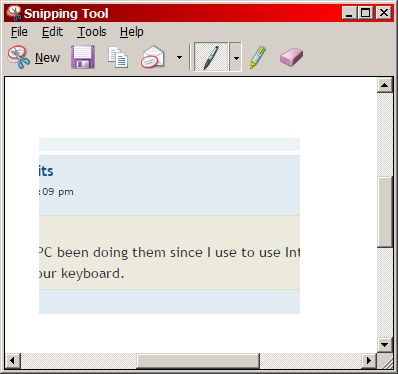
Try the Windows Snipping Tool (part of W7) - hit the Windows button, start typing Snip and hit return when it appears. Lets you choose an arbitrary rectangle of screen, then save to a file (for uploading), copy to the clipboard, or send directly to email. You can also draw on your snip with a basic pen or highlighter
Also, Paint may well save the picture as a bitmap (.BMP) which makes for very large files. The Snipping tool has JPG, PNG (both good for photos) or GIF (good for limited colour range) - all compressed formats.
I’ve driven it several times and never really been sure. You enter the road at ether end at 30mph but quickly enter a 10mph zone. The 10 looks like an official speed limit to me so I’m sure it’s enforceable. I think the sign about humps for half a mile is irrelevant as I’ve never encountered any.
Driving south you quickly leave the 10mph and enter 30mph. Driving north the 10mph extends to almost the whole road. So this leave a section in the middle which is 30mph going south and 10mph going north. Anyway, that’s my interpretation and is what I’ve implemented.
I’d very much appreciate comments and any other interpretation anyone may have.
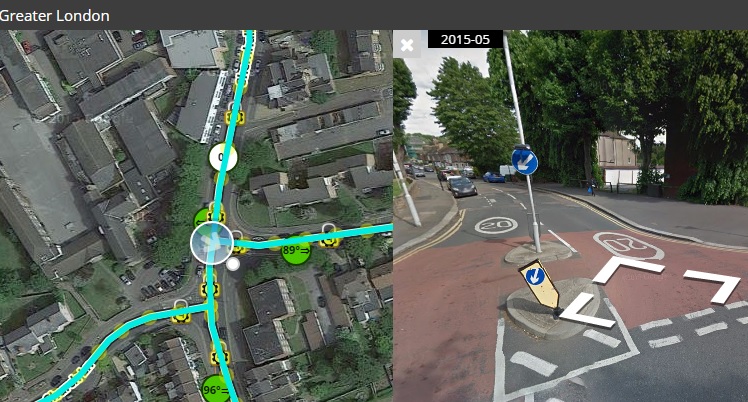 This is the area near where I work in East London the problem I have is lock levels. In the attached picture I have marked the whole area as 20mph since Tower Hamlets council did this about a year ago the only problem I have is the roads I have marked in Red I would do but the Level 4 Lock stops me from marking them as 20mph. The roads in Purple are 30mph roads.