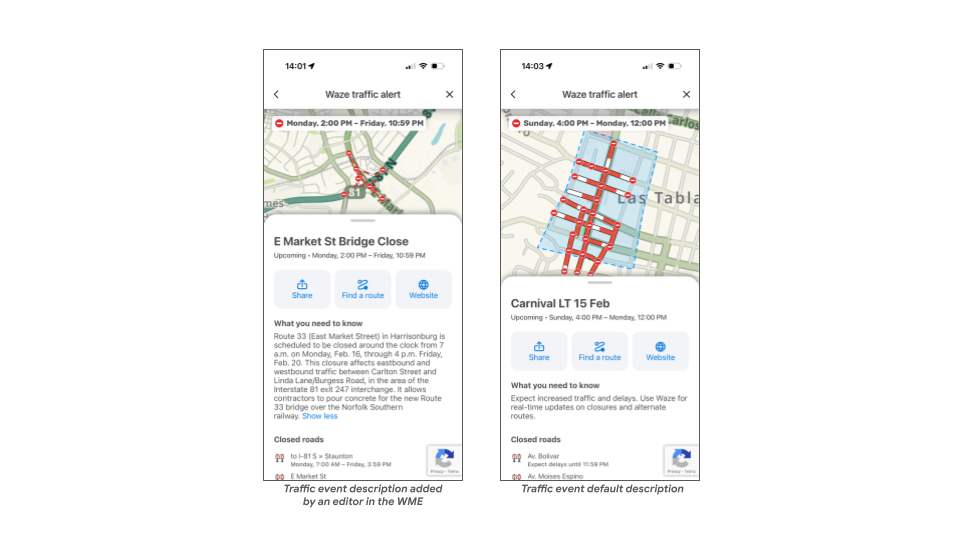
We are excited to share that Traffic Event descriptions are now visible to users!
As you know, when creating a Traffic Event in the WME, you have the option to add a description to provide more context. Previously, this information wasn’t visible to users for various reasons.
We heard your feedback loud and clear regarding the time you invest in writing these descriptions and the significant value they provide to users during traffic disruptions.
Moving forward, descriptions added to Traffic Events (in all categories) will be visible to users on the event’s landing page once published.
If no description will be added, we will use a default copy which was used until today: “Expect increased traffic and delays. Use Waze for real-time updates on closures and alternate routes.”
We encourage you to use this field whenever you see fit. Your insights will now directly reach the users impacted by these traffic events, helping us further improve the overall user experience.
If you have any questions, please don’t hesitate to reach out!
Thanks Hezi! It will be tested very soon! By the way, when clicking on the “event page” link appearing on the WME event tab, we are still redirected to the old version of the event page. Is that how it’s suppose to be?
Hi Hezi,
I tested the new feature this afternoon, adding a description in English and Italian to an ongoing event. It works both on the client and the web.
But as Jeff wrote, it’s time to see the new version of the events web page by default… when we access it from wme.
Excellent. This measure helps to clear up any doubts or concerns regarding the reason for the delay. It also allows the user to understand in detail the cause of the increased travel time on the route.