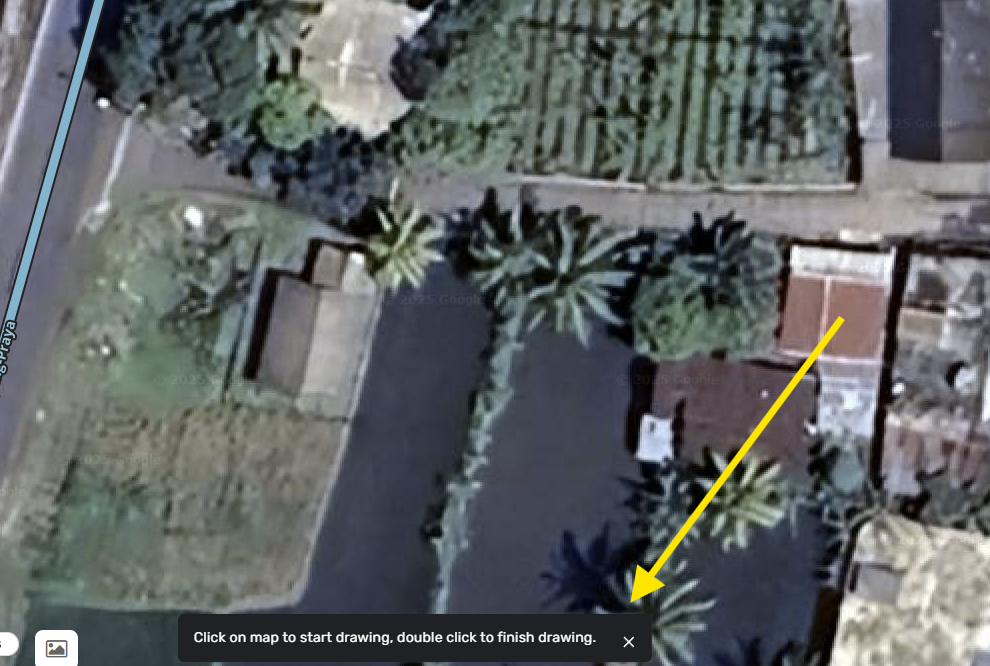
We are aiming to improve the user experience for drawing segments and polygons, and are now introducing the first change— a tooltip that indicates how to finish drawing roads or polygons.
Improvement to: House Numbers (HN) Revamp – Click-to-Edit HNs: We have introduced a change that allows editors to enter edit mode directly by clicking on HN chips—even on non-selected segments—eliminating the need to select the segment first. It streamlines the editing workflow and is implemented in response to the community feedback.
WME Style improvements: Implemented save loading state for the Save Button.
SDK improvements: please refer to the change log to check the SDK additions.
Performance: We’ve implemented changes that aim to improve the loading experience when panning and zooming the map.
Bug fixes:
We released 10 bug fixes:
School Zones & Scheduler: fixed the issue that the School Zone’s geometry can’t be edited while it overlaps with the venue’s polygon.
School Zones & Scheduler: resolved the issue where a redundant line with “invalid” timeframe is displayed on the Summary page in case the Local Schedule contains only “imported” timeframes.
School Zones & Scheduler: resolved an issue where sorting by “Used in” did not work.
School Zones & Scheduler: added a change to address the issue where the Community Schedulers list didn’t reflect all available shedules.
School Zones & Scheduler: added a partial fix for the issue where timeframes should be ordered chronologically. We keep you updated on the further progress.
Compact mode: Turn tooltips now automatically resize to a compact format when compact mode is enabled.
House Numbers (HN) Revamp: Zooming in with HN selected breaks WME
House Numbers (HN) Revamp: resolved an issue where adding a number required an extra click on the HN to activate typing.
On Segment suggestions and Suggest an edit: disabled showing the tip tooltip for rejected / applied suggestions.
Issue with Turn popup: Turn popups near the bottom of the screen now stay fully visible and no longer go off-screen when hovered.
Known issues:
Polygons on the map: tapping the polygon sometimes causes the WME map area to freeze.
The highlighting of invalid House Number errors on save, on the map, was removed. This will be re-implemented to display specific errors.
After accepting or rejecting a Suggested Edit the card does not reflect the updated status.
When suggesting the change for the city of a named segment, the resulting suggestion may incorrectly display “A segment without a street name” instead of showing the updated address.
Hi,
My apologies for repeating myself, but is there any update yet on the reappearing of the delete photos yet?
i know that there is a workaround, but it talks some while to get a fix.
I don’t see anything about it in the solved nor open issues.
Many thanks,
Eddy
We can now edit school zones when overlapped. However, we can no longer edit things under the school zone. Can’t click segments, or places. Can’t move nodes of an area place under the school zone.
There surely must be a better solution. The selected item must always be editable. Things smaller than the polygon must be selectable when that polygon is not selected.
Thank you for the fix regarding School Zone geometry editing. I’ve noticed the issue has been significantly reduced, but it still occurs in some cases, although less frequently.
Sorry for the inconvenience. Just to confirm—does the issue occur when selecting random KoiFish segments? I’m checking with the team and will get back to you shortly.
Apologize for pointing out this feature on the wrong WME version. anyway, I’m seeing a warning message at the bottom of the work area, and I’m wondering if it’s necessary at this stage. It served its purpose in practice mode, but now it contributes to visual clutter. Once we’ve moved past practice, we usually have a good grasp of what to do.
I mean, come on, if you enable something, at least give us control to disable it on the settings menu.