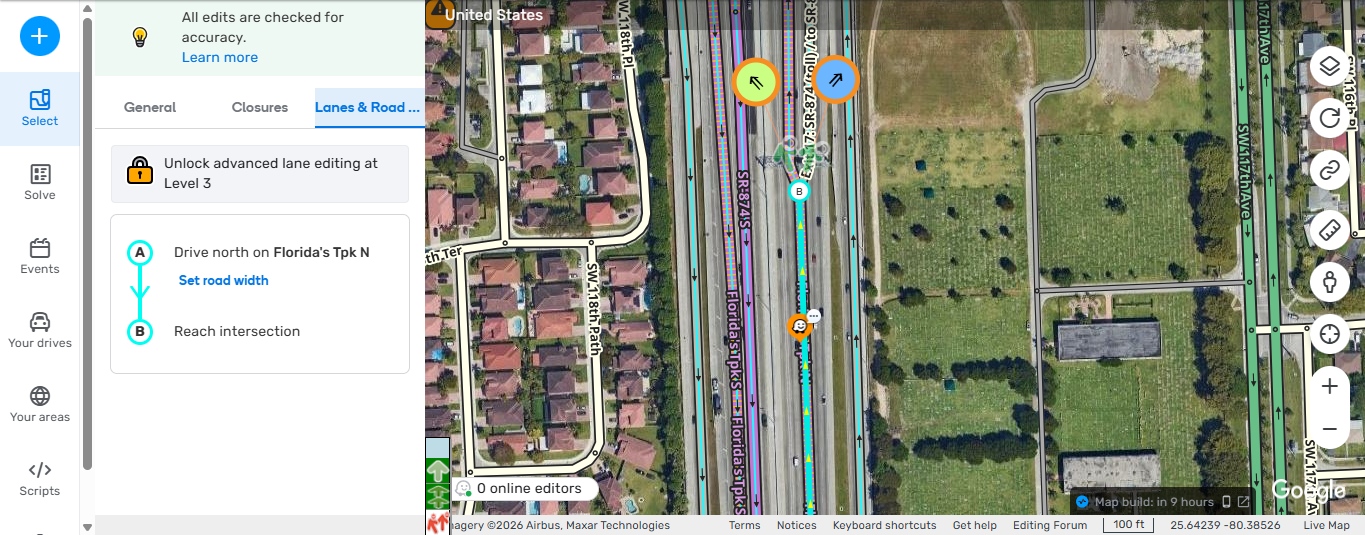
Hi Again i just encountered another issue with this Release, when trying to look at the Lane Guidance in a Freeway, which i been always able to see. is now giving me a Message that i need to be R3 to unlock advance Lane Editing Feature ( while Im R4 ) and is not showing the Lane guidance which would be really helpful specially when having a UR reporting wrong LG.
4 Likes
Hi @locojd1,
Thank you for surfacing this issue. I see you’ve raised a separate bug report, which is much appreciated - we will highlight it to the team.
Would you be able to provide segment permalinks with this message? I presume this could be pointing to segment locks not LG in general (albeit the message is incorrect, and this has already been raised).
All the best,
Olesya
3 Likes
Hi @LihtsaltMats,
For URs with comments, you can try “Description AND comments” and “Comments only”.
If you’re after URs with no comments, you can try “Description only” and “None”.
Please let me know if you have further questions.
Best,
Olesya
4 Likes
The issue is not segment lock and yes LG you can only edit when i downlock the segment, what im referring to, is that we are not longer allow to see the Lane guidance in freeways like we always have,
and it should not give me an error saying to unlock this feature you need to be R3, because im already R4 so there is an issue there, this happens in any freeway segment
3 Likes
Hi @locojd1,
Thanks for your response. Would you be able to provide some PLs where you see this issue so I can compare it to my view?
3 Likes
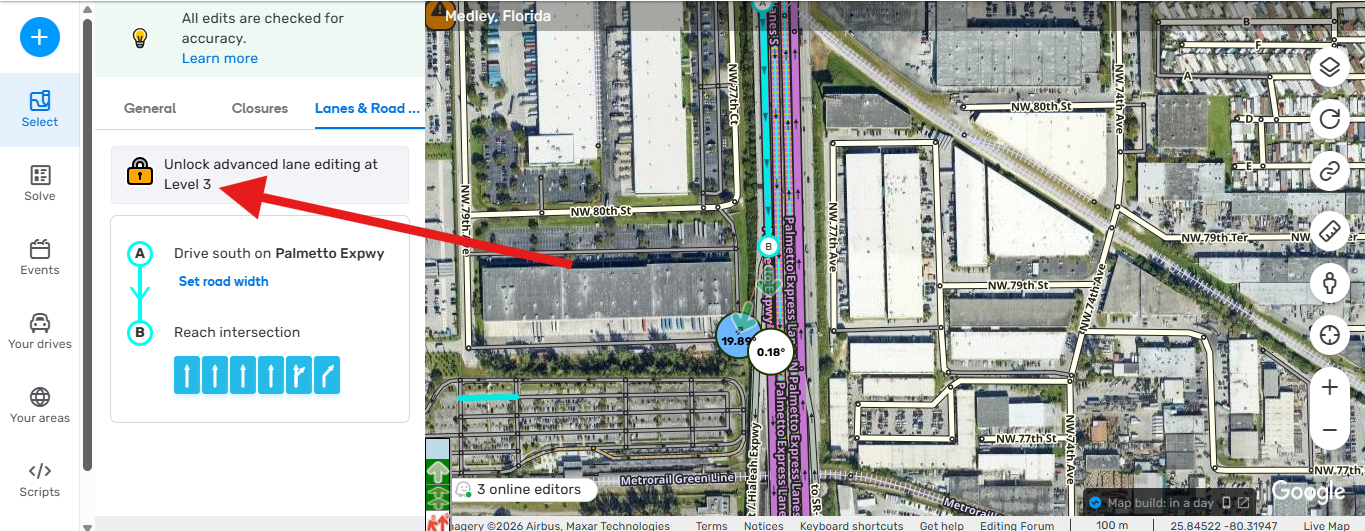
Hi @Olesya-Staff, right here i put a few segments but the issue is happening in all freeways and MH https://waze.com/editor?env=usa&lat=25.77121&lon=-80.19885&marker=true&zoomLevel=19&segments=61392712
https://waze.com/editor?env=usa&lat=25.78326&lon=-80.23836&marker=true&zoomLevel=18&segments=76351531
https://waze.com/editor?env=usa&lat=25.84541&lon=-80.32112&marker=true&zoomLevel=17&segments=518132827
2 Likes
Hi, @Olesya-Staff
I’m after URs that either have or don’t have comments.
I have two use cases and neither of them care about the existence of a description:
- 0 comments - ask for clarification OR answer to the description.
- 1+ comments - respond to a previous comment something.
Filtering by the description field doesn’t help me at all.
For URs with comments, you can try “Description AND comments”
This won’t fulfil the first use case. It’s almost enough for the second but it will hide URs WITH descriptions.
and “Comments only”.
This won’t fulfil any of my use cases, because it hides URs with descriptions.
If you’re after URs with no comments, you can try “Description only”
This won’t fulfil the second use case. It’s almost enough for the first but it will hide URs WITHOUT descriptions (there are more of those!).
and “None”.
This option hides URs with descriptions, so some of them will be missing.
Currently it looks like the only way to successfully complete my use cases is to do this: https://www.waze.com/discuss/t/introducing-automatic-update-request-replies-for-urs-without-description/397721/130?u=lihtsaltmats
It’s a lot of clicking and switching for something that was very easy before. I’m not sure why it was necessary to connect “description” and “user comments” in such a way.
3 Likes
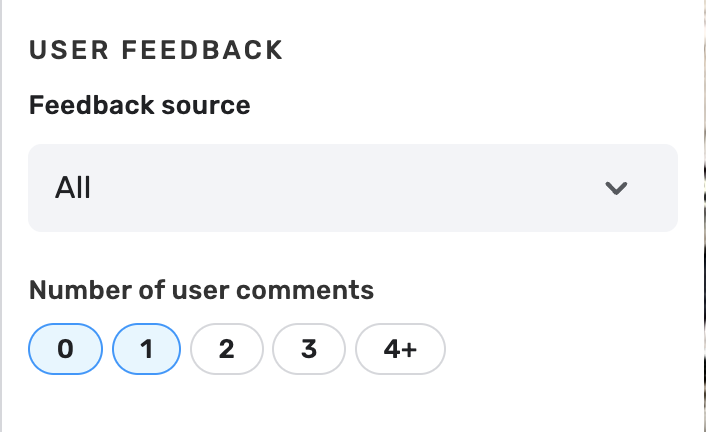
Hi LihtsaltMats, thank you for the detailed message. You can currently filter what you need using one filter only.
- ALL+ 0 comments will surface URs with and without description and 0 comments.
- ALL + 1 comments will filter URs with one comment and with or without description.
So a combined filter of ALL+ 0 and 1 comment will be most useful for the flows you described. 
6 Likes
Hi @locojd1,
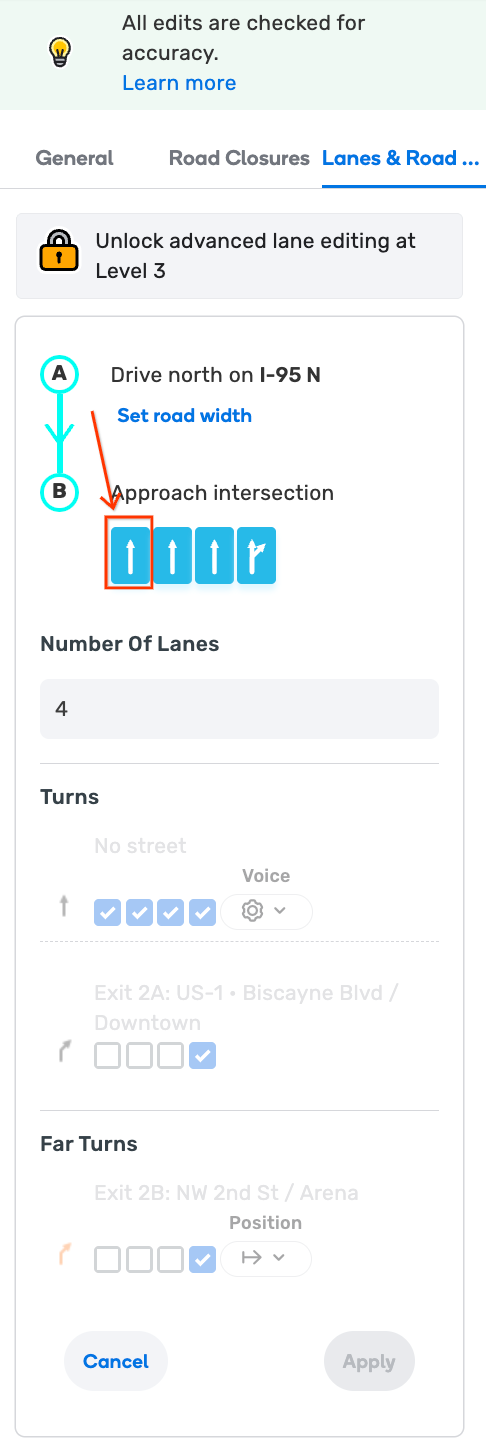
Thank you for the permalinks! Just to be sure we are on the same page, can you not view lane guidance upon clicking on arrow icons?
4 Likes
Hi, i cant see anything, not even that page for LG, it says i need to be R4 to be able to see that.
3 Likes
So nothing happens when you click on the lane arrows? I’m sorry for asking so many questions, I’d just like to make sure I clearly understand the problem. Would you be able to record a video perhaps?
On my end, when I long in with a lower level user, I can still view all lane guidance, albeit the whole area is greyed out for me.
3 Likes
ALL + 1 is still a half measure. I don’t know how many comments URs have. At the end of the day I only care if they have any comments. Is it 1, 2, 3 or more - I want to see them all.
I’m not quite sure why user feedback was turned into one option. UR description and UR comments don’t seem to be values that should be excluding each other. I don’t understand why counting comments is necessary either.
So my main feedback is. Please consider reverting some of the filter changes back to old ones:
Show URs with description: yes/no.
Show URs with comments: yes/no.
So switching between URs that have (any non-zero amount) comments and don’t have comments wouldn’t take so many clicks. Currently it looks like setting the number of user comments is unnecessary granularity, but it could also be easiliy fixed if there was a button to select all the options except 0 (and vice versa).
Thank you and have a pleasant day!
4 Likes
Thank you for checking on this, It seems that after the new update, i cant reproduce the issue anymore, so now it is working properly.
4 Likes
Great work! It would be great if you added more information so we can include Instagram pages. Greetings, community!
5 Likes
Did this change originate in the community? Seems like a complication to the existing known functionality. A soft validation flag during saving that Place hours cross midnight would have been a better “fix”.
5 Likes
Why not make it the same as time based restrictions and just add a flag the closing time is the next day? Now the developers have added a more complicated work flow that editors do not need or want.

4 Likes
Thank you for your feedback.
This change was required in order to ensure system compatibility and to prevent incorrect data.
I requested more details from the team, and I will update you once I receive an update from them.
Kind regards,
Olesya
3 Likes
I think the main issue is in the past we were able to set hours to cross midnight and the app handled it fine. Somewhere along the way, there was a change to the app that broke this and the fix is to change WME and how we edit.
Now we have who knows how many places that have hours that cross midnight and they don’t display properly, and now we have to find those places and update them since it’s unlikely the app will be fixed to handle it.
8 Likes
There are fewer things more effective at getting users and editors to stop contributing to the map than by telling them that their correct edits are invalid. This is how businesses that are open late (past midnight) post their hours.
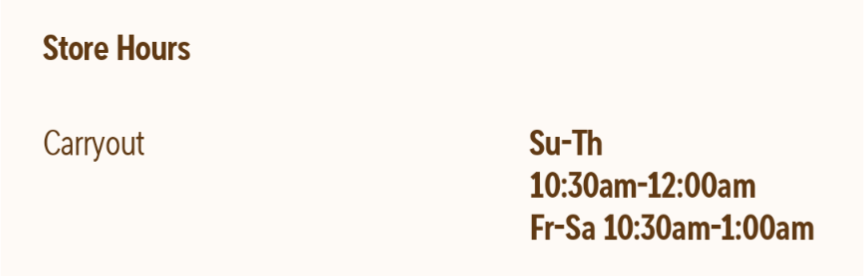
I know the first time I try to input business hours of 10:30 AM to 1:00 AM (e.g. a pizza delivery place) and it rejects it, I’m not trying again. Let Google Maps tell Waze what the venue hours are.
3 Likes
Thank you for sharing your perspective. I’m currently re-checking this flow with the team and will let you know when I hear back.
Best regards,
Olesya
3 Likes