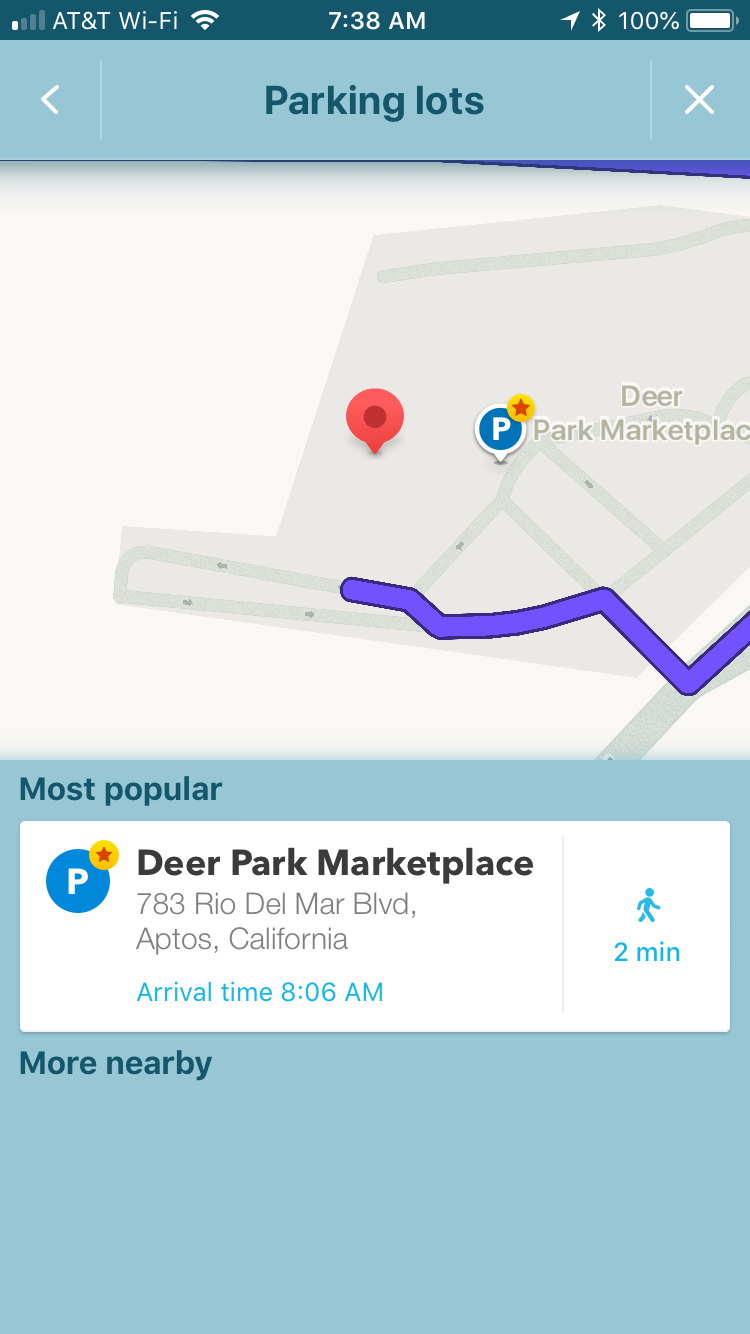
The app’s way of offering PLAs has changed, but it’s still doing this with my test case. If I route to the “Red Apple Cafe” in Aptos, California,, the app offers a “P” button. If I press on it, I get the screen below. Note that the Deer Park Marketplace is an Area Place with only one category – Shopping Center. The stop point shown by the app corresponds to the stop point for the Shopping Center Area Place.
I think this behavior is important to account for, for two reasons:
If editors have added PLAs in addition to a Shopping Center AP, the app may offer two (or more) parking destinations that are effectively the same destination – giving the user redundant choices.
If the Shopping Center’s Area Place has been reduced in outline to match only the buildings, Waze may nevertheless still offer it as a parking destination; but now the stop point will probably not be most appropriate as a parking destination.
I can see this too, that Waze thinks Deer Park Marketplace is the most popular lot by Wazers driving to Red Apple Café. So maybe Waze has machine-learned that this is a parking destination, because it covers parking lots, and there are not associated parking lot places here. Nick found a mall in MD that did this.
Here’s the thing though, if shopping center category is used for parking detection, I’m still not seeing how this means we shouldn’t reduce the area place size of certain malls. In fact, it could mean that we should reduce their size in order to stop Waze from detecting parking in them and offering them as redundant parking choices.
Anyway, the stop point of the mall was never appropriate as a parking destination, and people should add a separate stop point anyway (as was done in this case) rather than relying on the center of the polygon, so changing the size wouldn’t make a difference.
I guess I’m confused…I thought Waze treated the “Parking Lot” specially. However, we see Waze appears to be treating an Area Place with the category “Shopping Center” pretty much the same (exactly the same?) as if it were a Parking Lot.
What I think I’m hearing is that Waze does not actually treat the Parking Lot category differently at all, but rather uses machine learning on any Area Place and it sees Wazers parking within the Place boundaries it will begin offering it to drivers as if it were public parking, regardless of its category?
What about all the special details for Parking Lots that we can’t provide for a Place with the Shopping Center category? When Waze uses machine learning to determine that a given Area Place is a parking lot, how does it decide to fill those details in?
What if Waze is offering the Shopping Center category as if it were a parking lot only to drivers whose destination is a Place Point located inside the boundary of the Shopping Center Area Place? I have no idea if that’s what’s going on.
But if so, what does that mean when we map shopping centers consisting of several smaller buildings with lots of parking between them? Should each building get an Area Place with the name of the shopping center?
I’m not in the NDA data path for Waze’s internal behaviors so there’s no way I can answer these questions or make recommendations. I’m just observing that it is doing something unexpected (well, unexpected to me, at least) with the Shopping Center Area Place, and maybe we need to nail that down before we issue firm guidance about how to map the things…?
Here’s an example of a shopping center with many buildings and parking between them, the Camino Real Marketplace in Goleta, CA. Currently the former style of a giant Area Place covering the whole center is used. How should the Shopping Center category be applied for this location under new rules?
If we could actually have an area place for a shopping mall, and also see building and parking lot outlines within, then it would really make the most sense to map that way, and easy to come to consensus. But Waze does not work that way.
Right now, there is a lot of experimenting going on in some states, while in other states senior editors have come to advocate various approaches. I don’t think there is consensus at this time.
It may be possible to list the different types of approaches (generally, without all the specific details) and let the reader know that they need to check their state page (some of which redirect to a regional page) for specific details.
The conversation going on here now will be useful for developing state and regional guidance. Eventually, the communities from the various states and regions may reach consensus on a new national guideline.
So this would mean only map to the building footprint if the place consists of a single, recognizable building. To DL’s question about multiple buildings, this proposed guidance would mean map to the fence, rather than trying to show each building outline. And no, I don’t think that all area places detect parking. Shopping center might, if no PLAs are mapped, similar to how gas station is supposed to detect parking.
As I’ve read back through this thread, I see general consensus for this, and as I look around the country, this tends to be the approach used, at least for big malls. Are there specific states and regions whose practice differs from the guidance proposed above? If there aren’t, there appears to be at least enough support for this change to make a poll on it.
MAR does shopping centers to the edge of the property to include the PLAs.
If you do go forward with the change in guidance, there should be a statement that changes should be made only when editing it for another reason. This does affect the presentation in the app, but does nothing for routing, which is the primary reason people use the app. Get me to the correct location (front door or equivalent) the fastest legal way.
So going around and changing all the places that were made to guidance at the time is probably not the best use of volunteers’ time when other items need to be addressed at higher priorities.
Might even have this in hold until the multiple entry points is released since people will need to adjust these area places (shopping malls, stadiums, hospitals, universities, etc) then so will only have to be edited once vice numerous times.
From discussing with gOyDp and others, the concept of town center mall could get confused with a random group of strip malls, so I think it could use a little clarification along with example pictures. How about this (parenthetical addition in red)?
I don’t really agree with this.
Almost all guidance on places (with the exception of stop points and RPPs) does nothing for routing. We have changed many other things on the places page without such caveats, and I don’t see a need to add them here. The only time it might make sense to add such a statement to a guidance change is when the new guidance is liable to misuse or point farming. Changing geometry of area places is not liable to misuse, and it certainly doesn’t give easy points. Otherwise, editors are smart enough to determine their own priorities, and our guidance should reflect that.
No. This is a visual change. I don’t know what coming change you could possibly be talking about that would affect this decision.
And I agree with Kartografer that there is NO reason to “wait until you’re editing that shopping center for some other purpose before making the change” in this case. This isn’t hundreds of thousands of micro-doglegs on the map. This affects shopping centers—large, visible, and limited in number. This is the type of change that should be done swiftly and all at once, or else you’re creating an inconsistent visual experience for no reason.
I don’t disagree with the goal to make these changes “swiftly and all at once”. I’m not sure I’ve ever seen any change happen that way, even the ones we wanted to, but I completely agree that there is no reason to discourage a campaign.
The key is whether the language is clear enough that editors who do launch into campaign mode won’t do the wrong thing en masse. Maybe a few folks could ask rank-and-file editors in their region if they understand the proposed language to mean what we want it to mean.
All of this is of course contingent on the rumored change on the back end. As always it is not for us rank-and-file to know what is coming, but it would be great at least to have consistent guidance from those who do (or should) know. Unless Waze has begun to outdo even itself when it comes to compartmentalizing information.
Since Waze has a minimum size limit for the AP to show in the app, how is the proposed change going to affect smaller shopping centers, schools, and urgent care facilities? Will we now have a lot of APs that aren’t displayed on the app? If so should they just be mapped at PPs?
The proposal as it stands is only for large shopping malls with a single prominent building of sufficient size and scale to be map-viewable if mapped to the building exterior only. But the question will quickly arise why not do the same thing for schools, hospitals, …
Perhaps a general guideline could be a very simple one – if a building has a unique and locally well-known name, and is big enough to show as an area place, and is not part of a “village center” sort of pedestrian or quasi-pedestrian collection of buildings, then it can get mapped to the building outline.
It hardly makes sense to display a shaded polygon on the app display without a meaningful name. So if a building has a name that’s not locally well known (e.g. “Camino Asfalto Marketplace Building #13”) then I would say it’s unlikely to make a good area place as a building. This doesn’t constrain there being a larger area place to the property line.
There is still the question of overlapping area places, for example a building (e.g. “DwarfLord Hall”) inside a campus (e.g. “Golden Axe University”). If the display washes out and you just see the text “DwarfLord Hall” floating in a huge sea of gray, that seems like a poor use of a building-specific area place.