EN New mapping guidelines for parking lots - Available
[hide]Intro
Waze has a new big focus for the future of the app - Parking
Waze Parking will take routing a step further by giving Wazers a real end-to-end experience.
This will help users plan their drive more accurately, navigating them to the best parking space based on their destination and time window, and update ETA accordingly.
Before this project is fully developed and implemented in the app, it requires a specific way of mapping parking lots in the WME so that they can be associated with the new project features.
Overview
This tutorial is relevant to all parking lots (public and private). This does not apply to side-street parking spots.
All parking lots need to be mapped as a Area (polygon) shaped Place, with an entrance point in the relevant location.
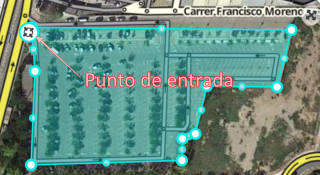
It is very important for the purpose of modeling and planned parking features that the shape of the polygon will be as close as possible to the shape of the actual parking lot, including the entry/exit location (Waze will soon be adding support for multiple entry and exit points per place).
For underground parking it is hard to know the exact polygon, so try to estimate it based on your knowledge of the place, and in that case the accuracy of the entry point is even more important.
All parking lots (even ones that are on premises), should be mapped as a place by its own, and not by editing the original Place on the map.
How to create a parking lot
- Open the WME
- Hover with your mouse over the Add Place button
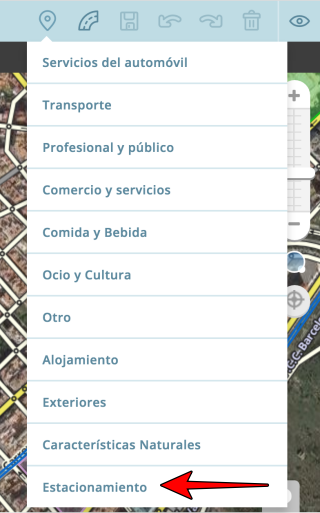
- Hover over “Car Services” and select the Polygon option (on the Right)
- Start creating the shape by moving the mouse and clicking the left button to create the shape’s nodes. To finish creating the shape, double click on the last point.
- Place the entrance point in the entry point to the lot (The target sign).
This way, navigating to the parking lot will take the driver to the correct entrance. - On the left menu, please select “Parking Lot” under “Categories”
- Click Save in the upper right corner. (Disk button)
On-premises Parking - It is important to create 2 separate places - one for the complex, and one for its designated parking lot.
- Option to link between the original complex and its designated lot will be added in a later phase.
Underground Parking Lots - Create a polygon surrounding the parking lot’s estimated perimeter (if you know its boundaries) and locate the entrance point in the original location.
- If parking lots overlaps with a Place, do not add “Parking Lot” category to a Place. Create a separate Area polygon for the parking lot.
Planned additions - Multiple entrance\exit points: Scheduled for end of 2016
- Link Places and Parking lots (Place and designated lot)
- WME support - Parking lots that are mapped as points will be shown as map problems that require attention.
[/hide]
DE Neue Richtlinien für die Kartierung von Parkplätzen - Verfügbar
[hide]Intro
Waze plant wieder einen neuen Schwerpunkt für die Zukunft der App - das Parken.
Waze Parking bringt das Routing einen Schritt weiter, indem es den Wazern eine echte Ende-zu-Ende Erfahrung bietet.
Das wird Nutzern dabei helfen, ihre Fahrt noch genauer zu planen, sie in Abhängigkeit vom geplanten Ziel und Zeitrahmen zum günstigsten Parkplatz leiten und die geschätzte Ankunftszeit (ETA) danach berechnen.
Bevor dieses neue Projekt komplett entwickelt ist und in der App vollständig implementiert werden kann, müssen Parkplätze im Editor in einer speziellen Art und Weise eingetragen werden, die an den Richtlinien des neuen Features ausgerichtet ist.
Übersicht
Dieses Tutorial betrifft alle Parkplätze (öffentlich und privat). Es ist nicht gültig für einzelne Parkflächen entlang der Straße.
Alle Parkplätze müssen als Fläche (Polygon) mit einer Zufahrt an der entsprechenden Stelle eingetragen werden.
Für die geplante Umsetzung des neuen Features ist es sehr wichtig, dass die Form der eingetragenen Fläche der aktuellen Form des Parkplatzes so genau wie möglich entspricht, inklusive der Ein- und Ausfahrt (die Unterstützung für mehrere Ein- und Ausfahrten zu einen Parkplatz wird von Waze so schnell wie möglich implementiert).
Bei unterirdischen Parkplätzen ist die genaue Form nicht immer exakt festzustellen, hier sollte die ungefähre Form bestmöglich nach der Erinnerung eingetragen werden. In diesem Fall ist die Genauigkeit bei Ein-/Ausfahrten von besonderer Bedeutung.
Alle Parkplätze, auch die innerhalb von Gebäuden, werden als eigener Ort eingetragen und nicht als zusätzliches Feature zu in der Karte bereits bestehenden Orten.
Anlegen eines Parkplatzes
- Öffne den WME
- Bewege die Maus über den Button “Ort hinzufügen”
- Bewege die Maus über “Auto Dienstleistungen” und wähle die Polygon-Option (rechts)
- Erstelle die Fläche mit einzelnen Mausklicks entlang der Außenseite der Form, mit einem Doppelklick auf die letzte gesetzte Geometrienode wird die Aktion beendet.
- Platziere den Orientierungspunkt (das “Ziel”-Icon) an der Zufahrt zum Parkplatz, dadurch wird ein Fahrer zur richtigen Einfahrt geführt.
- Wähle im Menü auf der linken Seite die Kategorie “Parkplatz”
- Speichere mit einem Klick auf das Diskettensymbol rechts oben im Editor
Parkplätze in Gebäuden
- Es ist wichtig, zwei separate Orte anzulegen, einen für den Gebäudekomplex und einen für den vorgesehenen Parkplatz.
- Die Option zum Verknüpfen von Gebäudekomplex und Parkplatz ist für eine spätere Phase vorgesehen.
Unterirdische Parkplätze
- Erstelle ein Polygon entlang der ungefähren Ausdehnung des Parkplatzes (soweit bekannt) und platziere den Orientierungspunkt an der richtigen Stelle.
- Wenn der Parkplatz sich mit einem anderen eingetragenen Ort überlappt, füge dem ursprünglichen Ort nicht die Kategorie “Parkplatz” hinzu. Erstelle für den Parkplatz eine eigene Fläche.
Weitere Planung
- Mehrere Ein- und Ausfahrten: geplant für Ende 2016
- Verknüpfung von Parkplätzen und anderen Orten (zugehörige Parkplätze)
- WME-Support - Parkplätze, die als Punkt eingetragen sind, werden als Fehler angezeigt, die einer Bearbeitung bedürfen.
[/hide]
FR Nouvelles directives de cartographie des parkings - Disponible
[hide]Intro
Waze va se focaliser sur un gros thême pour le futur proche de l’application - Les parkings
“Waze Parking” amène la navigation un pas en avant en donnant aux Wazers une expérience complète de bout-en-bout.
Ceci aidera les utilisateurs à planifier leurs trajets avec plus de précisions, Waze les guidera jusqu’au meilleur endroit où se parquer selon leur destination finale et l’heure à laquelle ils doivent y être, en mettant à jour leur temps estimé d’arrivée pour en tenir compte.
Avant que ce projet puisse se développer et être inclu dans l’application, il est nécessaire de cartographier les parkings d’une manière spécifique si l’on veut qu’ils puissent fonctionner avec les nouvelles fonctions liées à ce projet.
Résumé général
Ce tutoriel s’applique à tous les types de parkings (public et privé). Ceci ne concerne pas les places de stationnement situées en bords de rues.
Tous les parkings doivent être cartographié en zone (polygone), avec un point d’entrée placé au bon endroit pour l’accès au parking.
Il est très important pour le modeling et les fonctions de planification des parkings que la forme des polygones soit aussi proche que possible de la forme réelle de la zone parking, en incluant les accès d’entrée(s) et de sortie(s) (Waze ajoutera bientôt la possibilité de placer plusieurs points de guidage sur un même lieu permettant d’indiquer des entrées ou sorties multiples).
Pour les parkings souterrain il est plus difficile de connaître la forme exact à donner au polygone, il faut donc essayer de l’estimer en se basant sur ses propres connaissances du lieu, et dans ces cas précis la précision de placement du point de guidage est encore plus importante.
Tous les parkings (y compris ceux appartenant à un grand complexe ou à des commerces), doivent être cartographiés comme des lieux à part et non pas en agrandissant d’autres lieux (par ex: commerces) pour qu’ils englobent leur propre parking.
Comment créer un parking
- Ouvrir WME
- Placer sa souris sur le bouton pour ajouter des lieux
- Placer sa souris sur la première catégorie “Car Services” (Services autos) et sélectionner l’option polygone (à droite)
- Commencer à créer la zone en déplaçant la souris et en cliquant le bouton de gauche pour placer des points de géométrie. Pour terminer la création du lieu, faite un double-clic sur le dernier point de géométrie à placer.
- Déplacer le point de guidage (icône cible placée au centre par défaut) sur le point d’accès voulu. Ainsi, la navigation vers le parking emmènera le conducteur correctement jusqu’à son entrée.
- Dans le menu de gauche, sélectionner “Parking” comme catégorie principale.
- Cliquer le bouton de sauvegarde en haut à droite de l’éditeur.
Parking appartenant à un autre lieu - Il est important de créer 2 lieux séparés - un pour le lieu (ex: commerce ou autre), et un pour son parking.
- L’option pour lier le lieu principal au lieu parking créé séparément sera ajoutée dans une prochaine phase.
Parking souterrain - Créer un polygone pour délimiter le périmètre estimé du parking (si vous connaissez sa forme) et localisez le lieu de l’entrée pour y placer le point de guidage.
- Si le parking souterrain est sous un autre lieu déjà existant (superposé), ne pas ajouter la catégorie “Parking” au lieu existant en plus de sa catégorie principale. Créez là aussi un nouveau polygone séparément pour indiquer que le lieu dispose d’un parking souterrain.
Additions programmées - Points de guidages multiples pour les entrées/sorties: Prévu pour fin 2016
- Lier les lieux à des parkings
- Support sur WME - Les parkings cartographiés comme point au lieu d’un polygone seront indiqué comme des problèmes de carte qui requièrent votre attention.
[/hide]
IT Nuove istruzione di mappatura per parcheggi - Traduzione disponibile
[hide]Introduzione
Waze ha un nuovo grande obbiettivo per il futuro dell’app - Gestione Parcheggi
Il sistema di Waze per i parcheggi porterà il routing ad un ulteriore passo avanti, dando ai Wazers una vera e propria esperienza end-to-end.
Questo aiuterà gli utenti a pianificare i loro viaggi in modo più accurato, li guiderà verso il parcheggio migliore in base alla loro destinazione ed in base all’orario, il Tempo Stimato d’Arrivo (ETA) si aggiornerà di conseguenza.
Prima che questo progetto sia completamente sviluppato e implementato nell’app, richiede che i parcheggi siano editati in un modo specifico nel WME in modo che gli stessi possano essere associati con le nuove caratteristiche del progetto.
Panoramica
Questo tutorial interessa ogni Area di Parcheggio (Pubblico o Privato). Non riguarda i parcheggi al lato delle strade.
Ogni parcheggio deve essere editato come Area (Poligono), con il punto di entrata nella posizione più idonea.
E’ molto importante per come è pianificato questo progetto, che la forma del poligono sia il più vicino possibile alla forma effettiva del parcheggio, incluso il punto di entrata / uscita (Sarà presto aggiunto il supporto per ingressi ed uscite multipli).
Per i parcheggi sotterranei è difficile sapere l’esatta forma del poligono, per cui cercate di stimarla in base alle vostre conoscenze del posto, comunque è molto più importante la correttezza del punto di ingresso.
Tutti i parcheggi (anche quelli che si trovano nei locali), devono essere editati come un luogo a se stante, e non si deve modificare il Place originale sulla mappa.
Come creare un parcheggio
- Aprire il WME
- Posizionarsi con il mouse sul pulsante per aggiungere i luoghi.
- Spostarsi con il mouse in fondo alla lista su “Parcheggi” e selezionarla.
- Iniziare a disegnare l’area spostandosi con il mouse e cliccando con il pulsante sinistro per creare i nodi, per finire cliccare due volte con il pulsante sinistro sull’ultimo nodo.
- Posizionare il punto di ingresso (mirino) all’ingresso del parcheggio, in questo modo si verrà guidati nel punto corretto.
- Nel menù a sinistra inserire tutte le informazioni a nostra conoscenza sul parcheggio
- Cliccare sul pulsante a forma di dischetto in alto a destra per salvare
Parcheggi nei locali
E’ molto importante creare due aree separate, una per il locale ed una per il parcheggio.
Più avanti si potranno collegare i locali con i rispettivi parcheggi.
Parcheggi sotterranei
Creare un poligono su tutta l’area stimata del parcheggio secondo le nostre conoscenze e individuare il punto corretto di ingresso.
Se il parcheggio è sovrapposto ad un altro luogo, non aggiungere la categoria “Parcheggio” a tale luogo ma creare una area separata per il parcheggio.
Aggiunte previste
Punti di ingresso ed uscita multipli (fine 2016)
Collegamento tra parcheggio e luogo
Supporto nel WME - I parcheggi editati come punto saranno mostrati come Map Problems così da richiedere la vostra attenzione.[/hide]--------------------------------------------------------------------------------------------------------------------
! Important Update - Available
[hide]Parking lot places can’t have additional categories anymore, Waze is going to split existing places with such category combination. Separate places - one for the Parking lot, and one for the other attribute.
This will happen next week.
We have defined 3 cases, based on the other categories of the place:
1. Parking lot is the primary category of the place (e.g. ATM) => Most attribute stay in the parking lot place
2. Parking lot is the secondary category of the place (e.g. shopping center) => Most attributes are moved to the new place of the other category
3. Parking lot and the other category are of equal importance (e.g. taxi station) => Most attributes are duplicated and will be included in both places
An exception is transportation: When a place has both parking lot and transportation category, transportation will be removed.
This might not work perfectly and smoothly at first, so please send feedback to your Local Champs for the splitting process, once occurred.
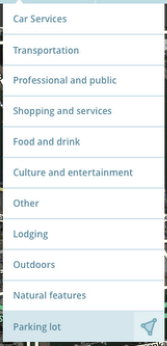
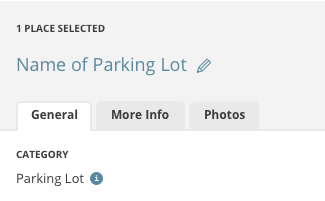
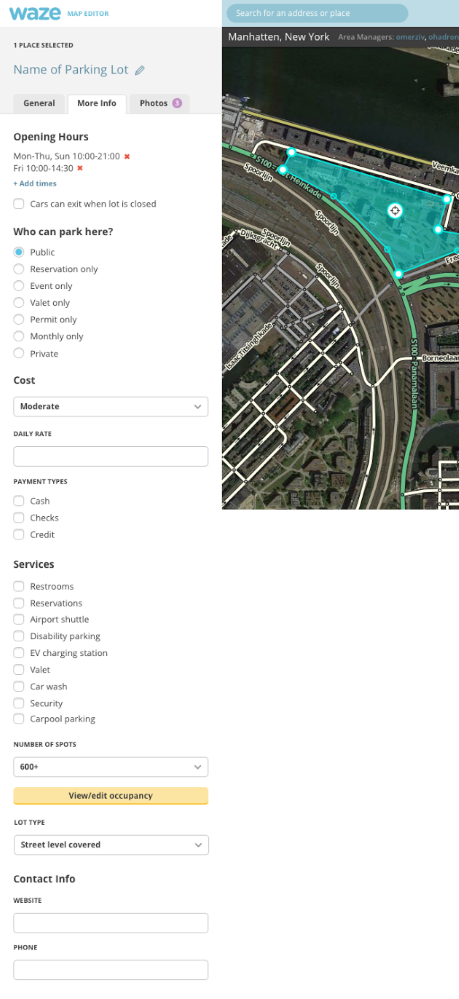
And now, some Mocks for this process, for WME.
WME:
[/hide]
DE Wichtiges Update - Verfügbar
[hide]Parkplatz-Orten können keine zusätzlichen Kategorien mehr zugeordnet werden, Waze wird derartige Places mit mehreren Kategorien in separate Orte aufteilen - einen für den Parkplatz, einen für die anderen Merkmale.
Dies wird nächste Woche erfolgen.
Basierend auf den anderen Kategorien wurden drei Verfahren festgelegt:
- Parkplatz als wichtigste Kategorie eines Ortes (z.B. bei Geldautomaten) => die meisten Merkmale verbleiben beim Parkplatz.
- Parkplatz ist untergeordnete Kategorie eines Ortes (z.B. bei Einkaufszentren) => die meisten Merkmale werden auf den neuen Ort der anderen Kategorie übertragen.
- Parkplatz und andere Kategorie sind von gleichwertiger Bedeutung (z.B. bei Taxiständen) => die meisten Merkmale werden dupliziert und beiden Orten zugeordnet.
Eine Ausnahme bildet die Kategorie Verkehr: Wenn einem Ort neben der Kategorie Parkplatz zusätzlich eine Kategorie aus der Oberkategorie Verkehr zugeordnet ist, wird diese entfernt.
Anfangs mag die Neuerung noch nicht vollständig und reibungslos funktionieren, bitte wendet euch mit Feedback zum Aufteilungsprozess an eure Local Champs, sobald die Änderung stattgefunden hat.
Nachfolgend eine Vorschau darauf, wie die Neuerung im WME umgesetzt werden soll
[/hide]
FR Mise à jour importante - Disponible
[hide]Les lieux désignant un Parking ne peuvent désormais plus avoir des catégories multiples, Waze va diviser les lieux existants comportant des combinaisons de catégories. Séparez les POI - un pour le parking et un autre pour l’autre attribut.
Ceci va se passer la semaine prochaine.
Il y a 3 cas définis, en se basant sur les autres catégories du lieu:
1. Parking est la catégorie principale du POI (ex: Parking + ATM) => La plupart des attributs restent dans le POI Parking.
2. Parking est la catégorie secondaire du POI (ex: Centre commercial + Parking Lot) => La plupart des attributs sont déplacé dans un nouveau POI comprenant la catégorie principale de l’ancien.
3. Parking et l’autre catégorie sont d’une importance égale (ex: Station de Taxi) => La plupart des attributs seront dupliqués et inclus dans les deux nouveaux POI après la division.
Une exception c’est les transports: Quand un POI a la catégorie Parking et une catégorie de Transports, cette dernière sera supprimée.
Il y a des chances que ceci ne fonctionne pas parfaitement au départ, donc merci de fournir un retour à vos Champs locaux une fois que le processus de division aura été appliqué.
Et maintenant, quelques maquettes de ce processus pour WME.
WME:
[/hide]
IT Aggiornamento importante - Traduzione disponibile
[hide]I luoghi parcheggio non possono più avere ulteriori categorie, Waze sta per dividere i luoghi con tale combinazione di categorie. Luoghi separati - uno per il parcheggio e uno per gli altri attributi. Questo avverrà la prossima settimana.
Abbiamo definito 3 casi, basati sulle altre categorie dei Luoghi
La categoria Parcheggio è la principale (es. bancomat) => molti attributi verranno spostati sul nuovo Luogo parcheggio.
Il Parcheggio è la categoria secondaria (es. Centro Commerciale) => molti attributi verranno spostati nel nuovo luogo dell’altra categoria.
Il parcheggio e l’altra categoria si equivalgono (es. Stazione TAXI) => molti attributi verranno sdoppiati ed attribuiti ad entrambe i luoghi.
una eccezione è la categoria Trasporti, quando un luogo ha la categoria Parcheggio ed un’altra della sezione Trasporti, quest’ultima sarà cancellata.
Questo procedimento potrebbe creare problemi all’inizio, per cortesia segnalateli ai Local Champs.
E ora alcuni modelli di questo processo per WME.
WME:
[/hide]



 [/hide]