Road Closures Form for All Editors

UPDATE:
The forum post is no longer monitored and should not be used.

Hi Everyone,
Please fill in this form for construction, work closures and emergency closures.
This form is to be used by all editors who do NOT have direct access to the Waze Road Closure system.

US Champs and State Managers will review your requests and they will be submitted to Waze if approved.

  • Find all the information that you can about the closure- description, dates, times, name of road, relevant webpage.
  • Please provide a permalink with all of the segments that need to blocked, highlighted. This is needed to close each segment.
  • The closures are based on segments ID’s. It’s recommended to lock the segments to a high level, to help prevent any changes during the closure period.
  • Date format: YYYY-MM-DD url=http://en.wikipedia.org/wiki/ISO_8601[/url]
  • Time format: HH:MM:SS
  • NEW!..Nodes ID’s - Use this when you need to block two ways segments but only for one direction. You need to add the node ID’s ordered by the closure direction.
  • NEW!..Time Zone Enter only one of these:
  • Pacific,
  • Mountain,
  • Central,
  • Eastern,
  • Hawaii,
  • Alaska,
  • Puerto Rico
    Champs and SMs: Please review requests here. Don’t forget to enable notifications to get alerted when there is a new request.
    Any other major traffic event in your area use this form.

Thank You and Happy Wazing :slight_smile:
orbitc

My employer blocks access to Google Docs. Is there an alternate link?

Failing that, I could report from home.

You can PM your RC (or an SM if your state has one).

A couple questions on this great new feature:

The guidelines mention that closures can be added 24 hours or more prior to an event. Is this subject to the standard WazeHQ availability of Sunday through Thursday (USA time, observing Friday and Saturday as Israel days off), or will events submitted on Friday be live for Sunday (or late Sat)?

Are these updates subject to the tile updates, or are they independent? Said another way: if a closure is uploaded Monday morning, but the tiles don’t update for another 3 days - will the closures still appear in the app or will they not appear until the tiles update?

I see that this is targeted for construction or emergencies, but some are also using this for localized events (parades, etc) which I think is awesome. Some locales such as NYC don’t publish full closure information about localized events until very late in the week and I want to make sure it is OK to use this system for those types of events. There is a high impact to traffic, but details are often not provided far enough in advance to qualify for a Major Event.

I would put TBR and put it in the sheet. Waze is usually get to it even on the weekends but not always.

No

It will appear in the live map.

Yes, you can use it for these kind of events. Events that impact many such as NYC Marathon, please use the even closure form.

understood - just want to set expectations

absolutely. major events such as the marathon are usually better about publishing closures far in advance. minor events such as summer parades not so much - they’re on the weekend traffic advisory and update some time between tuesday and friday, depending on when they get around to it. they still have a large impact on traffic, but we don’t get enough advance warning to go through the standard major event process.

thanks!

Hi, what is the preferred method for requesting a previously submitted road closure to be removed, such is in the case of a road reopening sooner than the originally published date?

Thanks!

If you specified the correct end date in the original request, then no further action is required - the closure will expire automatically.

If you need to adjust any aspect of the closure such as the end date/time being moved up (construction ahead of schedule?? HA!), submit the closure as you did initially with the updated information, and note in the comments that you are modifying a previous entry. The manager reviewing the closure will see that, find the original entry, and modify as needed.

A quick but very important note on closures: we need to be careful with closures, especially bridge replacements, not to overly restrict local access. There are many instances of closures on very busy, densely populated streets where the closure may only affect a small portion of the segment in the middle. If the entire segment is closed, it can do bad things to drivers trying to route to destinations on the non-closed portion of the segment.

My suggestion, posted here for peer review, is that if a closure only affects a small part of a larger segment, that segment should be broken so that the closure is limited only to the area actually closed. See this segment as an example. The bridge closure is actually very small, and does not restrict local traffic on either side of the closure (the only effect is that vehicles are not permitted to pass over the bridge). In this example, if the entire original segment was closed, a driver trying to navigate to a point on that road would be given directions to one of the dead-end side streets, very much out of the way of their intended destination.

I also recommend locking that segment to avoid having the “duplicate junction” being removed or anyone doing anything inadvertently that alters the segment ID. If it is a long term closure, you can optionally mark it (CLOSED) in the street name. I also like to drop a UR next to the closure once I have inputted it into the sheet. There is a column on the WazeHQ upload sheet (currently column S) that includes pre-defined UR text you can paste in.

Thoughts?

Ben, I get closure info locally from a County Government maintained Facebook page from my county. Sometimes, the closure is in an area of the county with which I am not familiar and don’t travel often.

Example 1, the official announcement regarding the long term closure of this segment actually stated that a much larger portion of the road would be closed. I live near enough to this area that I was able to do a drive-by to see what segments were ACTUALLY closed.

Example 2, the official announcement regarding the short-term closure of these segments actually indicates this whole section is closed all of this week. I doubt it. I don’t have much occasion to drive through Sykesville to check.

What should be done in the case of Example 2?

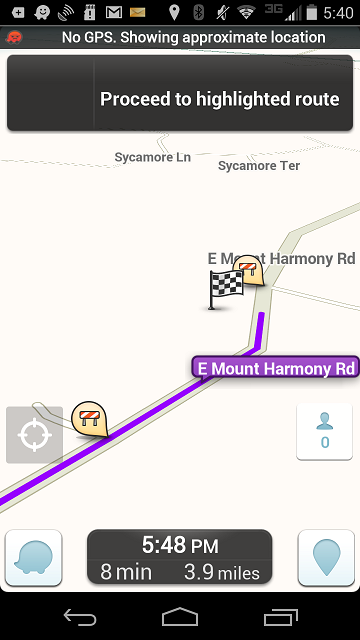
I think there is a problem. But I don’t think what you identify as the problem actually happens. When I route to a segment that is closed, waze simply routes me onto the closed segment. For example, waze routes me to 875 E Mount Harmony Rd, Owings, Md even though that address is currently on a closed segment.
MHarmony.png
(Athough, I don’t know why the red and white cross hatching isn’t showing.)

However, the problem arises if I have to cross the closed bridge to get to the address. As waze doesn’t know exactly where the closure is waze can’t decide to only route you in one end or the other of the segment.

Personally, I don’t think we should worry about this yet. I would vote to not add segments as a matter of course to enable routing correctly in from the correct end of the segment when a bridge is closed in the middle. I would think that the majority of the time it is only going to affect local residents who are going to know where exactly one can get through and where one can’t. However, if the bridge is on a long commercial major highway segment then it might be worth it.

(So this is just another argument as to why it would be helpful to have all the driveways actually mapped.)

This is a good example of what I was referring to:

5a8e5asu.jpg

This isn’t a perfect example, but it’s representative of what could happen if you don’t isolate the closure to the actual impassible section.

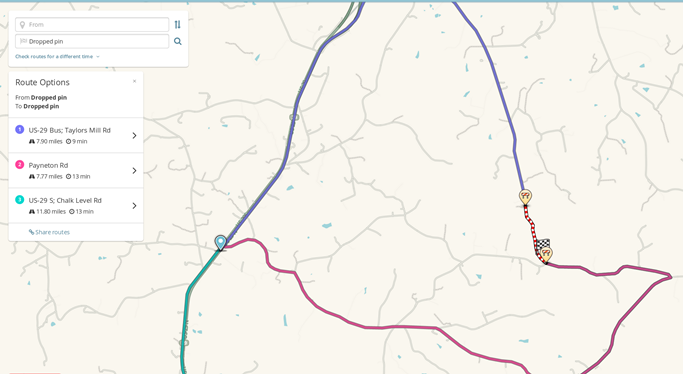
Permalink to the area above
livemap route showing the bad directions which will undoubtedly annoy drivers

the other compelling argument for isolating the closure to just that which is actually impassible is: if you are routing to a destination close to the closure, it is important to know which way to enter the restricted segment. if you enter from the wrong direction, you could end on a very long detour at best, or lost at worst.

This is a good example of how that could manifest itself:

thelongway.png

In this case, there’s a closure of that single segment, let’s assume for the sake of example the bridge is smack in the middle of that segment. Your destination is a hot new piano bar at the south side of that segment and your date is meeting you there at 8pm. You’re not terribly familiar with the area, but you’re really interested in this person so you agree to make the trek.

Now - because the entire segment is closed, Waze will try to get you close, but it doesn’t know if it should send you to the north entry to the segment or south. You’re trying to get to the south end of the segment, but under normal circumstances, the north entry is still faster (according to the routing engine). So… like 99.9% of wazers, you just click “GO!” and you’re off. DANGER WILL ROBINSON!! You find yourself on the wrong side of a bridge that doesn’t exist, no idea where you are, and you have to make the 20 minute (measured with google maps) drive back alllll the way around to the other side of the closure – assuming you figure out how to get to the other side. Better show up with some kind of a gift. :oops:

Yes, of course people with “local knowledge” will just go the right way. But what about people going to the airport? A job interview? A client site? A date? One really, REALLY good way to get someone to stop using Waze is to make them late to a date.

And of course, as with everything on waze, this would not be absolute guidance. Each closure should be evaluated to determine exactly where drivers can and cannot go, and what might be the consequences of closing an entire segment. I try to look at the closure I’m inputting and say “if I am trying to get to somewhere in this area, how will this closure affect me?”

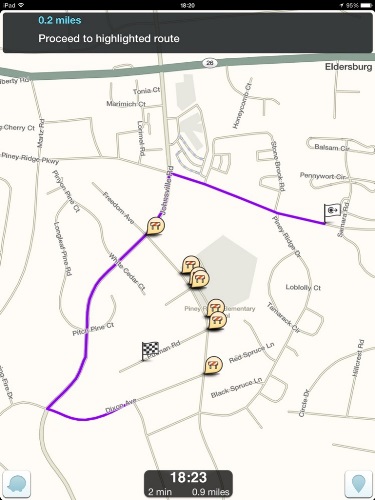
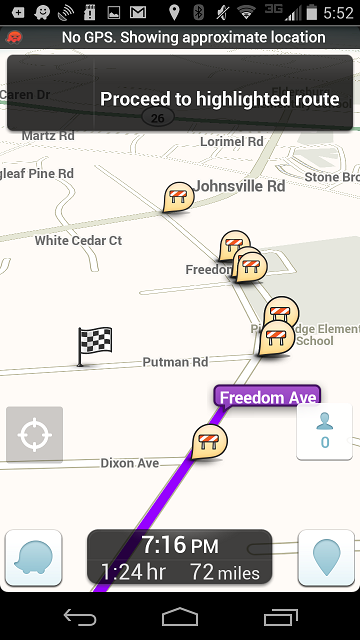
Hmm. I had routed to Putman Rd as a example too, but didn’t post it because multiple segments closed act differently from a single segment closure like when a bridge is out. The issue with Freedom Rd is that we don’t know where more precisely the road is closed. But when I tried earlier routing to Putman I got a different result. Maybe because I tried from the other direction.
Putnam.png

Sure but the majority of bridge closures around here have no businesses on the segment. Where the bridge is in a commercial area, they usually figure out a way to keep at least a lane open during construction around here or there are other nearby bridges that mean getting around to the other side isn’t much of a problem. So I understand that problem. I’m just concerned that its going to be a large task to keep up with all the closures. I’m not sure its worth it to find out where on the segment the barricades are actually erected for most of the closures.

PesachZ and I had a similar case recently. Even though we’re not local (passing familiarity with the area), we were able to figure out where the actual closure was, and which connetcing segments of road were/weren’t affected, and craft a closure that made sense for the area.

I think Ben’s approach is sound, where you know the area r can find out more. Yes, it is more work. So is all map editing.

Where you don’t/can’t, do your best, and maybe post in the unlock forums, as a rank 1 (even if it isn’t rank 1).

There have been several issues recently with editors adding closures where the start date was a few weeks or months in the past, where the closure was “uploaded” by Waze but never took effect. If the closure started in the past, changing the start date to the current submission date and putting the “real” start date in the UR comments seems like it may be the best method. Even if the editors submitting the closure don’t catch this and put in the current day for the start date, any Champ or SM confirming the closures and submitting to the Waze sheet should catch it.

Do have any confirmation that the prior start causes issues with the upload. The only closure that I’ve noticed where the upload didn’t take effect, the start date was after the upload.

August rows 155, 164, 165, 167, and 168 were logged a few days ago by HavanaDay along with the hundred other good ones that he has entered. The only difference was the start date a few months ago. Closures did not reflect in the LiveMap or app as of last night even though the Waze status was “uploaded”.

I changed the start dates from May to August last night, changed our status to “Updated Details”, and as of this morning, the closures were in LiveMap and app after Waze updated the details.

August row 163 was logged with a closure start date after it was uploaded, but didn’t show on the map until it was uploaded again.

Currently August row 146 is not showing on the map although it was uploaded with a start date after the upload.

I know that NJDOT describes closures in terms of the posted detours to through traffic, so they almost alway imply that any local access that doesn’t involve driving over the actual part of the road being worked on is allowed. Yeah, it takes a little more work to research and determine which segment is actually being ripped up, but that’s why we have a community of editors, no?

For things like bridge or culvert replacements, I try to isolate the 1 segment (or 2 segments if spanning a city boundary) that is over the disrupted part of the road. Waze will pick up the detour around it anyway for through traffic, while still correctly navigating to/from local places/addresses in the area.

I guess the only problem I see with this is if there were multiple ways to get around the closure on more local streets, when the state/county/city designated a specific detour for through traffic, but so far I haven’t come across that.

There are two issues with bridge/culvert replacements/reconstructions. The first question becomes whether you can isolate the closure to some point between the points where the detour starts and ends. The second question is whether its worth it to add transition nodes on the waze map to create a short segment to limit the closure to the actual bridge/culvert crossing.

I have no problem with the first. The second seems a bit premature to me. I’d like to see how the closures work before we start adding additional complications. But ultimately, yes it would be ideal to only prevent routing across the portion of the road that cannot be traversed. But there will be issues that need to be dealt with. What if there are multiple possible detours and the road closed signs are posted with an intent for non-local traffic to use a longer detour, but the road closed signs don’t block the road to local traffic allowing a shorter detour to be used through residential streets. Should waze route everyone past the road closed signs to use the faster residential detour? What if there is no actual blockage at all? What if the road is closed to through traffic for a week for repaving but allows access to residents along the entire length of the closure from either end for the entire closure period?

I’m not saying we shouldn’t try to isolate the closure and have waze provide the best driving instructions. I’m just saying that at this point adding an extra segment precisely where the bridge is out should not be a requirement to enter a closure published by a relevant highway department.