Early results from the first bit of script-o-matic testing…
Routing from my old favourite, Games Lane in Cockfosters (51.65501626,-0.156668998) down to the B219 in Peckham Rye (51.45954977,-0.06766258), logging started at 23:00 yesterday, with the script requesting a recalculation of the route (approximately) every minute.
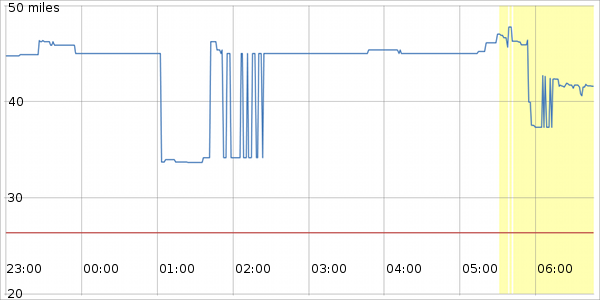
This is a plot of the route distances (blue = quickest, red = shortest) against time. Where the plot background changes to yellow, this indicates results where the two routes differ in their endpoints. For each result, the shortest route always reached the requested endpoint, so differences in the endpoints are entirely due to the quickest route failing to reach that endpoint. Whilst checking the progress of the script this morning, I could see on the Livemap window that the quickest route was falling well short of the endpoint - there was clear space between the two endpoint marker flags. I could also see that, at one or more points along the route, Livemap was reporting heavy traffic, whereas when I kicked off the test last night the map was clear of traffic issues.
Interesting also to note that period between 01:00 and 02:30ish where the quickest route manages to shed around 10 miles yet still reach the destination correctly.
I left the script running this morning, so fingers crossed we should end up with a full 24-hour log of this route later tonight…
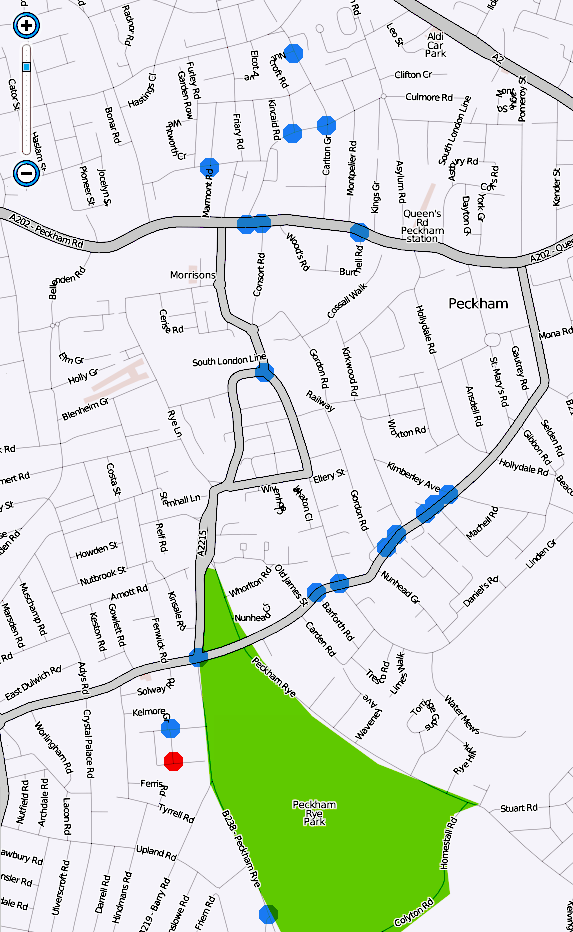
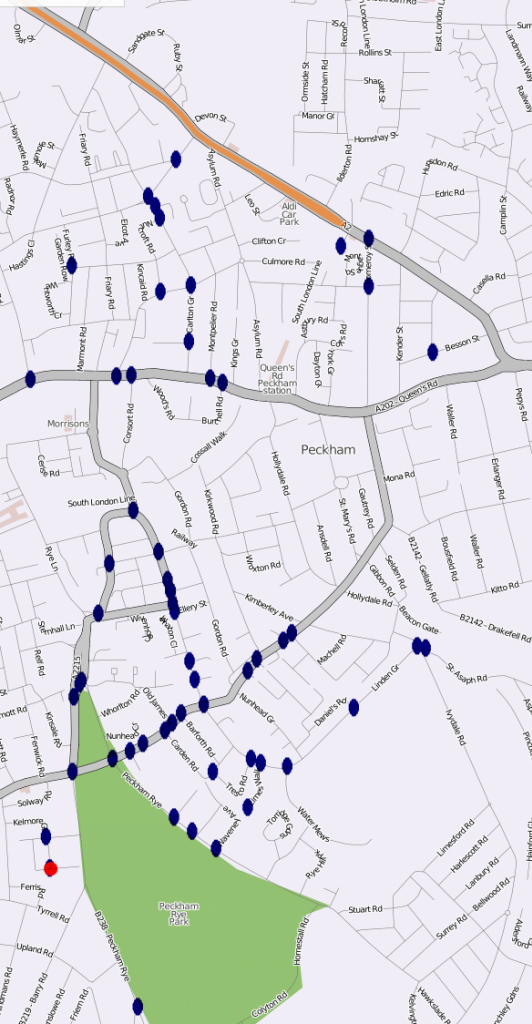
Bit of GIMPing (doesn’t sound nearly as cool as Photoshopping…) gives us a mapped out view of all the endpoints for the above data
The red dot shows the true endpoint (it appears I actually set it to a side road just off the B219, rather than the B219 itself…), and the blue dots show all of the incorrectly generated endpoints for the quickest routes within the yellow area of the earlier plot.
Sadly, script-o-matic Mk.1 was quickly hacked together in such a way that, if Livemap failed to return any routes, it’d require manual intervention to continue logging, and at just after 8am yesterday Livemap, not unexpectedly, failed to return any routes…
The all new and improved script-o-matic Mk.2 (cleans whiter than white, with 33% fewer calories, using the latest nanoparticle formulation) should now be able to resume logging automatically once valid routes are available again. It’s been running on the same route since just before midnight yesterday, so at the very least I’ll be able to compare the early morning results for two consecutive weekdays - be interesting to see if that 01:00-02:30 route shortening occurs again.
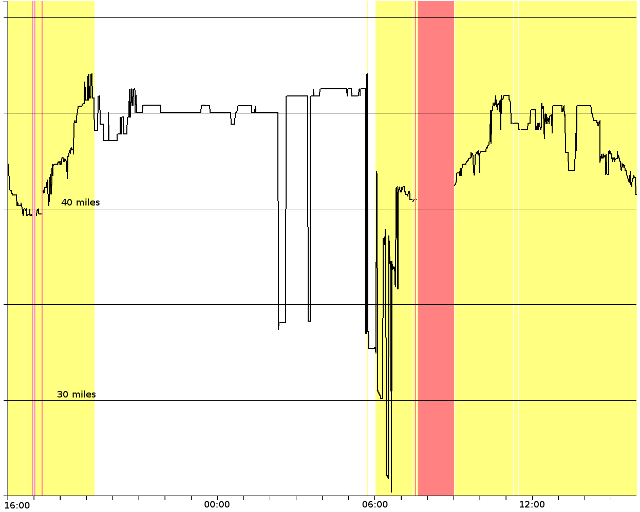
Too impatient to wait until after midnight to see the full set of results from today, so here’s a sneak preview… Same start and endpoints as yesterday.
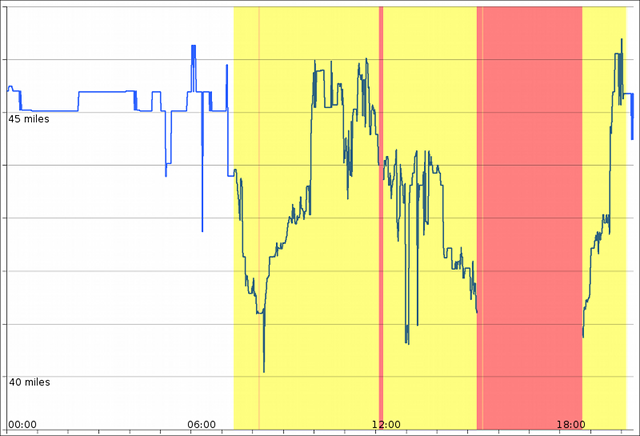
As with yesterdays testing, the shortest route always reached the intended endpoint (where Livemap returned routes), and its distance only varied slightly every now and again, so I haven’t bothered plotting that one this time. The above plot concentrates on the quickest route results where, as we saw yesterday, things tend to go awry.
Once again, the yellow regions of the plot shows where the route fell short of the endpoint. Unlike yesterday, we now also have data to show where Livemap failed to return any results, these are the red regions. There’s one very slender red region just after 08:00 (which pretty much coincides with when the logging fell over yesterday…), then a slightly wider region around noon, and then from just after 15:00 through to almost 19:00 the routing engine was almost entirely incapable of returning any routes - there’s just that very brief period around 15:30 where a single incomplete route is generated… Once the routes start to be reliably generated again just before 19:00, they remain incomplete until just after 20:00 where they seem to return to normality again.
The information that Twister is producing is wonderful, and I have no idea how it’s done :? I do hope it leads to an early resolution of the problem.
Meantime, URs continue to be raised containing postcodes or addresses, presumably failed routing searches. Do we want to keep these for further evidence, or close them?
There also appears to be a spate of “off and on” routings at M25 junctions south of London (I haven’t looked elsewhere 'cos that’s outside my area), with two in the last three days at J6, Godstone. Are these likely to be related? I know it shouldn’t happen - in the US, it appears to be illegal - but it does. Is there a known solution to this problem?
I’ve got an idea how it’s done but am still amazed at the skill of some in the UK Waze community. Does anyone have any concerns that Waze HQ won’t like calling the routing server so frequently?
The postcode errors do annoy me (and I’m sure the users are annoyed too). I presume most of them are failed routes but having seen some of the replies to UR comments I’m sure some of them are also user error. I’d continue to follow up the errors with each user as you have been doing, at the very least users do get some feedback.
The on and offs seem to be getting more frequent. Not just on motorways either. I presume Waze has somehow adjusted the algorithms and they will have to tweak them some more. Perhaps we should start up another thread (with screenshots).
You can thank Timbones, it’s his Livemap navigation script I used as the basis for this one… And quite frankly, if Waze are concerned about one extra routing request per minute, then we’ve got more to worry about than the number of incomplete routes being returned.
I’ve now tweaked the script again to capture a bit of extra data based on some thoughts I had regarding the last set of results and why the fastest route might be falling short/failing entirely. Let’s see what the next 24 hours brings us results-wise.
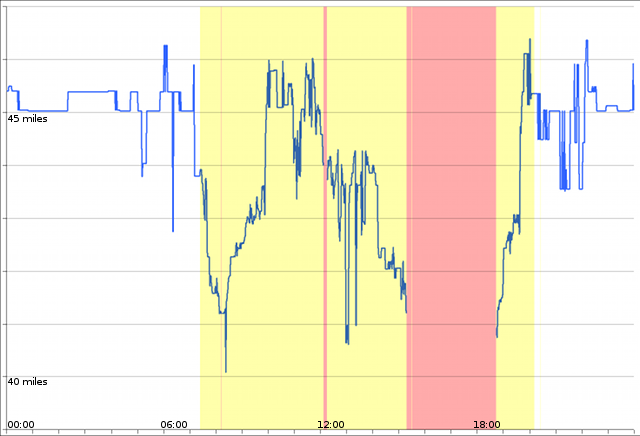
Last testing session ran into some Firefox hassles, preventing the full log from being saved. I did still get a complete 24 hour cycle, but this one runs from 16:00 on Monday to 16:00 on Tuesday, as opposed to the 00:00-00:00 logs of previous tests…
“Quickest” results - pretty much business as usual here…
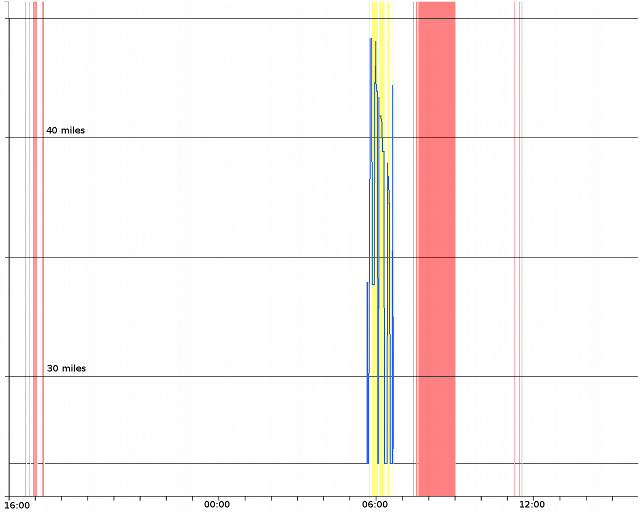
“Shortest” results - business unusual here though, for the first time the routing engine has started returning incomplete routes here too… Notice though how the incomplete routes are all longer, significantly so, than the complete ones - I wonder if there were some temporary road closures that morning, or could this have coincided with a mapping update?
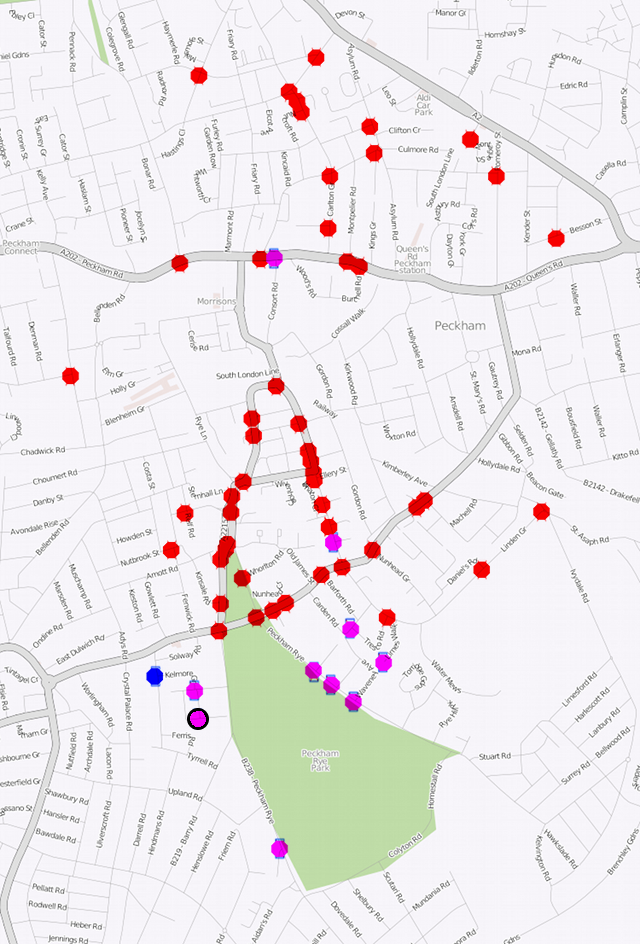
Endpoint plot - red for quickest routes, blue for shortest and purple for where both types of route had the same endpoint. The black-ringed purple dot lower-left is the true endpoint.
I’m dealing with a UR at the moment where the user failed to get a route from Croydon Rd, Mitcham to UB7 0HB. I was able to generate a route in the middle of the day - the user informs that they failed to get a routing at around 7:30am and 4pm, which are in the “not working” time slots.
It rather defeats the primary reason for having Waze if it can’t provide routes during peak travel periods.
Just noticed that in the request sent from livemap to the routing server, there’s a timeout parameter which is set to 60000 (I’m assuming milliseconds). If I generate a modified request with a much shorter timeout parameter (<100) then I get an error response instead of the expected route. Given how long it can take the server to return results during the day, I wonder if the complete failures logged during my earlier testing were requests that timed-out before any routing results could be generated…
It’s possible. I’ve also seen some requests timeout, but after 2 or 3 more tries it sometimes works. It’s as if some intermediate data is being cached internally so that subsequent requests are quicker.
You might want to experiment with the nPaths parameter too. Asking for one route might be less likely to timeout.
I’ve just rewritten the routing tester in Delphi, which makes it easier to extract the data of interest as well as providing additional data not available to the scripted version and allowing the request parameters to be modified, so expect some more results to be provided over the next few days…
Using our trusty old test route once again, this plot shows the server response time (in milliseconds) to each routing request (grey line) with the usual yellow and red background areas denoting requests where the returned route was incomplete or non-existent. The black line is a 5-point averaging of the raw response times. The plot starts at 00:00 today and runs through to around 10:15.
What’s interesting here is that throughout the period where no routes were returned, there’s a corresponding drop in average response times, which suggests the server is simply rejecting the requests as they arrive rather than attempting to calculate any routes and then timing-out during the process (the request timeout parameter was set to the default 60000 for this test). Bear in mind that the response times recorded by the test client include network transit times for both the request and response packets, in addition to the processing time of the routing server itself, so the odd spike in raw response times may be down to network congestion rather than server slowdown.