A UR in west London here is, rightly, complaining about how Waze directed them straight across the main road and up a cul-de-sac to to a u-turn back towards the main road just to avoid having to do a right turn directly onto the main road…
I’ve been able to replicate this frankly insane bit of routing in Livemap by asking for routes at 19:00 or 19:30 (around the time the UR was raised), but only if the start point of the route is far enough west along The Heights.
With the start point close to the junction, all looks OK:
We saw something similar at Chandler’s Ford, though that was with a roundabout. I don’t see an enabled U-Turn at the end of the dead-end, so this shouldn’t be happening.
There’s a similar issue with the UR on the A27 at Worthing - this was reported at 11:01 with heavy traffic, but it doesn’t make sense as this should have been a simple left turn at traffic lights. I don’t think Waze is able to track queue lengths for individual lanes, so it’s difficult to understand why it made this routing choice. I see Tim has already commented on this UR so this one is on his radar!
I have a feeling that, while Waze can’t track lanes, it does collect separate statistics for a segment based on the exit from it (i.e. which segment comes next). So if a segment ends with a choice between a left turn and a right turn, Waze will collect separate statistics for speed through the segment for each option, and thus if there are two lanes on the ground, Waze is capable of detecting that one moves faster than the other even though it doesn’t know there are two lanes!
Unfortunately I don’t think this works past a junction, so if there is a minor road joining just before the main junction, Waze will lose the idea that there are two separate queues before the minor road.
You’re spot in, Ian. Waze does indeed record the times to make a turn, and will learn that some turns are quicker than others. This doesn’t work well where junctions are close together, and queues are long, but they are working on a way to improve that.
Meanwhile, I’ve been monitoring both of these junctions, and haven’t seen any routes like the ones reported. Which is a pity, as I know how to fix it…
Looking at this junction again, I notice that the right turn has been disabled. Is this correct?
If so, then straight across and U-turn would be a cromulent route for Waze to use.
Interesting… haven’t seen any URs raised here to say the right turn is disallowed, and the usual keyword based searches aren’t giving up anything to say there’s been a change here. It’s not too far from home, so I’ll see about doing a drive-by in the next few days.
Not sure if this is the correct thread as I’m mobile and will not be on the PC until Sunday.
Traveling from Cold Ash West Berkshire to Solone Sq Sw1
Since when has the Hogarth Roundabout been J12 on the M4? Instructions should have been something along the lines of take the 1st exit on the A4 Great West Rd
Your screengrab shows you just to the east of J12 here - had Waze given you an off-and-on route through J12 or did it route you straight through as normal? If the navigation instructions shown here are all in sync, then a 2nd exit instruction onto the entry to M4 could only be generated as part of an off-on route through J12, as the normal approaches to the entry slip here would generate a 1st or 3rd exit instruction instead…
If it had only just finished giving you an off and on routing, then it may simply not have caught up with itself to clear these instructions and leave just the basic “continuation” information that would correspond to the drive from here to the point at which you’d then start to be given the instructions required to negotiate the Chiswick roundabout.
It’s also possible that, if you’d been doing something else with the app or your phone when those previous instructions had been onscreen at the appropriate time, when you then returned to the map view it interfered with the instruction update and caused these old instructions to remain onscreen. I’ve seen this happen sufficiently often across multiple versions of the app for me to believe it’s just something inherent in the way either that the app itself performs updates of the things it overlays on the map, or something in how Android handles update requests from apps where the bit of the screen they’re asking to update isn’t currently on show - for me the problem usually manifests itself if I’ve left Waze running in the background and switched to a different app, when I then return to Waze some of these map overlays (instructions, camera/alert popups etc.) get stuck until the app triggers the next update for them.
To my knowledge no on & off were given. I noticed this instruction and shut down Waze. I then restarted it and despite it routing me once I was already on the M4 it gave the same instructions.
I didn’t give me the correct information until after an On & Off I encountered at J3. When it told me to take the 2nd exit at the Hogarth Roundabout ( https://en.m.wikipedia.org/wiki/Hogarth_Roundabout )
Here’s a UR at the Tot Hill A34 junction which has the reporter doing an unnecessary loop around a roundabout - from the report details it seems this was on Thursday 24th Sept at around 1600hrs. This loopy routing definitely shouldn’t work out to be quicker!
I wonder if this was triggered by the apparently rather large difference of opinion between the reporters actual position and the GPS position being reported by their phone - I’m assuming they were heading down the B4640 onto the southbound A34, but as they approached the junction their GPS position started to vary so much that it would have triggered the mechanism within the Waze app that says “hang on a moment, there’s no way this user can possibly be on the road I’m assuming they’re on given where their GPS receiver is now telling me they are, let me just try and figure out which road they might really be on now…”.
Now, if that relocation mechanism happened to incorrectly place them heading west on the bridge, the route then being offered would be absolutely correct - head up to the western roundabout, turn back, and rejoin the original route again at the eastern roundabout. If this relocation occured just as the user was actually reaching the eastern roundabout, and they hadn’t noticed Waze recalculating the route, then it might just possibly, given a following wind, two hail marys and a dollop of bad luck, appear as if it was actually telling them to seamlessly route from their current location all the way across the bridge and then back again, rather than it being more obvious that it thought they were already on the bridge.
Yes it’s a possibility - the B4640 is lined by lots of trees and the reporter’s device may have poor GPS sensitivity. If the relocation placed them on the bridge while they were still travelling down the B4640 and approaching the first roundabout, the instructions would have said to take the 3rd exit at the (2nd) RAB, which would lead to them ending up on the bridge and then the GPS sorting itself out.
I’ll suggest this to the reporter and suggest they keep an eye out for poor GPS reception, as they may face further issues.
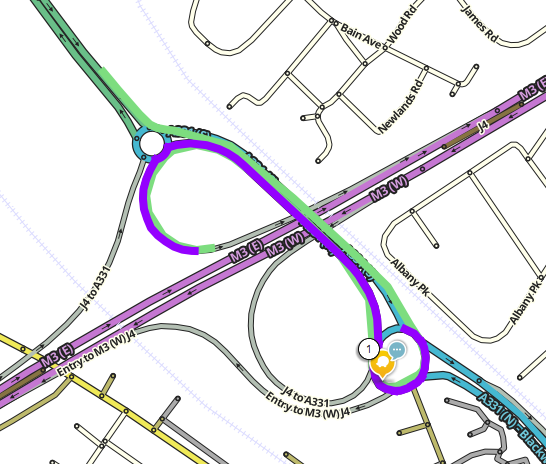
Similar to PealRinger’s UR earlier in this thread, here’s another one where a cul-de-sac u-turn was used in preference to routing directly across a junction.
Another lollipop here.
Route required: from the NW corner to roundabout then 2nd exit directly onto M3(E) slip.
Actual route: to the roundabout, 1st exit over the M3, U-turn at the roundabout on the other side, back over the M3, and now it’s 1st exit onto the slip.