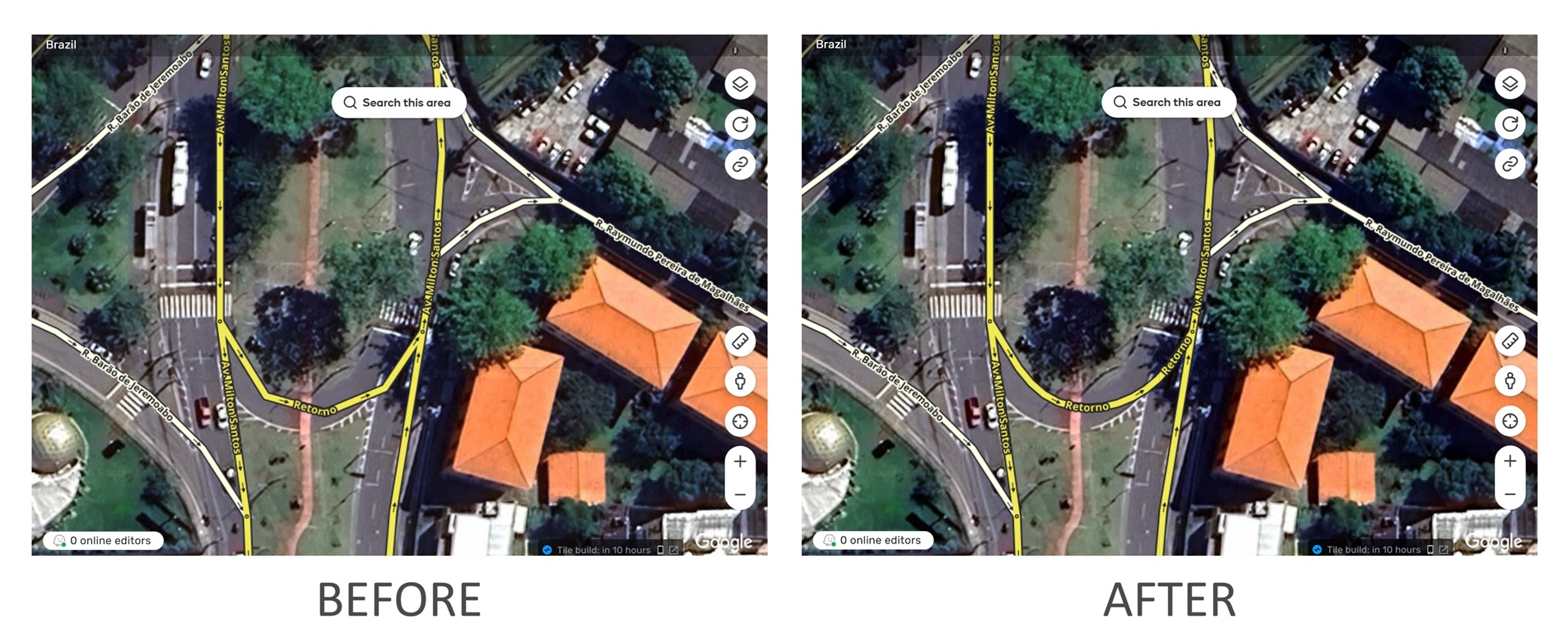
This script allows you to smooth segments with poor geometry. It works as follows:
Select a segment
Click on the Scripts menu
Select the Segment Smoothing Tool tab
Click the Smooth button
If necessary, click the button again to increase the smoothing
The purpose is not to allow mass editing, but to make it easy to smooth segments in specific cases. Therefore, this can only be done with one segment at a time.
A limit has been implemented to prevent the user from creating a large number of geometric nodes. When this limit is reached, a message is displayed.
The idea is to help editors convert a segment with very poor geometry into an aesthetically pleasing segment that reflects the actual geometry of the road, like the one I showed in the video.
This type of poor geometry usually exists in locations where Falcon is not critical, as there are no parallel roads in the same direction.
It contains a mechanism that prevents a large number of geometric nodes from being created. When this limit is reached, a message is displayed to inform the user.
In theory, smooth geometry should actually help Snapper on curved roads, since the segment shape alings better with the curved GPS lines compared to straight lines.
Finally, it allows only one segment to be changed at a time, in order to discourage editors from making unnecessary changes
Thanks for this script! I do a lot of basemap work, and some roads are miles long. This will definitely be a time saver. I especially like how you limit the number so editors can’t go crazy with edits.
 ), and this will help a lot to fine-tune details and get everything just right.

