Is there someplace in the script code that I can edit and turn off the feature? I have tried a couple of places but no joy.
From here: https://github.com/bedo2991/svl/blob/master/svl.user.js
Comment line 149
do you mean line 148, like this:
That does seem to have ‘fixed’ the problem I have been fighting.
Thank YOU for all the WAZE you help!
This should come in handy. I can not find the preferences option and I have disabled all other scripts.
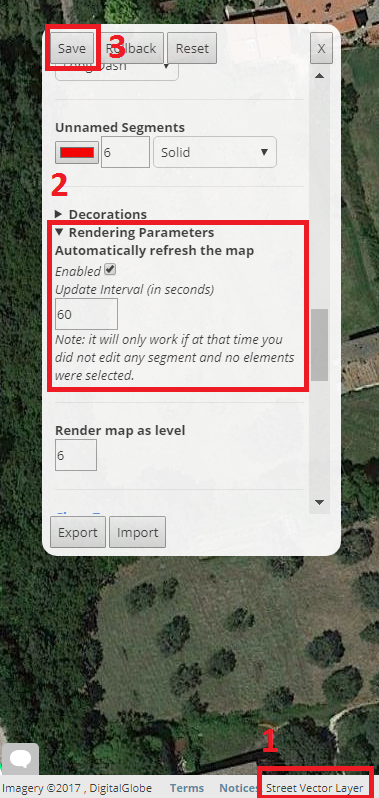
It took me awhile to figure out that Waze - Google Maps™ link was hiding that. Wow, I have been missing out. Thanks!
Afraid I don’t see anything like that:
https://www.dropbox.com/s/3o8rhgnu1prg8w1/info%20bar.png?dl=0

Of course, some other extension must be killing the display. 
Or you can click at the end of the arrow 

Wonder FULL, on a scale of one to 10, an 11! Clicking on the scale numbers brings up the box that allows controlling SVL. Thank YOU for all the WAZE you help!
Nice!
Thanks to Bedo2991 
Small Update to version 4.1
Fix: The script did not load when the URL did not contain a slash after /editor
Version 4.3 is out
- Improved rendering of speed limits on one-way streets (before it was shown also if only set in the opposite direction).
- Improved the interface style of the preference panel (known issue: no X button on production WME, just save or rollback the changes to close the panel)
Auto refresh is disabled by default on new installations
Fix: Auto refresh does not happen when a place update request is open
Fix: (from the unreleased 4.2) New settings export method to overcome Chrome’s Prompt window size limit. Your configuration will be copied to your clipboard (this requires an extra permission). Then press CTRL+V to paste it to a file or wherever you like.
Version 4.4 is out
Click here to force an update
What’s new
- Routing mode: while in routing mode, roads are rendered as they are seen from the routing server (i.e. taking the “routing” attribute into consideration). For example, a preferred Minor Highway is shown as a Major Highway. The street name and arrows (if one way) remain of the original color to let you notice it. On the top right of the screen a red box appears while in routing mode. You can move the mouse on it to temporarily disable routing mode.
- Option to show the GPS points above the road layer (requested by some of you)
Technical notes:
Less complete redraw
Code refactoring:
Passes Jslint tests.
Strict mode enabled on the whole script
Known issue (aka features)
When the routing mode is saved as “enabled”, the red status box does not appear until the preference panel gets opened once, but the routing mode is enabled as it should.
1 Like
Version 4.4.3 is out
Click here to force an update
What’s new
- More labels are displayed on a single segment (until now: max one label per segment)
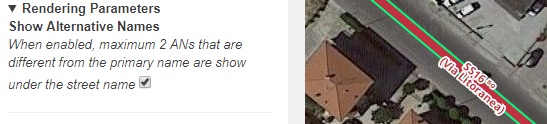
Hello. Can you return such functionality as displaying alternate names in your script? https://i.imgur.com/En632qR.png

Version 4.5 is out!
- Added an option to display maximum 2 alternative names if different from the primary name (disabled by default)
- Required changes to keep working on future WME release.
Version 4.5.2 is out!
- Support for the new road type: Alley
Minor correction of typos
Version 4.5.3 is out!
Fixed a small bug that made roads disappear after editing their alternative names.
Informational message: Street Vector Layer refers to W.selectionManager.hasSelectedItems, which will be removed in a future version. I see that the script tries to use W.selectionManager.hasSelectedFeatures first, so this script won’t run any issues at any time. But feel free to remove the reference to that method as it will trigger a deprecation log message.