:oops: :oops: :oops: :oops:
Thank you
:oops: :oops: :oops: :oops:
Thank you
Version 0.7 (is all about the arrows)
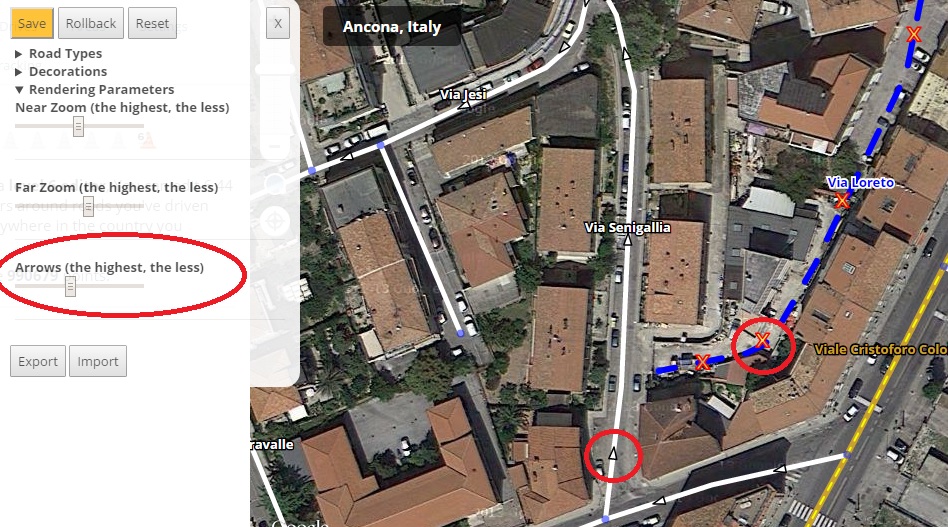
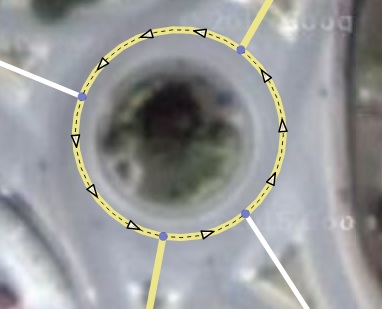
Redesign of the arrow styles (from equilateral to isosceles) and for the unknown direction a red cross.
Redesign of the arrow placement engine. It should be more efficient and generate less reduntant arrows (you can tweak it using the new slider in the preference panel).
Fix: red segments were not drawn.
Known issue
Long one way segments with few geometry nodes should have more arrows shown.
When changing the elevation of a segment, its new status is not rendered accordingly.
Nodes, will be fixed: “Waze-soon”
Is anyone actually using it apart from me? 
yes i’m using it… 
Just wanted to say, first time using this and I love it!
About to be one of those “Can’t edit without” scripts.
The built-in elevation rendering is fantastic!
Great for a beta, I hope eventually it’s possible to get a little better name rendering and divided road rendering. As it is now, some freeways look like one large blue blob. Not a big deal at all. Just a note.
Thanks again!
2 people, not bad
Version 0.8
OMG, you mad?! This is the best thing (after JAI, UR-MP and Toolbox ) ever!
Is it available to anyone?
Yes, the download link is somewhere in the previous messages
Inviato dal mio LG-D620 utilizzando Tapatalk
I mean it’s not working for some people.
Explain better, who are those ‘some people’? You?
Inviato dal mio LG-D620 utilizzando Tapatalk
No, for me it’s ok. Some other editor. Could not get it working. Ill try to get console texts from him.
[EDIT] Nevermind, he reinstalled some more times, and it worked.
Wow, very nice script, thanks from Russian editors community
Hey, this one is a nice idea, but a little confusing in practice… it seems like the names are a little too far away from the road. It’s kind of hard to tell what names goes to what roads. Also, as I’m seeing now, sometimes the name goes to the north, sometimes to the south. It seems it would be a little less confusing if at least they all went the same direction.
They go either up or down in a “random” way, to try to reduce the problem in regular grids. If they all go to the same direction they will be overlapped more easily.
I’m also not able to get the script working. Multiple installs and Firefox restarts. The script is listed in the Greasemonkey’s pulldown menu, but the WME’s layers still do not contain this one. Switching all other scripts off did also not help.
It works fine on Firefox 39.0 on Windows 8.1, Greasemonkey 3.2
This looks like a startup sequencing problem between SVL and the native Waze code. On my PC at home SVL initialises cleanly, whereas on my slower PC at work it fails exactly as described above. A quick poke around in the code shows that it’s failing in wbwGlobals() at the point where it tries to read the Waze.map.zoom attribute, because at the point at which this line of code is executed on this particular PC, the parent Waze.map object hasn’t yet been created…
If you have a look in the uroRealWazeBits() function in URO+ you’ll see the method I’ve used to ensure all the necessary Waze bits are present before attempting to access them - I’d suggest modifying your corresponding wbwWazeBits() function to provide similar object-existence testing before allowing SVL to continue initialising, and also call wbwWazeBits() before wbwGlobals() so that you then know Waze.map.zoom must exist.
Works great on ubuntu 14.04. Chrome and Firefox.
Thanks, I’ve deployed a possible fix for that problem in
Version 0.9
Thanks! I’ll try it again.
Sent from a touch display, which took care of perfectly scrambling my thoughts.