[Script] Street Vector Layer

This is a great tool, and also a useful back for when the tiles server is being cracky even for those like me who like the new colors!!

One request so far, would you be able to add the option to hide labels entirely? If i move the slider all the way to end it would not show any labels?

Oh and on more not as important, the option to customize the labels color and stroke?

Thanks for a job well done.

Thanks for the suggestions. Could you please elaborate a little bit more this one?
For every street type you want to be able to set a different color other than the colour of the street or you want the possibility to have all of the them of a given colour? (All black or all white or a specified colour).

Version 1.0

  • Moving the labels’ sliders completely to the right won’t make label appear at all.
  • Bug fixes (used to happen when merging/splitting segments).

Did you change the default color scheme for the better? It’s time to show it to the world, it might become the default one in one of the next version!

How to share your settings

  • Open the preference window by clicking on the attribution bar.
  • Make sure your latest changes were saved and then click on the “Export” button at the bottom.
  • Copy the string and paste it here on the forum between “Code” tags.

For example…
“New Editor” colors scheme (for masochists only)
default.png

{"version":"0.9","clutterCostantNearZoom":"352","clutterCostantFarZoom":"469","streets":[null,{"strokeColor":"#ffffdd","outlineColor":"#000","strokeWidth":"5","strokeDashstyle":"solid"},{"strokeColor":"#fdfaa7","strokeWidth":"6","strokeDashstyle":"solid"},{"strokeColor":"#6870c3","strokeWidth":"9","strokeDashstyle":"solid"},{"strokeColor":"#b3bfb3","strokeWidth":"6","strokeDashstyle":"solid"},{"strokeColor":"#00ff00","strokeWidth":"3","strokeDashstyle":"dash"},{"strokeColor":"#469fbb","strokeWidth":"8","strokeDashstyle":"solid"},{"strokeColor":"#69bf88","strokeWidth":"7","strokeDashstyle":"solid"},{"strokeColor":"#867342","strokeWidth":"5","strokeDashstyle":"solid"},null,{"strokeColor":"#9a9a9a","strokeWidth":"6","strokeDashstyle":"dash"},null,null,null,null,{"strokeColor":"#6fb6be","strokeWidth":"3","strokeDashstyle":"dot"},{"strokeColor":"#9a9a9a","strokeWidth":"3","strokeDashstyle":"dash"},{"strokeColor":"#beba6c","strokeWidth":"4","strokeDashstyle":"solid"},{"strokeColor":"#ffffff","strokeWidth":"4","strokeDashstyle":"dash"},{"strokeColor":"#222222","strokeWidth":"4","strokeDashstyle":"dashdot"},{"strokeColor":"#ababab","strokeWidth":"5","strokeDashstyle":"solid"}],"red":{"strokeColor":"#ff0000","strokeWidth":"6","strokeDashstyle":"solid"},"roundabout":{"strokeColor":"#111","strokeWidth":1,"strokeDashstyle":"dash"},"toll":{"strokeColor":"#29f4fc","strokeWidth":"2","strokeDashstyle":"solid"},"closure":{"strokeColor":"#ff00ff","strokeWidth":"4","strokeDashstyle":"dash"},"restriction":{"strokeColor":"#f8bf16","strokeWidth":"2","strokeDashstyle":"dash"},"arrowDeclutter":"37"}

Do you want to try it?

  • If you made any change to your preference, export them first and store them somewhere (e.g. a text file).
  • Select the whole text that makes up the new preference and copy it (CTRL+C)
  • Open the script preference window
  • Click on the “Import” button at the bottom.
  • Paste the string and click on Ok.

You don’t like it and you want to go back to the previous one?

  • I hope you did a backup as I’ve said above
  • Import the backup you’ve previously done as explained in the previous section.

You don’t like it and you want to go back to the default one?

  • Open the preference window
  • Click on the “Reset” button on the top

Two things.

  1. the option for a custom color for each street type, (additionally a shortcut that sets all types to the same color would be nice too)
  2. the option to set a custom color, and thickness for the stroke (the black outline around the names). If you give a thickness slider, then sliding all the way to one end would remove the stroke entirely.
    Thanks for the option to remove road names I see you slated it for 1.0

Another request if you’re interested. add the option for decoration on runways. WME default is white and black alternating line. This can be done in your layer with a white road color and a black dash decoration.

P.S. When will 1.0 be available for download?

Edit: v1.0 downloaded 3 hours ago :smiley:

PPS for anyone interested here is my version of the native WME colors, trying to replicate as accurately as possible the colors, thickness and style. I use this layer primarily as a backup for the tiles when they aren’t loading properly, so I want it to look the same.

{"version":"1.0","clutterCostantNearZoom":"700","clutterCostantFarZoom":"700","streets":[null,{"strokeColor":"#fefde8","outlineColor":"#000","strokeWidth":"3","strokeDashstyle":"solid"},{"strokeColor":"#fdfba8","strokeWidth":"3","strokeDashstyle":"solid"},{"strokeColor":"#676ec6","strokeWidth":"6","strokeDashstyle":"solid"},{"strokeColor":"#b3bdb5","strokeWidth":"3","strokeDashstyle":"solid"},{"strokeColor":"#b1ae9b","strokeWidth":"3","strokeDashstyle":"dash"},{"strokeColor":"#42a1bd","strokeWidth":"5","strokeDashstyle":"solid"},{"strokeColor":"#69c288","strokeWidth":"4","strokeDashstyle":"solid"},{"strokeColor":"#847347","strokeWidth":"3","strokeDashstyle":"solid"},null,{"strokeColor":"#858585","strokeWidth":"2","strokeDashstyle":"dash"},null,null,null,null,{"strokeColor":"#86afab","strokeWidth":"3","strokeDashstyle":"dashdot"},{"strokeColor":"#6a6a6a","strokeWidth":"2","strokeDashstyle":"dash"},{"strokeColor":"#b7bb80","strokeWidth":"3","strokeDashstyle":"solid"},{"strokeColor":"#ffffff","strokeWidth":"3","strokeDashstyle":"dash"},{"strokeColor":"#ffffff","strokeWidth":"3","strokeDashstyle":"dashdot"},{"strokeColor":"#aaaaaa","strokeWidth":"3","strokeDashstyle":"solid"}],"red":{"strokeColor":"#ff0000","strokeWidth":"3","strokeDashstyle":"solid"},"roundabout":{"strokeColor":"#111","strokeWidth":1,"strokeDashstyle":"dash"},"toll":{"strokeColor":"#25f5fd","strokeWidth":"2","strokeDashstyle":"solid"},"closure":{"strokeColor":"#ff0000","strokeWidth":"8","strokeDashstyle":"dash"},"restriction":{"strokeColor":"#efc02e","strokeWidth":"2","strokeDashstyle":"dash"},"arrowDeclutter":"10"}

Version 1.0 is already available for download since the time of the post.
Do you have any problem updating it?

I don’t see why it can be useful to have a decoration on runway (that is practically a useless road type) just to make it look like the Waze one.
You can just pick another color and another pattern. Doing it will slow down the execution and I really don’t think is worth it. The same goes for railroads.

At the moment runways have a bright color to detect when users use that type as a taxi Lane… Not because I want them to look nice on the map.

It did download after I posted here (3 hours ago), I updated my earlier post. I understand you reasoning with the decorations.

Version 1.1 (requires to store the preferences to default)

  • Slider for label outline width

  • Roads layers are disabled automatically if enabled (there is an option to disable this, if you really want to).

  • When zooming out at level 0 or 1 the default road layer is displayed automatically (so that we can even see the city names), when zooming in again the vector layer comes back and the road layer gets disabled (unless you changed the option mentioned at the previous point).
    Warning

  • When you want to share a permalink remember to enable the road layer again, otherwise the others will get a permalink with the road layer disabled, if they don’t have this script.

Thanks for the quick progress. I updated the script, got a popup to backup my settings with export text there ready to copy.
I copied the string (I’m including it here for reference).

{"version":"1.0","clutterCostantNearZoom":350,"clutterCostantFarZoom":410,"streets":[null,{"strokeColor":"#fefde8","outlineColor":"#000","strokeWidth":"3","strokeDashstyle":"solid"},{"strokeColor":"#fdfba8","strokeWidth":"3","strokeDashstyle":"solid"},{"strokeColor":"#676ec6","strokeWidth":"6","strokeDashstyle":"solid"},{"strokeColor":"#b3bdb5","strokeWidth":"3","strokeDashstyle":"solid"},{"strokeColor":"#b1ae9b","strokeWidth":"3","strokeDashstyle":"dash"},{"strokeColor":"#42a1bd","strokeWidth":"5","strokeDashstyle":"solid"},{"strokeColor":"#69c288","strokeWidth":"4","strokeDashstyle":"solid"},{"strokeColor":"#847347","strokeWidth":"3","strokeDashstyle":"solid"},null,{"strokeColor":"#858585","strokeWidth":"2","strokeDashstyle":"dash"},null,null,null,null,{"strokeColor":"#86afab","strokeWidth":"3","strokeDashstyle":"dashdot"},{"strokeColor":"#6a6a6a","strokeWidth":"2","strokeDashstyle":"dash"},{"strokeColor":"#b7bb80","strokeWidth":"3","strokeDashstyle":"solid"},{"strokeColor":"#ffffff","strokeWidth":"3","strokeDashstyle":"dash"},{"strokeColor":"#ffffff","strokeWidth":"3","strokeDashstyle":"dashdot"},{"strokeColor":"#aaaaaa","strokeWidth":"3","strokeDashstyle":"solid"}],"red":{"strokeColor":"#ff0000","strokeWidth":"3","strokeDashstyle":"solid"},"roundabout":{"strokeColor":"#111","strokeWidth":1,"strokeDashstyle":"dash"},"toll":{"strokeColor":"#25f5fd","strokeWidth":"2","strokeDashstyle":"solid"},"closure":{"strokeColor":"#ff0000","strokeWidth":"8","strokeDashstyle":"dash"},"restriction":{"strokeColor":"#efc02e","strokeWidth":"2","strok eDashstyle":"dash"},"arrowDeclutter":"10","labelOutlineWidth":"3","disableRoadLayers":true}
I then went to import it back into the script using paste, and I get an error message.

If I use the code I exported from the earlier version of the script, it imports just fine, and shows my previous settings.

Also I have another request. Could you add the option for this script to load disabled (turned off in layers) by default if the option is selected. Some of us only use the layer as a supplement to WME layers, and this way we wouldn’t have to toggle it off each time we load WME. I like to have it off, and then turn it on (using a hotkey) when I need it.
There is an extra “new line” here:

"restriction": {
        "strokeColor": "#efc02e",
        "strokeWidth": "2",
        "strok
eDashstyle": "dash"
    },

This works:

{
    "version": "1.0",
    "clutterCostantNearZoom": 350,
    "clutterCostantFarZoom": 410,
    "streets": [
        null,
        {
            "strokeColor": "#fefde8",
            "outlineColor": "#000",
            "strokeWidth": "3",
            "strokeDashstyle": "solid"
        },
        {
            "strokeColor": "#fdfba8",
            "strokeWidth": "3",
            "strokeDashstyle": "solid"
        },
        {
            "strokeColor": "#676ec6",
            "strokeWidth": "6",
            "strokeDashstyle": "solid"
        },
        {
            "strokeColor": "#b3bdb5",
            "strokeWidth": "3",
            "strokeDashstyle": "solid"
        },
        {
            "strokeColor": "#b1ae9b",
            "strokeWidth": "3",
            "strokeDashstyle": "dash"
        },
        {
            "strokeColor": "#42a1bd",
            "strokeWidth": "5",
            "strokeDashstyle": "solid"
        },
        {
            "strokeColor": "#69c288",
            "strokeWidth": "4",
            "strokeDashstyle": "solid"
        },
        {
            "strokeColor": "#847347",
            "strokeWidth": "3",
            "strokeDashstyle": "solid"
        },
        null,
        {
            "strokeColor": "#858585",
            "strokeWidth": "2",
            "strokeDashstyle": "dash"
        },
        null,
        null,
        null,
        null,
        {
            "strokeColor": "#86afab",
            "strokeWidth": "3",
            "strokeDashstyle": "dashdot"
        },
        {
            "strokeColor": "#6a6a6a",
            "strokeWidth": "2",
            "strokeDashstyle": "dash"
        },
        {
            "strokeColor": "#b7bb80",
            "strokeWidth": "3",
            "strokeDashstyle": "solid"
        },
        {
            "strokeColor": "#ffffff",
            "strokeWidth": "3",
            "strokeDashstyle": "dash"
        },
        {
            "strokeColor": "#ffffff",
            "strokeWidth": "3",
            "strokeDashstyle": "dashdot"
        },
        {
            "strokeColor": "#aaaaaa",
            "strokeWidth": "3",
            "strokeDashstyle": "solid"
        }
    ],
    "red": {
        "strokeColor": "#ff0000",
        "strokeWidth": "3",
        "strokeDashstyle": "solid"
    },
    "roundabout": {
        "strokeColor": "#111",
        "strokeWidth": 1,
        "strokeDashstyle": "dash"
    },
    "toll": {
        "strokeColor": "#25f5fd",
        "strokeWidth": "2",
        "strokeDashstyle": "solid"
    },
    "closure": {
        "strokeColor": "#ff0000",
        "strokeWidth": "8",
        "strokeDashstyle": "dash"
    },
    "restriction": {
        "strokeColor": "#efc02e",
        "strokeWidth": "2",
        "strokeDashstyle": "dash"
    },
    "arrowDeclutter": "10",
    "labelOutlineWidth": "3",
    "disableRoadLayers": true
}

Thanks, I as I had my previous backup, but that was copied exactly from the popup, and pasted directly into the script. That means the popup from the update is adding the extra line.

You may rang to update that.

Though I must say it was pretty cool that you prompted for the backup like that. [emoji106] [emoji106]

Sent using Tapatalk for Android
Edit: unless it somehow got corrupted on my machine.

Version 1.2

  • In the preference menu you can choose whether the layer should be enabled on startup or not.
  • Tunnels are slightly lighter.
  • (from the prev. version, but I forgot to write it) “Street vector layer” is added in the attribution bar.
    Couldn’t reproduce the “new line” problem in the exporting/importing settings.

it must be one of the settings I have which I changed since my original posted export above is causing it, because when I export now manually, I’m getting the same error.

This is a direct copy of the export string from 1.2

{"version":"1.2.1","clutterCostantNearZoom":"350","clutterCostantFarZoom":"410","streets":[null,{"strokeColor":"#fefde8","outlineColor":"#000","strokeWidth":"3","strokeDashstyle":"solid"},{"strokeColor":"#fdfba8","strokeWidth":"3","strokeDashstyle":"solid"},{"strokeColor":"#676ec6","strokeWidth":"6","strokeDashstyle":"solid"},{"strokeColor":"#b3bdb5","strokeWidth":"3","strokeDashstyle":"solid"},{"strokeColor":"#b1ae9b","strokeWidth":"3","strokeDashstyle":"dash"},{"strokeColor":"#42a1bd","strokeWidth":"5","strokeDashstyle":"solid"},{"strokeColor":"#69c288","strokeWidth":"4","strokeDashstyle":"solid"},{"strokeColor":"#847347","strokeWidth":"3","strokeDashstyle":"solid"},null,{"strokeColor":"#858585","strokeWidth":"2","strokeDashstyle":"dash"},null,null,null,null,{"strokeColor":"#86afab","strokeWidth":"3","strokeDashstyle":"dashdot"},{"strokeColor":"#6a6a6a","strokeWidth":"2","strokeDashstyle":"dash"},{"strokeColor":"#b7bb80","strokeWidth":"3","strokeDashstyle":"solid"},{"strokeColor":"#ffffff","strokeWidth":"3","strokeDashstyle":"dash"},{"strokeColor":"#000000","strokeWidth":"3","strokeDashstyle":"longdash"},{"strokeColor":"#aaaaaa","strokeWidth":"3","strokeDashstyle":"solid"}],"red":{"strokeColor":"#ff0000","strokeWidth":"3","strokeDashstyle":"solid"},"roundabout":{"strokeColor":"#111","strokeWidth":1,"strokeDashstyle":"dash"},"toll":{"strokeColor":"#25f5fd","strokeWidth":"2","strokeDashstyle":"solid"},"closure":{"strokeColor":"#ff0000","strokeWidth":"8","strokeDashstyle":"dash"},"restriction":{"strokeColor":"#efc02e","strokeWidth":"2","strok eDashstyle":"dash"},"arrowDeclutter":"10","labelOutlineWidth":"3","disableRoadLayers":true,"startDisabled":false}

Can we get this to auto-update?

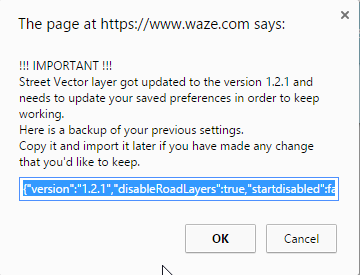
Hey, now this popup jumps out every editor launch :smiley:
2015-07-20 09_53_33-The page at https___www.waze.com says_.png

Thanks for reporting, it should be fixed now in 1.2.2

Hey, it’s 1.2.5 and we get no Whats new? :smiley:

Minor bug fix, 1 typo in the code.

I installed this for the first time, got this: (otherwise seemed to work okay)