The picture is too small
yes, sorry…
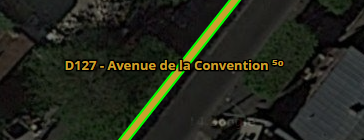
It’s possible to see the “problem” with the permalink.
This is what you’re supposed to see:
Thank you Bedo2991. Are you on te beta-editor ? I’m on the prod.
I will reinstall the script.
I try to find a resolve to show you what I have on the screen.
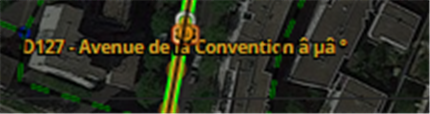
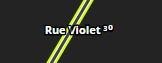
I guess you see either 2 squares, or question marks, or random letters. Either somehow those small numbers are not in your character set or when you downloaded/installed the script something went wrong with the char format.
Does it work for the others?
When I link to update from the PC , the link takes me to the 1.2.7 release.
On the tablet I go to version 1.3.
So I copied and sent (from the tablet ) in my gmail.
From this I copied and pasted into Tampermonkey .
The problem :
All right :mrgreen:
Again I had the issue I copied the JSON string from the update popup, but when I try to import it,it fails. I’m including the exact string I copied below.
{"version":"1.2.6","clutterCostantNearZoom":"350","clutterCostantFarZoom":"410","streets":[null,{"strokeColor":"#fefde8","outlineColor":"#000","strokeWidth":"3","strokeDashstyle":"solid"},{"strokeColor":"#fdfba8","strokeWidth":"3","strokeDashstyle":"solid"},{"strokeColor":"#676ec6","strokeWidth":"6","strokeDashstyle":"solid"},{"strokeColor":"#b3bdb5","strokeWidth":"3","strokeDashstyle":"solid"},{"strokeColor":"#b1ae9b","strokeWidth":"3","strokeDashstyle":"dash"},{"strokeColor":"#42a1bd","strokeWidth":"5","strokeDashstyle":"solid"},{"strokeColor":"#69c288","strokeWidth":"4","strokeDashstyle":"solid"},{"strokeColor":"#847347","strokeWidth":"3","strokeDashstyle":"solid"},null,{"strokeColor":"#858585","strokeWidth":"2","strokeDashstyle":"dash"},null,null,null,null,{"strokeColor":"#86afab","strokeWidth":"3","strokeDashstyle":"dashdot"},{"strokeColor":"#6a6a6a","strokeWidth":"2","strokeDashstyle":"dash"},{"strokeColor":"#b7bb80","strokeWidth":"3","strokeDashstyle":"solid"},{"strokeColor":"#ffffff","strokeWidth":"3","strokeDashstyle":"dash"},{"strokeColor":"#000000","strokeWidth":"3","strokeDashstyle":"longdash"},{"strokeColor":"#aaaaaa","strokeWidth":"3","strokeDashstyle":"solid"}],"red":{"strokeColor":"#ff0000","strokeWidth":"3","strokeDashstyle":"solid"},"roundabout":{"strokeColor":"#111","strokeWidth":1,"strokeDashstyle":"dash"},"toll":{"strokeColor":"#25f5fd","strokeWidth":"2","strokeDashstyle":"solid"},"closure":{"strokeColor":"#ff0000","strokeWidth":"8","strokeDashstyle":"dash"},"restriction":{"strokeColor":"#efc02e","strokeWidth":"2","strok
eDashstyle":"dash"},"arrowDeclutter":"10","labelOutlineWidth":"3","disableRoadLayers":true,"startDisabled":true,"showSLcolor":true,"
showSLtext":true}
I was able to get the import to work by removing two line breaks at the end like this manually:
{"version":"1.2.6","clutterCostantNearZoom":"350","clutterCostantFarZoom":"410","streets":[null,{"strokeColor":"#fefde8","outlineColor":"#000","strokeWidth":"3","strokeDashstyle":"solid"},{"strokeColor":"#fdfba8","strokeWidth":"3","strokeDashstyle":"solid"},{"strokeColor":"#676ec6","strokeWidth":"6","strokeDashstyle":"solid"},{"strokeColor":"#b3bdb5","strokeWidth":"3","strokeDashstyle":"solid"},{"strokeColor":"#b1ae9b","strokeWidth":"3","strokeDashstyle":"dash"},{"strokeColor":"#42a1bd","strokeWidth":"5","strokeDashstyle":"solid"},{"strokeColor":"#69c288","strokeWidth":"4","strokeDashstyle":"solid"},{"strokeColor":"#847347","strokeWidth":"3","strokeDashstyle":"solid"},null,{"strokeColor":"#858585","strokeWidth":"2","strokeDashstyle":"dash"},null,null,null,null,{"strokeColor":"#86afab","strokeWidth":"3","strokeDashstyle":"dashdot"},{"strokeColor":"#6a6a6a","strokeWidth":"2","strokeDashstyle":"dash"},{"strokeColor":"#b7bb80","strokeWidth":"3","strokeDashstyle":"solid"},{"strokeColor":"#ffffff","strokeWidth":"3","strokeDashstyle":"dash"},{"strokeColor":"#000000","strokeWidth":"3","strokeDashstyle":"longdash"},{"strokeColor":"#aaaaaa","strokeWidth":"3","strokeDashstyle":"solid"}],"red":{"strokeColor":"#ff0000","strokeWidth":"3","strokeDashstyle":"solid"},"roundabout":{"strokeColor":"#111","strokeWidth":1,"strokeDashstyle":"dash"},"toll":{"strokeColor":"#25f5fd","strokeWidth":"2","strokeDashstyle":"solid"},"closure":{"strokeColor":"#ff0000","strokeWidth":"8","strokeDashstyle":"dash"},"restriction":{"strokeColor":"#efc02e","strokeWidth":"2","strokeDashstyle":"dash"},"arrowDeclutter":"10","labelOutlineWidth":"3","disableRoadLayers":true,"startDisabled":true,"showSLcolor":true,"showSLtext":true}Speed limits fork for me.
Is it possible to support MPH also? Numbers should be 35 and 60.

Can you give me a permalink with a segment there with the speed limit set?
Nevermind, this might work:
V. 1.3.1 - Changelog
- Support for mph speeds (The conversion is done from the script, the Waze model saves the speed internally in kmh. I think some rounding errors might be possible and the speed shown by the script might be different from the one applied in WME (send me a permalink if this happens).
- The way segments are colored has been changed slightly, now it should be easier to distinguish “close” difference speeds at a glance, at least in kmh.
Is it possible to have Private and Parking lot Roads not show up until zoom level 4? Currently they show at level 3 with Primary streets and it’s confusing to see “floating” road segments.
Is it possible to show speed limit for each segment direction on different sides of segment?
It is technically possible but I personally wouldn’t do it (unless your post gets an incredibly high amounts of likes). Then you are able to select and edit segments that you can’t see…
You mean the coloured line? That would be great and I’ll try to do it, but I see it really unlikely to work in the near future… 
Please! I want this too. Maybe it could be an optional setting?
I really don’t mind if they are invisible yet selectable.
I mean if segment has different speed limits on A-B and B-A directions, can it be shown on own side each? Like 70 on one side, and 50 on another side.
For that you (bedo2991) may get a hint from FZ69617’s Rout Speeds. The script nicely shows transit speeds also for segmentes that are used on both directions in the same routing.