Small bug (I think - but possible user error). When one UR is jumped to via feed or UR-MP that UR is auto-centered. But, if there is another UR on the screen, the auto center doesn’t work on the second UR. Filling in the comments work fine, but the auto-center doesn’t.
2019.03.01.01: NEW: UR overflow handling (aka "backfill").
               NEW: Warning for more than 499 URs on screen when UR overflow is not enabled.
               NEW: Auto refresh setting on zoom / pan.
               CHANGE: Auto center on UR now automatically centers at current zoom level for all
                       levels.
               ENHANCE: Debug logging for marker manipulation now queues into single per
                        manipulation type log message.
               BUGFIX: Filtering intermittent during zooms and other functions.
Enable UR overflow handling: If this setting is enabled and there are more than 499 URs on the screen, URC-E will attempt to gather more URs and add them to the map, if they do not already exist. WME does not display more than 500 URs on a single screen on its own.
Enable auto refresh on zoom / pan: Reloads the map data when zooming or panning to show URs that may have been missed due to WME’s 500 UR limit. Will only reload if the zoom level is between 3 and 10, there are not pending edits, and there are more than 499 URs loaded.
The Auto center on UR setting, if enabled, will now center on the UR at any zoom level, unless a zoom-in setting overrides it for a given UR.
Having an issue where UR’s are stacked, your information box is on top of the UR’s so even though your script is trying to unstack them, I can’t actually click on the “unstacked” UR’s.
The “CommentTeam” default list is currently undergoing some much needed TLC. We have put together a team of representatives from each region to put the list through processes of fine-tuning, adding, removing, etc. comments as needed.
The list of representatives is available in the first post of this thread. If you have suggestions, comments, concerns, etc., please do not hesitate to contact your regions designated representative.
Per comment list settings: The settings located in this box are customizable per comment list. By default, all comment lists use the “URC-E Master Settings” setting for each of the “Per comment list” settings. The box on the far right is the “Use URC-E Master Setting setting” for each given setting and list. (See more info below)
Append comment mode: Now inserts the clicked comment at the cursor position.
Unstack markers: Markers not involved in the current “stack” are temporarily hidden until restacking.
Auto set new UR comment (SLUR): New setting that allows you to enable or disable the auto set default UR comment for SLURs independently of the other auto-set new UR comment settings.
UR Overflow handling: Now queues sub-quadrants of the current map view if the quadrant has more than 499 URs in it.Quadrants will be sub-divided until all 4 quadrants of the divide contain less than 500 URs each. This allows for ALL URs to be displayed in the given map view.
The per comment list settings additionally have the following occurring on them:
When you check / uncheck the “Use URC-E Master Settings setting” checkbox for a given per comment list setting, URC-E will update that per-comment list setting to match what is currently set for the URC-E Master Settings setting.
When you change a per comment list setting, it is only changed for the currently loaded / selected comment list. These settings are saved with all other settings.
When you change one of the URC-E Master Settings settings that also have a matching per comment list setting, URC-E will go through all your “per comment list” settings and update the changed setting for any lists that have the given setting set to “Use URC-E Master Settings setting”.
2019.03.06.01: NEW: Per comment list settings!
               ENHANCEMENT: Handle changing to MTE mode and back cleanly.
               ENHANCEMENT: Append mode now inserts new comment at cursor position.
               ENHANCEMENT: Customizable unstack sensitivity and disable above zoom (zoomed
                            out beyond) level.
               ENHANCEMENT: Unstack markers now temporarily hides markers not involved in the
                            unstacking.
               ENHANCEMENT: Split Auto set new UR comment (with description) out to not insert
                            on SLURs and added a new setting of "Auto set new UR Comment
                            (SLUR)".
               ENHANCEMENT: Better overflow handling. Now queues sub-quadrants to get ALL URs.
               ENHANCEMENT: Improved center on UR (popup link), UR Panel crosshairs click and
                            center on UR function.
               ENHANCEMENT: Added dismiss button for over limit message and need translation
                            message.
               ENHANCEMENT: Removed unnecessary logging.
               BUGFIX: Popup prevented selecting unstacked UR in some situations.
               BUGFIX: Unstack / restack routine sometimes flickered the UR markers involved.
               BUGFIX: Default comment with $SELSEGS$ did not give popup alert.
New restriction system to enforce certain features to be enabled or disabled. None are setup at this time. Region leadership has the option of enabling this system by state.
Backup / restore / reset settings system - Backup your settings to a JSON file. Restore settings from this JSON file (do not modify the JSON file directly!). Reset URC-E back to default settings (pretty much everything disabled).
Create your own custom comment list with a Google spreadsheet!
Convert your current custom comment list to a Google spreadsheet!
Insert comment (single click), shortcuts, append mode insert comment, etc. now keep focus on the input box so you can immediately begin typing.
Append mode now ensures there is a blank line both before and after the comment that is inserted.
Auto zoom in on new UR only zoom in for URS with ZERO (0) comments and you are zoomed out beyond zoom level 5.
Auto center on UR will now recenter the map for ALL URs at the current zoom level.
Auto zoom out after comment will zoom you back to the zoom level you were at when the UR Panel opened.
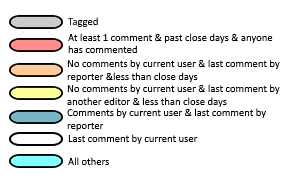
Small other bugfix and tweaks, including new pill counter colors. See below for color distinction.
URC-E marker pill color codes:
Note: These are in order of first match. The set of rules that matches first is the color of the pill.
2019.03.29.01: NEW: Restriction system for use by region / country leadership!
               NEW: Backup URC-E settings to JSON.
               NEW: Restore URC-E settings from backup JSON file.
               NEW: Reset URC-E settings to default.
               NEW: Create your own Custom List with a Google Spreadsheet!
               NEW: Convert your current custom list to a Google Spreadsheet!
               ENHANCEMENT: Moved all timeouts into an object.
               ENHANCEMENT: Combined banners and panel alerts into single function.
               ENHANCEMENT: Append mode / shortcuts / insert comment / etc. now return focus to
                            the new comment box.
               ENHANCEMENT: Append mode now ensures there is a blank line before and after the
                            inserted comment.
               CHANGE: Auto zoom in on new UR only zooms in for URs with zero comments and you
                       are zoomed out beyond zoom level 5.
               CHANGE: Auto center on UR will now recenter the map for ALL URs at the current
                       zoom level.
               CHANGE: Auto zoom out after comment will zoom you back to the zoom level you were
                       at when the UR Panel opened.
               BUGFIX: Hide without description failed to filter in some instances.
               BUGFIX: Some timeouts needed indexing. Now indexed based on random ID generated
                       at time of timeout call.
               BUGFIX: Comments erroneously inserted into map comment new comment box as well.
               BUGFIX: Pill colors not applying correctly. New color added (see forum thread).
               BUGFIX: Custom marker by custom text not working correctly.
URC-E is a direct replacement for URC, so you don’t need URC enabled.
If you used a custom add-on list before, make sure you have it enabled in TamperMonkey. If not, just select a different “Default List” under settings in URC-E. Select “CommentTeam” for example.
Can we customize (change) order for pill colors? It will be nice to have “white” on the top - I know I can use some extra filtering to show URs with comments from me but…
Trying to get URC-e to work with my old URC custom comments list, and I keep getting this error:
“Timed out waiting for the static list to become available. Is it enabled? Type: 'Static”
Yes, it’s enabled in Tampermonkey. Already tried changing the variable to “Custom” and the localStorage trick mentioned earlier, but no dice. Other ideas?
ETA: Tried renaming my variable back to UrcommentsCustomArray2 and now I just get “An error has occurred within URC-E. Please contact a WazeDev team member.” Looking in the console, I see this error: “URC-E: Your current selected list does not have a status set for Follow-up. Please contact list owner: Custom”
No idea how I missed the PM. E-mail probably went to Junk mail. Weird the control panel never said I had new messages here. Anyway, I apologize and have replied to ya! Thank you!
They have removed a function URC-E (and most other scripts that check UR data) uses. I have reported it and asked for explanation or if we will get it back. For now, URC-E doesn’t work in beta.