Oh. You all mean selecting a second comment from the list and having that append to the first one you selected…
Or whatever I happened to have already typed in the box.
I created a script in Tampermonkey that was the array of messages taken directly from my URC custom list with the var name Custom.
It worked initially and then stopped. Now it times out trying to load and I can’t get URC-E to switch to one from the sheet.
Make sure you have your custom one enabled and loaded in TamperMonkey. Make sure it’s exactly as it was for URC.
Good idea. (A checkbox next to the comment box that toggles between “replace” and “append” modes.) And it certainly shouldn’t append on a double-click.
I have checked it several times, including deleting and re-creating (copy and paste) it several times. I even tried deleting and re-installing URC-E in an attempt to at least be able to get back to the default sheet, but it didn’t clear the settings. Is there a way to reset URC-E to default settings?
Thanks.
I know there is a bug with that. I haven’t had a chance to push the fix yet. But yes, you can reset back to defaults.
Disable URC-E. Then reload WME. Then open console and type:
localStorage.removeItem("WME_URC-E");Then to make sure the settings are reset:
localStorage.getItem("WME_URC-E"); should show undefined or null.
Then reenable URC-E and reload WME.
Thanks! That did the trick. Once I cleared the settings, it started working again, including being able to use my custom comments and switch between canned and custom comment lists.
2019.02.04.02 was released two days ago. It included the following:
2019.02.04.02: NEW: WazeWrap update integration.
               BUGFIX: Not able to change lists in some situations.
               BUGFIX: ZoomIn on new.
               BUGFIX: WME bug workaround.
               BUGFIX: AutoCenter on commented.
               BUGFIX: Last Comment By in popup.-
Other slight changes to prevent future bugs.2019.02.06.01 is out. It includes the following changes:
2019.02.06.02: CHANGE: Auto Close UR Panel now closes the UR panel on any comment send.
BUGFIX: Parsing of old static list failed for some users.You could add an option to create our own default messages.
Below the commom resolution option would have the option “create response” and a tab with our answers would appear.
I am actually designing something along these lines. It’s a work in progress and will have to go through some beta testing before it reaches production. Thank you for the idea!
2019.02.08.01 is out. Change log:
2019.02.08.01: NEW: Ability to append a comment (Append mode).
               NEW: Switch comment lists from the comment list tab.
                    Note: This does not change your default list and is not saved.
BUGFIX: Selecting a MP caused URC-E to inadvertently process.I thank you.
I’ve read through all of the posts here and didn’t see my issue: filtering doesn’t seem to work consistently. I can set (e.g.) Hide Waiting. It doesn’t hide. I click the “Link” icon (bottom right corner of the WME screen) to reload, and when Waze reloads it hides the UR that is “waiting”. Then I zoom out one step and it’s no longer hidden. For some reason it’s not executing the Hide functionality except when WME starts up.
This is with current production WME and 2019.02.08.01 of URC-E. Possible interaction with URO+?
Can you give me an example PL? One that’s doing it for you so I can see if it does it for me?
Also, what is your reminder days and close days set to?
The UR appears and disappears a few times as WME loads - it’s almost like the script is quitting before it’s done or being tromped on by another script. Reminder=4, Close=7.
dBsooner,
Thanks for releasing this script. I’ve been using it for a couple of months now, and am really impressed with it.
2019.02.18.01 has been released.
2019.02.18.01: NEW: Added text replacement options in comment lists for drive date and time.
               ENHANCED: Auto set new UR comment split into two settings (with and without
                         description).
               ENHANCED: Title differentiation for beta script.
               BUGFIX: Entering event mode and back to default caused duplication of tab icon
                       and random marker issues.
2019.02.21.01 is out!
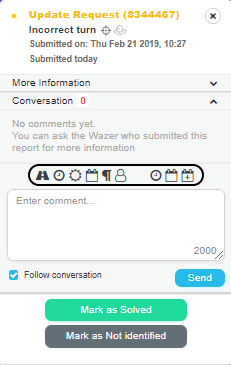
2019.02.21.01: NEW: Added shortcuts for text insertion to UR Panel.
               NEW: Added "expand all" and "collapse all" links to settings and comment list.
               NEW: Need translation banner for languages (locales) without a translation.
               NEW: Switched to using WazeWrap for WME event hooks.
               BUGFIX: Auto set comment issue when UR created with LiveMap.
               ENHANCED: With new shortcuts, dependency on panel swap for segment name insertion
                         is removed.
Shortcuts in the UR Panel:
- Road icon: Shortcut - Segment name(s): Click this icon to either replace ‘$SELSEGS$’ (or ‘$SELSEGS)’ with the name of the currently selected segment(s), or it will insert the name of the currently selected segment(s) into the comment box at the cursor position."
- Clock icon (left side): Shortcut - Drive time of day: Click this icon to insert the drive date time of day into the new comment box at the cursor position (2-digit hour, 2-digit minute in locale format).
- Sun icon: Shortcut - Drive day of week: Click this icon to insert the drive date day of the week into the new comment box at the cursor position (full day of week name in locale language).
- Calendar icon (left side): Shortcut - Drive date: Click this icon to insert the drive date into the new comment box at the cursor position (2-digit month, 2-digit day, 4-digit year in locale format).
- Paragraph icon: Shortcut - Description: Click this icon to insert the UR description into the new comment box at the cursor position.
- User icon: Shortcut - Waze username: Click this icon to insert your Waze username into the new comment box at the cursor position.
- Clock icon (right side): Shortcut - Drive time of day (casual): Click this icon toinser t the drive date time of day into the new comment box at the cursor position (in locale language).
04:00am-11:59am: morning
12:00pm-05:59pm: afternoon
06:00pm-08:59pm: evening
09:00pm-03:59am: night
-
Calendar icon (right side): Shortcut - Drive date (casual): Click this icon to insert the drive date into the new comment box at the cursor position (full month name, 2-digit day in locale format).
-
Calendar with + icon (right side): Shortcut - Drive date (fully casual): Click this icon to insert the drive date into the new comment box at the cursor position with the following table as a reference (in locale translation):
-
0 days: this morning, this afternoon, this evening, tonight
-
1 days: yesterday morning, yesterday afternoon, yesterrday evening, last night
-
2-6 days: Day_of_Week morning/afternoon/evening/night
-
7-13 days: last Day_of_Week morning/afternoon/evening/night
-
14-20 days: Day_of_Week before last
-
21-27 days: three weeks ago
-
28-60 days: a few weeks ago
-
61-120 days: a couple months back
-
121+ days: a while ago