which header section? URC, URS, WME?
The URC. see attached images.
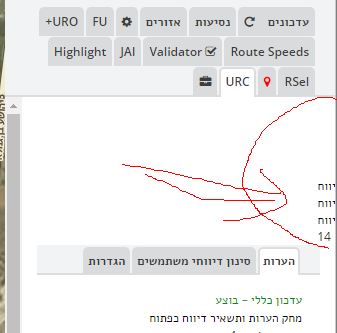

Please note that it is the WME language that affect this issue and not URC’s
I tried to make the zoom out links not float over the comments and forgot some languages have the side panel on the right or left side.
right side
Rickzabel,
Thanks so much for your support on this fantastic script.
With the recent addition of Speed Limit error URs, we believe many users don’t have the speed limit setting enabled on their app display, causing them to report speed limits that are already verified in the map.
I see a few editors have created a personal script entry to help these users enable that setting in their replies, but I thought it might be good to add something to the effect of:
It would also be nice if we could get an automated response regarding temporary limits, particularly those related to road construction. They pop up faster than I can close them on some stretches of interstate.
Unfortunately automated reply is something you have to take up with the powers that be. I’m sure the technology exist but I don’t think the want to implement it.
Sent from my XT1080 using Tapatalk
I will be adding the following comment after the"No reply close message"
“Speed Limit Already Set”,
“Volunteer responding; The speed limit here is already set correctly. In the future, please submit speed limit requests near the point where the speed limit changes. If the speed limit change is temporary due to construction, please advise and provide additional details. If you would like to see speed limits at all times while using the app, please go to Settings > Speedometer > Show speed limit. Thank you!”,
“NotIdentified”,
Perfect. Thanks!
(Note: I deleted your duplicate post.)
I am making the following change to the speed limit auto fill comment, i hope it helps
previous comment
“Speed Limit”, //23
“Waze did not send us enough information to fix your request. Would you please tell us as much as possible about the speed limit? Thanks!”,
“Open”,
new comment
“Speed Limit”, //23
“Waze did not send us enough information to fix your request. Would you please tell us as much as possible about the issue regarding the speed limit? In the future please submit requests near the point where the speed limit changes. If the speed limit change is temporary due to construction, please advise and provide additional details. If you would like to see speed limits at all times while using the app, please go to Settings > Speedometer > Show speed limit. Thanks!”,
“Open”,
it would appear that the waze’s function to un-follow URs in the background was removed from WME. if someone has a work around let me know, till then un-follow is broken.
the previous function call was
Waze.model.updateRequestSessions.objects[urID].toggleFollowConversation(‘false’);
Thanks,
rickzabel
That’s in the right direction, but the current guidance is that we’re not tracking temporary speed limits, unless it is a long term project. I think we almost need a separate response to where we can just comment as it being a temporary limit due to construction and close as not identified. I could just ignore them, but I think it will probably turn users off from the app if we don’t reply, even if we’re not going to change anything. But basically I think we need a response that allows us to clean these up quickly.
Remember that even a no-comment closure sends an email to the user.
I’ve had users complain about a route, ignore requests for information, and demand that we stop contacting them after the 4-day reminder bump… so I’ll close with no comment, and they come back to the UR and add another nasty comment about the next time we contact them we’ll hear from their lawyer.
But yes… we generally do need to send something more polite than the default “unresolved” email… though I will generally do that when I find a stack of 5-20 SL URs on a home or business in a parking lot.
I am still seeing this issue. If I turn off auto zoom but leave on auto center, when I click a UR, about half the time it does not auto center, my screen just stays as it was. If I close the UR window and click that UR again, it does auto center. Seems to be random on when it chooses to auto center or not. So it appears the problem is with auto center, not auto zoom.
I have not and did not plan on doing anything to attempt to fix this. I think it’s conflict between scripts, if you have uro installed disable it and see if the issue still happens.
The problem goes away if URO is disabled. I even tried disabling all the options in URO and leaving it enabled, but the problem still happens.
I need a little hopefully quick help. I put together my own custom comment script, published it on greasyfork, and installed it, but it isn’t showing up in the comment list menu. Any help will be greatly appreciated.
https://greasyfork.org/en/scripts/23209-wme-ur-comments-richardpyne-list
The only way for that to work would be to have it programmed into the original script.
You should install the custom list and then modify it to suit your needs:
https://greasyfork.org/en/scripts/6236-wme-urcomments-custom-list
I have since discovered that. The documentation I could find made it sound line URComments would detect the available lists, which as long as they are in the same namespace shouldn’t be too difficult.
You should install the custom list and then modify it to suit your needs:
https://greasyfork.org/en/scripts/6236-wme-urcomments-custom-list
[/quote]
Which may work okay for an individual, but is cumbersome at best when trying to share the list with a group.
Slightly cumbersome, but they could then paste a copy of your version over the installed custom version.
I save a copy of my version of the customized custom version and re-install it over the custom version whenever tampermonkey decides to update the custom version and installs a copy of the old custom version over my customized version.
I usually compare the two versions to make sure that the custom version hasn’t had any important changes made.