Can the ability to display comment numbers and days on a UR be displayed under the UR like it’s done on UR Coments? I don’t want to install that script just to have that feature and it would complement this script very well. Maybe a code share?
Having spent the last couple of weeks on business trips and family holidays with no opportunity to do any coding, it comes as something of a relief to be able to dust off the editor and source code again… 3.46 introduces a couple of new features:
Added restricted turn popup
Provisional support for Road Closure MPs (for those beta users with access to them…)
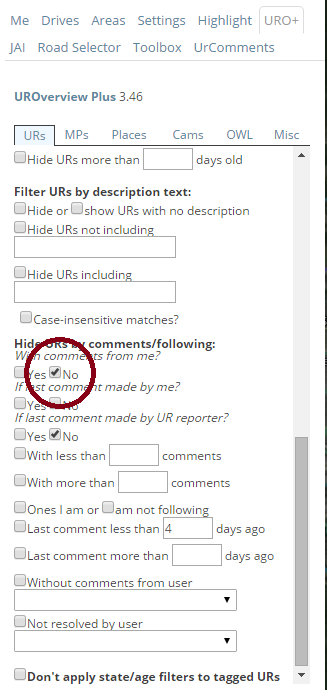
BUG: In Chrome with Tampermonkey, URO+ 3.46: every time I load the Editor, the UR filter setting for Hide URs with no comments from me is checked. I uncheck it manually, but the next time I load the editor it is there again. (Note: the other filter is one I did set the last time I used the Editor.)
I’d like to make a feature request, if this isn’t too unreasonable…
It seems there’s been a new update to WME, and we now get the little red icons (which used to be map problems and only map problems, like missing roads, etc.) for more than just a “missing road.”
This have information regarding an upcoming road closure nearby. The report text itself seems in all cases (that I’ve encountered so far) with this string at the beginning:
[TrafficCast]
Which makes for a nice tag string that URO+ could use to display a slightly different icon (like a picture of a car or something?).
Any chance we could get something like this? Or am I making a ridiculous request?
For anyone who hasn’t seen one of these yet, here’s the form that the problem text produces in whole and one of the ones that popped up near me:
These are new types of map request, and would benefit from all the URO features (zoom to area on open, etc) being applied to them as well, IMO.
Personally, I’d add a feature that searches for the string “TrafficCast” and immediately closes the MR as “irrelevant data” since they always make asinine claims such as “HWY-2 closed at HWY-2 for Unknown”.
Out of the 12 TrafficCast MRs showing up in my area today, 2 had valid data. The rest were inappropriate, incomplete, or had invalid locations (such as “hwy 2 at hwy 2”, implying a junction between a 1200+km long highway and itself, somewhere along its length, and not at the location of the MR icon).
Same here, though there was one I had to “irrelevant data” close because it was just a notice of construction on a freeway and be aware of slow traffic. Since there’s nothing we can do with/about that (given we don’t have any kind of way to set that condition in the map to show up in the app), that was really my only choice. The others were about ramp closures with start/end date/time, so I added those and then closed out the report.
Which was why I brought up the idea of maybe having URO+ give them a different icon based on the [TrafficCast] tag - it would be useful to have a visual cue that it’s a traffic report vs a regular MP.
I note that Jay’s stated location is in Canada; it could be that TrafficCast has some issues in that location that’s affecting him…?
Anyway, this is a discussion that’s getting off-topic for this thread. So, if the nice URO+ maintainer would pretty please add a new icon based on that tag, it would be awesome! :mrgreen:
I was already planning to do something for the equivalent reports we’re now getting over here in the UK, so once I get the framework in place for those then it shouldn’t be difficult to add in support for the way they’re being tagged elsewhere…
Note that the date and time are formatted using the .toLocaleString() function which use your current system settings to decide how the date/time should be presented, so if your system is set to DD/MM/YYYY and 24-hours (as mine is), then that’s how the date/time will be presented in URO+ too.
If you don’t want to/can’t change your system settings, then I’ll consider adding a URO-specific locale setting in a future release…
 but yes, that seems to have been the cause of the problem. Thanks!

