Wow, wonderful. Thanks for the swift update Twister
I can’t seem to open this PUR flag, for whatever reason, can it be filtered out somehow so I stop seeing it?
On the Places tab in the “Filter PURs by category/status:” group, try the “Ones I can’t edit” filter
I already have that on and this one shows up anyway. Sorry I should’ve said that the first time. =P
I think it’s a bugged PUR, I can’t open it either. But I didn’t try without scripts.
Sent using Tapatalk for Android
It looks like MP’s now have a flag of when the issue is outside your editable. Can we have a ‘ones I can’t edit’ filter for MP’s now too please?
The editable flag appears to be more a way to show whether anyone is able to edit a particular MP, and based on all the MP objects I’ve examined so far looks to be just a different way of telling whether a MP is open or closed, with its value copying that of attributes.open in each case.
On the other hand, the canEdit() function does provide a true/false response which does seem to take the current editable area of the user into account, so you should find something of interest in the next release…
3.50 introduces the following changes:
- Option to hide MPs outside of your editable area
- “Landmarks” changed to “Places” in the Misc tab “Disable popup for:” settings group…
Firefox+Greasemonkey version: https://greasyfork.org/scripts/1952-uroverview-plus-uro
Chrome Web Store version: https://chrome.google.com/webstore/detail/uroverview/amdamgkgchnbaopmphhjapmjcdghdphi
3.51 introduces the following changes:
- Added master enable checkbox to allow instant toggling of script activity
- Keyword filtering for URs now searches in comment text as well as descriptions
- UR stacks containing closed URs are unstacked without gaps if WME is switched into hide closed URs mode
- Various compatibility fixes for latest WME Beta release…
Firefox+Greasemonkey version: https://greasyfork.org/scripts/1952-uroverview-plus-uro
Chrome Web Store version: https://chrome.google.com/webstore/detail/uroverview/amdamgkgchnbaopmphhjapmjcdghdphi
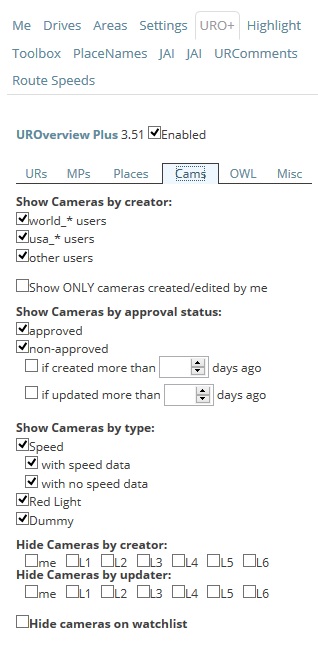
I’m having a problem that I’m not sure whether is user error or not. When I enable URO+ all my cameras disappear. I have nothing checked on the camera tab. I can’t find a setting that displays the cameras for me. Am I missing some setting somewhere?
About half of the options on the cameras tab are of the “tick to show/untick to hide” variety, so if you really do have nothing at all ticked on that tab then each of those options will be acting to hide their corresponding type of camera, and the combination of having them all acting together means there aren’t any types of camera that would remain visible.
To set up the cameras tab such that it’s performing no filtering whatsoever, make sure that only the following options are ticked:
Show Cameras by creator:
world_* users
usa_* users
other users
Show Cameras by approval status:
approved
non-approved
Show Cameras by type:
Speed
with speed data
with no speed data
Red Light
Dummy
Thanks, makes sense now. It was user error.
You have nothing checked on the cameras tab?
Enhancement suggestion: a key that ‘instantly hides’ the pop-up box. (perhaps shift?)
Reason: when trying to click on a point place or end node that is within an area place, the pop-up often ‘gets in the way’. This is especially problematic when attempting to drag an end node as the node gets ‘dropped’ as soon as it encounters the pop-up box.
A key that would suppress the pop-up would make these tasks much easier. Currently I sometimes must ‘disable’ display of places in order to work on something embedded within a place.
Thanks for a wonderful tool!!!
Great explanation of the problem. Frustrating when I slide to the side and box follows me, LOL.
Maybe even have the box freeze on the screen after it pops-up, till the next time we scroll far enough that it goes off-screen. Then refresh it again.
Steve
+1
May I also suggest that the popup box will appear under the mouse pointer.
Ditto.
This has become so frustrating that I just turned popups off for Places.
I never used the links in the boxes, and Place Names shows what it is.
The main usefulness of the popup for me is identifying pvt/residential vs “normal”
Having the popup appear under the mouse would solve a few problems. One would be the issue that we were attempting to correct with the “window close” time delay, but I think an opening delay would also be good…
But a very nice operation could be had if the popup opens under the mouse, then the popup automatically closes as soon as the mouse is moved off of it.
For Area places, at that point, locking out so it does not reopen until the map is panned or zoom changed.
Having it open under the mouse solves one problem, the one of getting the mouse pointer to the link in the popup.
Having it open under the mouse creates a problem as it gets in the way when we are trying to click on something (like a point place) covered by an area place.
Adding the feature of having shift close the popup, keeping it shut as long as shift is held would solve many problems, as far as I can tell.
Also expand the granularity to allow for an inhibit on popup on Area Places but allow Point Places.
It’s always Area Places that “get in the way”