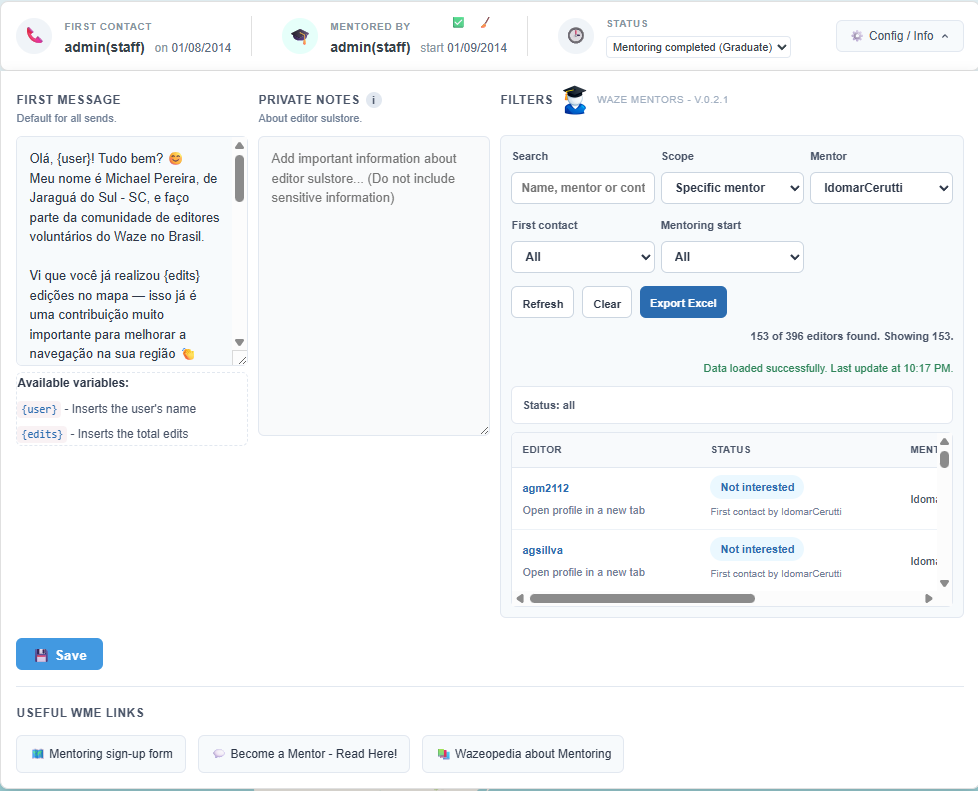
Waze Mentor is an extension developed to facilitate tracking the mentoring program within Waze Map Editor (WME).
You don’t need to be a mentor to use the script; you can use it to make initial contact and also to find out if someone is already talking to a particular editor.
(Currently only available in Brazilian Portuguese, English, Spanish and Arabic. it will soon be available in all WME languages.)
It adds a compact and intelligent dashboard directly to the editor’s profile, allowing mentors to quickly and efficiently track:
Date and person responsible for the first contact
Current mentor and mentorship start date
Student status (Interested, In mentorship, Completed, etc.)
Exclusive internal notes for mentors
Quick sending of personalized messages with dynamic variables
Filters with export options. (csv file Excel)
Key Features:
- Automatic database integration
- Official mentor verification via Waze
- Status control with instant updates
- Modern, lightweight interface integrated with the editor’s profile in WME
- Expandable settings panel
- Smart button for sending the first contact
Permission Control
The extension automatically identifies if the user is an authorized mentor.
Unauthorized users have limited access to administrative functions.
Ideal for
Waze community mentors
Mentoring coordinators
Organization and standardization of student monitoring