The original author, dummyd2, of this script stepped away from Waze and left the future maintenance to the WazeDev group. The below description is copied from the original script thread.
Install the WazeDev maintained version from the new Greasyfork: https://greasyfork.org/en/scripts/370072-wme-advanced-closures
The script adds a tab (slashed road) in the left panel, and a highlight on the map.
In the panel:
a button “add advanced closure”
a button “parse CSV” with a log console.
In the closure panel of a segments selection: a button “add advanced closure”.
- Add advanced closure
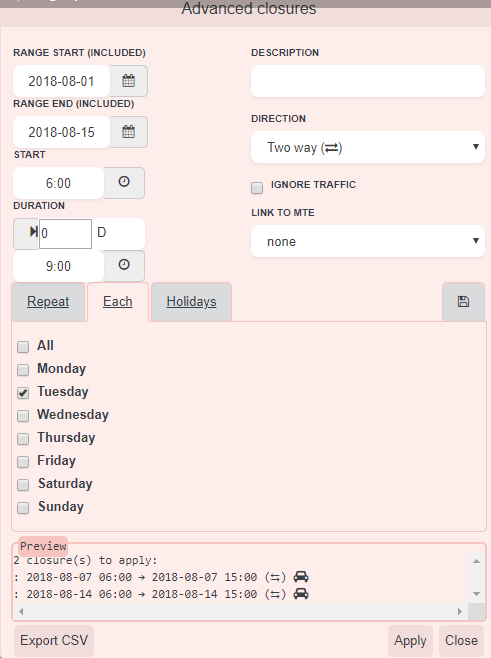
opens a window to generate recurrent closures.
The window is draggable through its title. To reset the position, click again the button. - Range (start date and end date) is the time range on which all closures will apply. In other words, the script will not generate closures before and after this range.
- Start and duration:
start is the start time of the closure un a day
duration is the duration of the closure - Description: free text
- Direction: on a multiple selection, it is the same direction as shown on the map.
- Ignore traffic
- (new in V1.1) MTE: MTE list of MTE loaded in WME and whose dates overlaps the defined range
- Then, choose a tab:
- Repeat:
- Times: the closure count
- Every: duration between the start date/time of a closure and the start date/time of the text closure
- Each:
day of the week of the start date/time (if the duration exceeds midnight, the end date/time will be the next day (or some days after), the closure will be applied even if the day of the closure end is not checked) - (new in V1.1) Holidays: holidays list based on holidayapi.com. You must select at least 1 segment before to detect the country, and then, click on “Refresh holidays”. If your country is not supported, you can contribute to holidayapi.com. The country abbreviation in WME is not the same as holidayapi.com. So we may need to translate it in the code to get it work. Let us know!
- The save tab allows you to save all presets but the range and MTE, and to load them.
New in V1.1: closure details loaded from an existing closure: select 1 segment. If more than 1 segment is selected, closures a read from the first segment only. - Once all set correctly, the preview area will show all closures ready to apply. It shows error messages and an orange warning if a closure overlaps on an existing closure, and if a closure is not included in dates of the selected MTE (tooltiptext for details).
- Select segments
- Then, apply. The preview will print OK or error messages. Before clicking on apply, choose the right tab (Repeat or Each). After the process, the script will select all segments and open the closure tab in the left panel.
Cases studies:
Every day from 12:00 to 14:00 between 13/06 and le 26/06 included
range: 2016-06-13 -> 2016-06-26
start: 12:00
duration: 2:00
Repeat: 500 times (the script will not create closure after the range end)
Every: 24:00
From monday to friday, from 20:00 to 06:00 the next day, from June to December:
range: 2016-06-01 2016-12-31
start: 20:00
duration: 10:00
Each: mon, tue, wed, thu, fri - CSV
apply closures defined in a CSV file.
New in V1.1: added a column (requiered) MTE ID before ‘comment’. Keep empty if no MTE.
Format:
header,reason,start date (yyyy-mm-dd hh:mm),end date (yyyy-mm-dd hh:mm),direction (A to B|B to A|TWO WAY),ignore trafic (Yes|No),segment IDs (id1;id2;...),lon/lat (like in a permalink: lon=xxx&lat=yyy),zoom (2 to 10),MTE ID,comment (optional)
add,"Closure test, by dummyd2","2016-05-27 00:00","2016-05-28 00:00","A to B",Yes,"297004533;297004532","lon=25.53629&lat=-76.47602",6,
add,"Closure test 2, by dummyd2","2016-05-29 00:00","2016-05-30 00:00","B to A",No,"297004533;297004532","lon=25.53629&lat=-76.47602",6,,It's cold here...-
If the fisrt column starts with ‘add’ or ‘remove’, it is processed by the script. (new in V1.1: remove is now supported)
-
Any other keyword is ignored, including ‘header’.
-
The, the format is described in the header.
-
You must ensure that the map zoom is wide enough to “see” all segments. So, the same CSV can work fine on a screen with a big resolution and doesn’t work on another computer with a lower resolution.
-
Open CSV file
-
The closure list will display under the button
-
You can test segments: check all closures and click on “check segments”. The script will simulate a map move on the lon/lat positions and zoom provided in the CSV, check if segments exists, if you have permissions to make closures on it, and warn you if your closure will overlap an existing closure.
-
On each closure:
-
target will move the map and select segments (will not apply the closure)
-
the arrow -> will move the map and apply the closure (will not select segments)
-
Click ‘Apply’ to apply all checked closures
If texts are cut, see the tooltiptext
A mini-log under each closure displays informations about the closure itself. The log under the list is global to all closures.
BE CAREFUL: closures are applied on segments ONE BY ONE. This means the direction A->B (or B->A) is not always the one shown on WME when selecting multiple segments!
So if you have more than one segment to close in one way, you may need to setup 2 closures: one with segments A->B, and another with segments B->A.
- Highlight
Closures made by this script are identified by a non-breaking space added at the end of description. If so, the script adds a “road” icon on the map. This non-breaking space is invisible on the app.