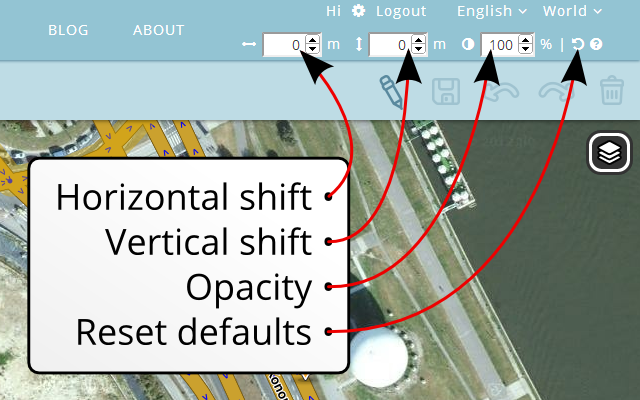
What is Aerial Shifter?
This script helps you adjust the position and opacity of underlying satellite imagery. Download links: > For Chrome browser please download the script at Chrome Web Store > For Firefox browser please download the script at GreasyFork.org
Note: for Firefox browser you also need Greasemonkey or Tampermonkey installed. Screenshots:
Changelog:
05.06.2016 v1.6.5
Merged ragacs changes
10.09.2014 v1.5:
Updated to the latest WME beta
Other minor changes
05.02.2014 v1.4.5:
Added ‘Reset defaults’ icon
Fixed right-to-left languages
Updated to the latest WME beta
10.01.2014 v1.4.4:
fixed panel width
other minor changes
08.01.2014 v1.4.3:
back to absolute rather than fixed position
08.01.2014 v1.4.2:
fixed WAS position
other minor changes
06.12.2013 v1.4.1:
opacity of satellite imagery by iainhouse
spinners for the inputs (seems does not work in Firefox)
settings are now in local storage rather than cookies
autoupdates
07.10.2013 v1.3.2:
new WME paths
fixed text position and color in prod WME
28.08.2013 v1.3.1:
updated to new WME beta path
27.08.2013 v1.3:
updated to Google satellite imagery
merged WME prod and beta branches
tested in Firefox
16.07.2013 v1.2.15 released for WME beta 1.2-68
24.06.2013 v1.2.14:
map panning fixed (thanks to iainhouse)
22.06.2013 v1.2.13:
fixed to work with WME v 1.2
Known issues:
Sometimes empty tiles appear around the map border.
Author: byo
Contributors: berestovskyy and iainhouse
Yes, I’m afraid so. Didn’t see this happening before - maybe something minor has changed in WME?
I’m pretty sure that after you got it working, it was almost the opposite: changing the values had no effect until panning the map.
[EDIT] Ignore the above (for the moment). Just realised I had another aerial shifter script installed. That was definitely responsible for the map not shifting as I changed the values. :oops:
Hi!
I got a PM today that the attached ZIP is not available for download anymore. I tried to download it myself and also got “The selected attachment does not exist anymore” message, so I had to reupload the attachment.
Anyone knows if Waze forum auto-deletes ZIPs after some time?
I can offer some help. I can’t fix the script proper, but I have identified the changes necessary and you can patch your own script until the author can update the proper script.
You will need to locate the un-packaged script where it is stored on your computer. First, open your Chrome Extensions tab. Each extension tab has a long ID: for my Waze Aerial Shifter, that ID is mjbppgkbhhfenndnpmblmdkegklllppk.
You then need to locate the script. I found it at %userprofile%\Local Settings\Application Data\Google\Chrome\User Data\Default\Extensions\mjbppgkbhhfenndnpmblmdkegklllppk\1.2.13_0 - on Windows, obviously! If you have a version other than XP, I’m not sure where it would be. It might be easier to search for a file containing the string “@name Waze Aerial Shifter” that appears in a similar location.
Once you’ve found the script, the change is relatively simple using a text editor such as Notepad. There are 2 instances of the string “OpenLayers.Layer.Bing_43” - change them both to “OpenLayers.Layer.Google_47”. Save the script & refresh your browser.