After updating to this latest version, when going from visible to invisible and back to visible, it’s killing chat altogether. I am unable to see any chat taking place, statuses of editors do not update and are blank until I type something into the chat window. No one sees my text though. I have confirmed with a few other SMs that this problem exists.
I would like to confirm this as well.
v1.0 of Chat Addon stops loading WME chat messages when you go from invisible back to visible. The status icons update, but no chat messages display until after you type and enter something.
So earlier, I created a private room, entered that room, didn’t post a message or anything, just clicked to go back to the US room. Within a few minutes I went invisible and went AFK. After I came back to my Mac, I noticed there was no chat for over an hour.
I started poking around in WME when I realized I was still seeing no chat, I was visible and in the US room. I refreshed my browser, logged out, back in, restarted my Mac, came back and no change. I then re-created the room I was in previously - Texas - and then typed a message in that room and then left and went back to the US room. It was only at that point did others see my messages and it actually recognized I had left the private room I went into hours earlier.
I’m trying to reproduce that on chrome or FF, but I have no bug on my side.
Can you try to remove and reinstall chat addon please?
Are you using chrome or FF?
Do you have any error message related to chat addon in the console? (crtl-shift-J)
I’m using Chrome Version 39.0.2171.71 (64-bit) on Mac OSX Yosemite. I was able to reproduce again tonight after creating a new room, not typing a message, going back to the US room and it still appears I’m in the private room:
You can see below that I ‘Joined room Texas’ but then in the top chat bar, I’ve gone back to the US room but I still appear by myself in the private room.
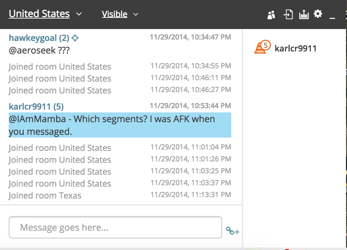
This was after I reloaded the script.
on each room change, you have one more message “joined room…” ?
I mean 2 messages, then room change = 3 messages, then room change = 4 messages… ?
I had this bug during development.
For others with the same bug, are you also on a mac?
I see that with multiple tabs opened on WME, bells won’t load.
Is there any user that have troubles on PC with a single tab?
Here is a version without socket reset, so you can still create rooms, but you still post in all rooms previously visited:
http://waze.gensig.info/WME/WMEChatAddon/WMEChatAddon_v1.0nsr.user.js
Sorry for the inconvenience :?
FF here.
Removed and reinstalled all chat scripts (add-on, jumper, and resizer, I removed resizer tonight, no change)
I’m not even getting status update or chat messages if I open WME “visible”.
I haven’t seen anything at all in chat in a few days.
Just sent a test ping to a local editor.
I’m not seeing any status updates… everyone is Zzz, my own icon is blank.
I disabled all chat related scripts (Addon, Jumper, & Resizer) and chat was not working for me; could be a Waze issue!
You were the local editor I pinged.
I thought it might have been me… :lol:
Out of the 20 or so on the list, yours was the only hardhat in the area and I had seen you active with Skidoo not long before.
For the past few days I was locked out of chat in a sort of odd fashion. I tried multiple computers and browsers and it seems to be tied to my account. I was able to see everyone in the room but they were all snoozing (when addons were enabled, and just listed when not using addons). I could not see any chats and no one could see mine. The solution was found by karlcr9911 and tonestertm and required that I first join a new private room and then rejoin United States.
That worked for me too
thanks guys for your feedback.
It seems that the connection is still alive, but the server never send something.
changing the room forces the socket to be rebuilt.
I’ll add a button to force a reload.
I also tried to switch off my wifi, and the chat GUI disappears after few seconds. When I switched on my wifi, the chat appears after few seconds. So the disconnect and connect events are OK.
I never had the bug you experienced. Only once, but many users of the room were kicked at the same time, so I suspect a maintenance on the waze server.
I’ll keep you in touch
I’m having the same problem over the last 2 days. I first experienced it on my work computer, and wondered if our firewall had been updated to block a port or something. I uninstalled all chat related scripts and it never did come back.
This afternoon, i fired up the laptop, running Chrome under Windows. Same problem. Well, first off, I realized I was still using the beta script of Chat Addon. I manually updated that, and still no chat. Same problem as others…Zzzs and no activity. I disabled all three of the chat scripts I use…and still nothing.
I guess I’ll have to figure out how to create a private room, and them come back to the main one. Maybe then I’ll my existence can be validated. 
EDIT TO ADD:
I reactivated Chat Addon 1.0, created a new room, and then went back to US. I’m seeing activity again in Chat. I wonder what the problem is.
V1.1
- bugfix: bells won’t load after room change
- smileys: same as phpbb forum
- emoji of tapatalk: eg: type emoji1 or emoji813 - http://club.myce.com/f34/tapatalk-emoji-smiley-set-how-insert-even-your-web-browser-337619/
- scroll with mouse wheel on firefox
- better socket handling (I hope)
- new button to reload the connection to the server. It will popup a report to send to me in a PM if it doesn’t work.
Those who use the NSR version should update to this version manually.
Let me know if it is better with this version. Hard to debug this :?
1 Like
Hi DummyD2,
thx for your skripts, are amazing and very helpful.
I try UR-Tracking and Chat Addon on android tablet.
It’s running greate at Dolphin Browser HD v. 8.6.1. with latest TamperMonkey Dolphin.
(newer versions of Dolphin with JetPack block WME chat, I don’t know why).
But even though I turned on the sounds and alert, chat add on does not make any sound.
Can you please advise or direct me where to look for solutions.
Or can you think of any way to get chat out of WME to smartphone with android?
sorry for my English.
Thx a lot,
best regards Janek
Hi Janek,
for sounds, I use the Javascript object “Audio” that loads an URL from google.
Here is an old post: http://stackoverflow.com/questions/13239123/audio-not-playing-on-https-with-android-browsers
Perhaps, the problem is still alive with https :?
Also:
https://github.com/processing/p5.js/issues/465
seems to need a user action to play a sound.
Sorry, but I can’t debug it or look for a workaround.
No idea if howler.js would help, but hope that it will help you in your troubleshooting 