Nope. I have not modified the script at all. Sketch is also having the same problem and he is also using Chrome on Mac OS. I have a suspicion it might be related to Mac OS, but I’m not sure.
It’s possible…
For information, the script was tested on FF/Chrome under Window and i use it on FF or Chrome under Linux.
If you have some time, you could convert the select box to a <ul><li> type of menu and use Bootstrap classes to make it perform like a dropdown. That will guarantee similar behavior across all browsers and platforms. But no rush. Thanks!
Actually, the simplest solution is to use <input type=“color”>. It won’t be as pretty, but at least those who are having the same issue will be able to see it. lol
I noted earlier in this thread that on the Mac, the browsers cannot override system behavior and the OPTION items in a SELECT control are not allowed to have background color changed, as well as other style items. This is documented in Mozilla dev threads.
It can be done, but it must be a custom control.
Sent from my iPhone using Tapatalk
Thanks, Alan, for the confirmation. I suspected it was something like that.
I found some time to look into converting the select box into a list-based dropdown using Bootstrap. I think this should work, though I haven’t tested it extensively. You can find the code and the comparison with your original code here:
https://gist.github.com/pattithepotato/8c3d20a6fd8514b3c343/revisions
It looks like this:
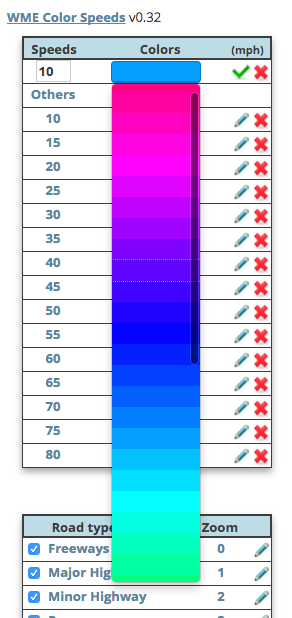
As a side note, I also commented out the re-coloring at 800ms intervals. I don’t think it should do this by default. On a typical widescreen desktop display, the redraw interval is much too taxing on system resources when editing roads in a populous city. I understand why it’s in the code, but I hope there is another solution…
I agree this script showing both sides is extremely useful, especially when you’re making a single pass via street view and trying to address SLs in both directions. Helps keep your place and sanity from speed limit sign to speed limit sign, especially when they’re at different locations on either side.
Only major issue I have is with the color granularity as already mentioned. WME Speeds has a nicer contrast between adjacent speed groups. Speeds below 30 MPH on this script are extremely hard to differentiate. While I have no issue customizing this, there really isn’t enough contrasting colors in the drop-down to choose from.
For information, I’m already working on a major update, to let you change colors as you wish:
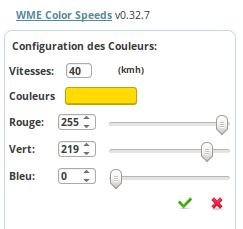
Very soon…
1 Like
Sounds great! Can’t wait.
This script is still “crashing” WME on save. WIth this script enabled, sometimes it will throw lots of “CityID” errors. This was mentioned previously I think. Need to find out what’s happening because it really makes using WME Color Speeds very difficult, having to reload the browser regularly.
I’m on it, but I can not seem to reproduce the bug…
Must depend on the system. Using Firefox on OS X, it’s fine. 
Using Chrome on OS X and I sometimes experience something similar to what Alan is describing. Lots of errors in the console, usually involving the CityID. I will try to capture the next time I see it; however, I’ve been too busy lately to do much editing.
Win7 and Win10 Chrome
v1.0.0 Available:
See details on the first post.
1 Like
Hello Seb.D!
It was perfect with all the configuration possibilities that the script has, become its most practical use and will surely be of great help to edit maps.
Thank you.
Love this script! One bug it seems for me, using chrome. When I change the opacity, it seems that only one side of two-sided streets change in opacity, the other direction stays the same default opacity. Thanks for all the updates!
V1.1.0 is online:
- Adding road categories: Parking Lot Road and Private Road.
- Possibility to not displaying Roundabout.
- WME Beta compatibility.
1 Like
Really useful script, but it would be even better if it could remember my personal customisations of available speeds and assigned colours.
I prefer to remove the speed limits not generally used in the UK leaving 70, 60, 50, 40, 30, 20, 15 and 10 with colours varying from Fuchsia through to Red via Blue, Green, Yellow and Pink. Whenever I have to restart WME (which is very frequently at the moment), the extension starts again from scratch with the default speeds and colour assignments 
Thanks!