[Script] WME Color Speeds v1.2.6

Hi everybody,

In association with Sebiseba and dummyd2.

  • In preview: colorization of the speeds A to B and B to A on two-way segment

  • Customizable list of speeds and/or colors for the verified speeds.

  • Verified speeds out-of the the list: red dashed.

  • Unverified speeds: light red dotted line.

  • Compatible Kmh / mph and driving on the left or right.
    I explain, on a one-way segment:
    * In France colorization will be on the right of the segment.
    * in England colorization will be on the left of the segment.

  • It can be disabled in the Layers menu.
    Layer.jpg

Fully compatible with all scripts and WME Colors HighLight.

Heu… Enjoy :mrgreen: :wink:

Available on greasyfork

Update V1.0.0 of 05/05/2016:

  • Added setting offset, opacity and thickness.
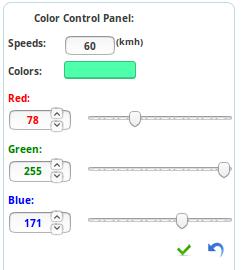
  • Possibility custom color throughout the range RGB.
  • For the USA: possibility of having a palette of color by state.

Update V1.1.0 of 19/08/2016

  • Adding road categories: Parking Lot Road and Private Road.
  • Possibility to not displaying Roundabout.
  • WME Beta compatibility.

Update V1.1.1 of 11/09/2016

  • WME Beta compatibility.

Update V1.1.3 of 25/09/2016

  • Possibility to set a palette by country.

Update V1.1.4 of 09/10/2016

  • WME Beta compatibility.

Update V1.1.5 of 10/11/2016

  • WME translation compatibility for other langages than Fr and En.

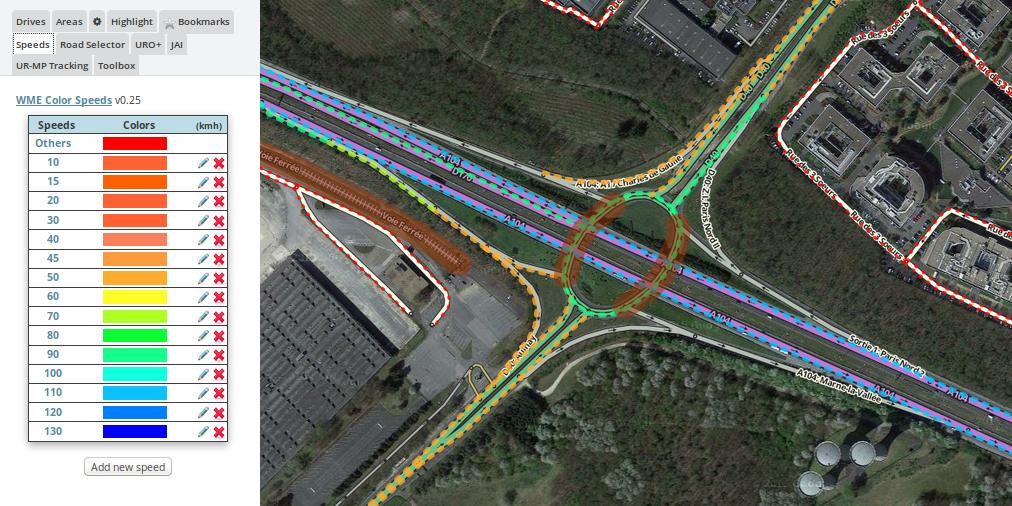
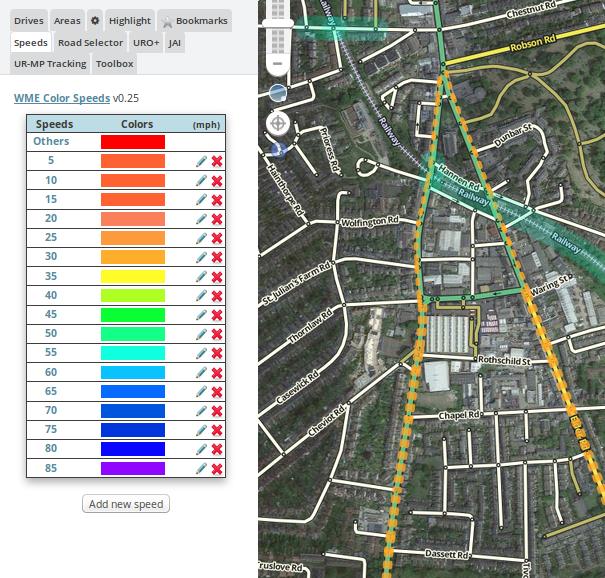
Screen in France and England for exemple :

KmhInFrance.jpg
MphInEngland.jpg
Reglages.jpg
ColorsAdjust.jpg

1 Like

Merci pour le partage, toujours top les scripts made in France :wink:

Merci Ă  toi :wink:

For information, I have to rewrite the post for better understanding.
And, I’m sorry for the late publication.

Hi,

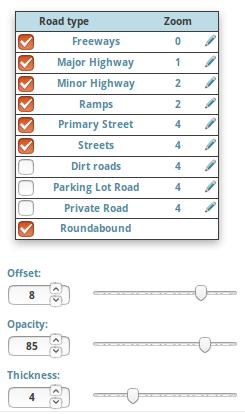
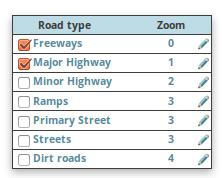
A small update that adds a grid for selected the controlled segment type and the max zoom level for this control (adjustable by clicking the pencil).

Reminder: zoom 0 = seen from afar; zoom 10 = close-ups.

Bug fix on deleting speed from the list.


Salut,

Une petite mise à jour qui ajoute une grille pour sélectionné le type de segment contrôlé et, le niveau de zoom maximum pour ce contrôle (réglable en cliquant sur le crayon).

Rappel: zoom 0 = vu de loin; zoom 10 = gros plans.

Correction d’un bug sur la suppression de la vitesse à partir de la liste.

RoadType.jpg

1 Like

Would be great to get this localized down to the state in the US with specific colors by state to align each with the DOT map colors.

I’d also like to see a a few more color selections (more granular) including black/grays, and the ability to set opacity manually as well.

EDIT: I took out the rgb color selections for the couleurs Array and am playing with two different ones. The first is by color family, the second by groups of websafe colors. Both of these require removing the “rgb” the for loop in the CSpeeds_Mainthml function.

Color Families

var couleurs=new Array("Pink","LightPink","HotPink","DeepPink","PaleVioletRed","MediumVioletRed","LightSalmon","Salmon","DarkSalmon","LightCoral","IndianRed","Crimson","FireBrick","DarkRed","Red","OrangeRed","Tomato","Coral","DarkOrange","Orange","Yellow","LightYellow","LemonChiffon","LightGoldenrodYellow","PapayaWhip","Moccasin","PeachPuff","PaleGoldenrod","Khaki","DarkKhaki","Gold","Cornsilk","BlanchedAlmond","Bisque","NavajoWhite","Wheat","BurlyWood","Tan","RosyBrown","SandyBrown","Goldenrod","DarkGoldenrod","Peru","Chocolate","SaddleBrown","Sienna","Brown","Maroon","DarkOliveGreen","Olive","OliveDrab","YellowGreen","LimeGreen","Lime","LawnGreen","Chartreuse","GreenYellow","SpringGreen","MediumSpringGreen","LightGreen","PaleGreen","DarkSeaGreen","MediumAquamarine","MediumSeaGreen","SeaGreen","ForestGreen","Green","DarkGreen","Aqua","Cyan","LightCyan","PaleTurquoise","Aquamarine","Turquoise","MediumTurquoise","DarkTurquoise","LightSeaGreen","CadetBlue","DarkCyan","Teal","LightSteelBlue","PowderBlue","LightBlue","SkyBlue","LightSkyBlue","DeepSkyBlue","DodgerBlue","CornflowerBlue","SteelBlue","RoyalBlue","Blue","MediumBlue","DarkBlue","Navy","MidnightBlue","Lavender","Thistle","Plum","Violet","Orchid","Fuchsia","Magenta","MediumOrchid","MediumPurple","BlueViolet","DarkViolet","DarkOrchid","DarkMagenta","Purple","Indigo","DarkSlateBlue","RebeccaPurple","SlateBlue","MediumSlateBlue","White","Snow","Honeydew","MintCream","Azure","AliceBlue","GhostWhite","WhiteSmoke","Seashell","Beige","OldLace","FloralWhite","Ivory","AntiqueWhite","Linen","LavenderBlush","MistyRose","Gainsboro","LightGrey","Silver","DarkGray","Gray","DimGray","LightSlateGray","SlateGray","DarkSlateGray","Black");

Websafe color groups

var couleurs=new Array("#000","#300","#600","#900","#C00","#F00","#003","#303","#603","#903","#C03","#F03","#006","#306","#606","#906","#C06","#F06","#009","#309","#609","#909","#C09","#F09","#00C","#30C","#60C","#90C","#C0C","#F0C","#00F","#30F","#60F","#90F","#C0F","#F0F","#030","#330","#630","#930","#C30","#F30","#033","#333","#633","#933","#C33","#F33","#036","#336","#636","#936","#C36","#F36","#039","#339","#639","#939","#C39","#F39","#03C","#33C","#63C","#93C","#C3C","#F3C","#03F","#33F","#63F","#93F","#C3F","#F3F","#060","#360","#660","#960","#C60","#F60","#063","#363","#663","#963","#C63","#F63","#066","#366","#666","#966","#C66","#F66","#069","#369","#669","#969","#C69","#F69","#06C","#36C","#66C","#96C","#C6C","#F6C","#06F","#36F","#66F","#96F","#C6F","#F6F","#090","#390","#690","#990","#C90","#F90","#093","#393","#693","#993","#C93","#F93","#096","#396","#696","#996","#C96","#F96","#099","#399","#699","#999","#C99","#F99","#09C","#39C","#69C","#99C","#C9C","#F9C","#09F","#39F","#69F","#99F","#C9F","#F9F","#0C0","#3C0","#6C0","#9C0","#CC0","#FC0","#0C3","#3C3","#6C3","#9C3","#CC3","#FC3","#0C6","#3C6","#6C6","#9C6","#CC6","#FC6","#0C9","#3C9","#6C9","#9C9","#CC9","#FC9","#0CC","#3CC","#6CC","#9CC","#CCC","#FCC","#0CF","#3CF","#6CF","#9CF","#CCF","#FCF","#0F0","#3F0","#6F0","#9F0","#CF0","#FF0","#0F3","#3F3","#6F3","#9F3","#CF3","#FF3","#0F6","#3F6","#6F6","#9F6","#CF6","#FF6","#0F9","#3F9","#6F9","#9F9","#CF9","#FF9","#0FC","#3FC","#6FC","#9FC","#CFC","#FFC","#0FF","#3FF","#6FF","#9FF","#CFF","#FFF");

55mph is stored at 89kph in the Waze data. The math done by the script ends up rounding to 56 instead of 55. The following code change works better I think:

fwdspeed = (fwdspeed!=null) ? (Math.trunc(fwdspeed0.625)) : null;
revspeed = (revspeed!=null) ? (Math.trunc(revspeed
0.625)) : null;

RANT: not sure why Waze uses .625 is, as the conversion when .621 is closer. And 0.6213711922374 is significantly closer to the actual value.

I have verified that this Script on Mac Chrome, while it works for the display on segments, the select menu with the colors does not show the colors. Chrome is unable to override the background color used for the select options, so the entire menu is white. Selecting an option does work, but you don’t have any idea what color you have selected.

Using “-webkit-appearance: none” does not help in this situation. The only possibility I can see which may help is to use jQuery to create “custom” select menus, such as the one which lets you add images and change text styles to each menu option item.

For the conversion, Waze has changed it, because it was functional at the beginning, as we can see from the screenshot in the first post.
Thank for the tip “Math.trunc”. I’ll add it.

For that, I do not understand, you want a different color by state for the same speed?
For me 50 Mp/h is 50 Mp/h or 90km/h is 90Km/h regardless of the state or country …

But a filter by city / state / country, why not…

For the color choice, i look what i can do, and how do that.

Many states in the US have maps which show speed limits with specific color highlights on their maps. each state is different. Many editors can edit in multiple states to add speed limits. For me, personally, I find it much easier to compare the Waze map to the state speed limit map if the highlight colors are the same. For that to work efficiently. I would like to be able to quickly switch ALL the color highlights in WME Color Speeds from one state color palette to another by selecting the state or color scheme from a menu. That would change all the WME Color Speed colors with a single selection. The key here is making the WME Color Speeds colors match the state speed limit map colors and be able to switch the WME Color Speeds with a single selection.

Does that make more sense?

Ok, now I see. :wink:
So, this involves generating object in live with the name of the State, it is not insurmountable :slight_smile:
But, I do that as inactive option by default.

I look at this.

For the color of highlight selection, i have the same in firefox and chrome on Linux, with no solution for the moment…

That is one way to do it, yes, but I would prefer user control over the scheme currently displayed, not automatic based on segment state.

Sent from my iPhone using Tapatalk

The update posted today broke 55mph again. Please include the truncation code I provided previously. 55mph comes up as “unknown” speed because the math is wrong.

Another problem/request: line type. dashed lines make it difficult to see small gaps in speed limits, because small segments can just be part of a gap in the dashed line.

Rectified, sorry :oops:

Thanks!

Sent from my iPhone using Tapatalk

Hello, UK user here.

I find this script works great for verified speed limits of 20, 30, 40 & 50 miles per hour.
But verified speeds of 60 & 70 miles per hour come up as unknown (red instead of blue colours).

Ian

Now fixed.
Thanks

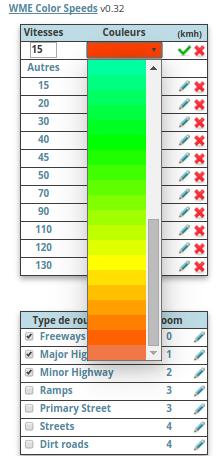
Hi there, thanks for this script! I’m not sure why it’s not more popular than the alternative, WME Speeds. The fact that you’ve added the math to shift the highlights to the left or right sides of the segment makes this one far superior. Anyway, I was wondering what these dropdown menus are for? I don’t see anything in them. All other scripts except WME Color Speeds have been disabled, but still nothing.

I’m running Chrome Version 48.0.2564.116 (64-bit) on Mac OS 10.10.5.

These dropdown menus are for select the new color.

Have you modified the script?
Because, i see it like this:
MenuDeroulant.jpg