Welcome to WME FixUI. This script is designed to overcome limitations and design flaws in the UI (user interface) of the Waze Map Editor. In particular, the aim is to improve usability of WME for users with smaller laptop screens, or who are struggling with low contrast.
Below is an angry rant explaining what I think of the WME developers and why I started this script. Reading it is not essential to using the script! :lol:
[hide]As a Waze editor, you are an unpaid volunteer. You work for Waze for nothing and your working environment is WME - the Waze Map Editor. The people who provide this environment treat us with contempt. :evil:
For many years it’s been obvious that the WME developers never use WME. They design the interface on lovely, big monitors, properly mounted on desks and in first-class condition, whilst utterly ignoring the conditions most of us are working with: the most-used screen size - as measured by global web site visitors - is 1366x768. The result is unfortunate for us: lots of wasted whitespace. The most obvious and annoying example has always been the left-hand panel where the segment details are shown: if your screen is anything less than full HD resolution, you will be constantly scrolling to see all the details.
But what’s worse than the bad design are the pointless changes they sometimes make to WME for no good reason. Remember I described WME as your working environment? Imagine one day you come to work and sit down at your desk - and someone has decided to alter your monitor height and fix it in a position that’s comfortable for them, but not you. Or they’ve glued the keyboard to the desk in their preferred position. Or they’ve changed your favourite mouse for a trackball. You might be able to get used to these changes, but it will always take you time and you may never work as well as you used to.
The straw that broke the camel’s back for me came in May 2016. Waze moved the zoom bar from the right side of the screen to the left - for no reason they have EVER explained. So I decided it was time to use my long-rusty programming skills and give something back to the community. The script rapidly grew from there as I worked on improving the WME UI for myself and other people made requests - and as Waze continued to screw up the interface with things like the new layers menu.
Then, in 2017, Waze announced they were going to completely re-design WME. Staff promised us that feedback from users would be taken into account. In October they released the new WME design to beta testers - and it was a direct slap in the face! Apart from incorporating a couple of ideas from WME Clicksaver, the new UI was good-looking, consistent - and a quantum leap backwards in usability. The V2 interface wasted, if anything, slightly more space than V1, whilst also eliminating nearly all contrast from the UI. Buttons lost their button appearance, whilst some menus were now styled as buttons. AND THEY MOVED THE ZOOM CONTROL AGAIN AND REMOVED THE SLIDER! It is awful - and whilst beta testers were still identifying new problems with the V2 interface, Waze released it without warning to production! It took me nearly 2 months to re-write just about every part of this script, to make old features work again and deal with the new screwups.
When they announced they were working on the new design, I foolishly expressed the hope this script would become redundant. Instead it’s more necessary than ever.  [/hide]WME FixUI is designed only to work with the WME UI. It has been designed to have minimal performance impact on WME. It doesn’t load any 3rd-party frameworks and it doesn’t do any work in the background. Most of the changes it makes are performed by adding CSS information to the page to alter the appearance and for most of the options, the script performs no action except when you change one of the options.
Whilst there have been scripts in the past (WME Maximized, WME UI Bugs) that alter the WME UI, they were just big blocks - either on or off. WME FixUI is designed to present a range of individual options that can be turned on or off - and when they are off they should have no effect on WME at all.
Version 2 of the WME user interface, released in October 2017, was a massive step backwards in usability with an extreme reduction in contrast. That led to version 2 of this script with variable contrast and compression enhancement. Prior to that, the options were simply on or off. Now, as well as controlling which improvements are active, you can independently control the degree of compression and contrast improvement each option applies.
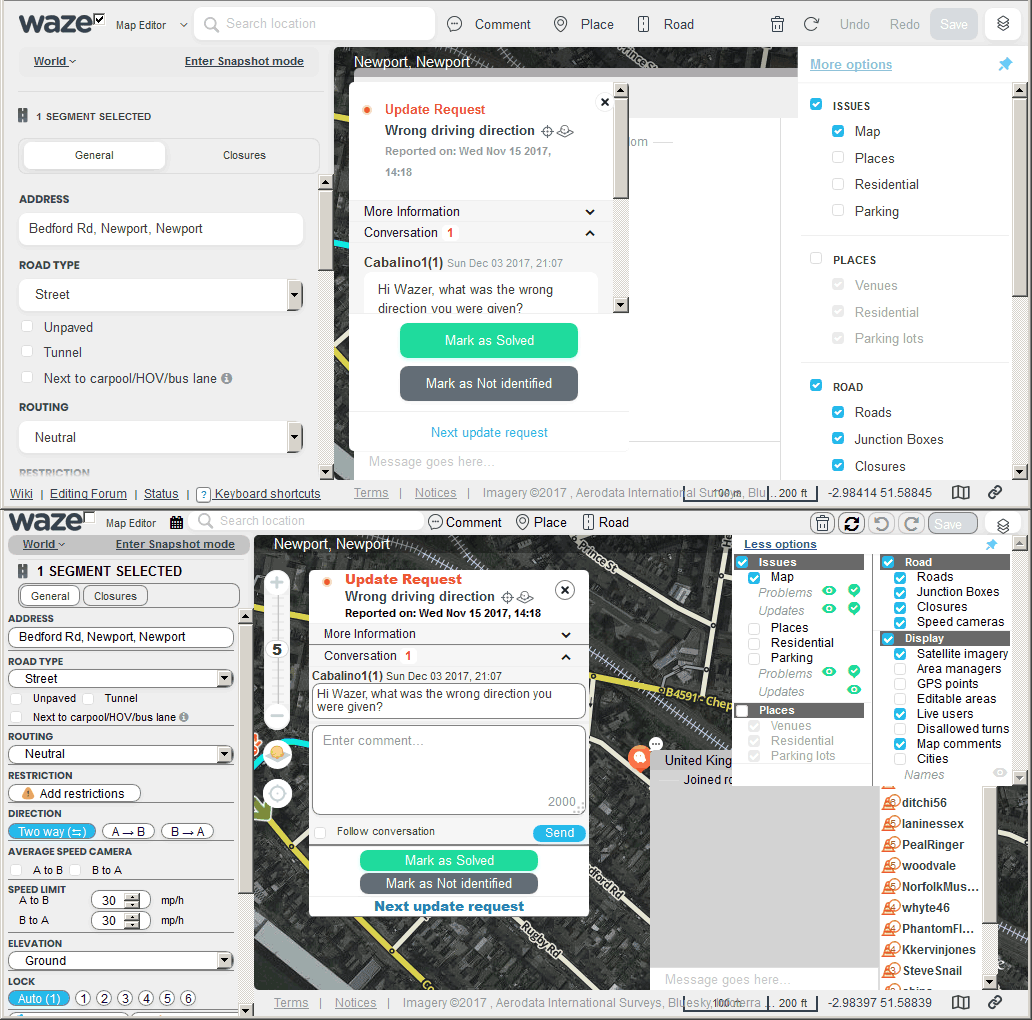
The most common screen size is 1366x768, but some netbooks may be as small as 1024x600. At maximum compression, this script should make WME usable on a netbook. The image below shows the difference between standard WME and fully-compressed on such a screen when the layers menu, chat window and a UR panel are all open whilst a segment is selected:
This script is called WME Fix UI, or WMEFU for short. If you think that is open to mis-interpretation, you’re wrong. The interpretation is completely correct: it’s what I feel like saying to those in charge of the WME UI. :twisted:
The following options are available:
-
These are simple on/off options:
-
Move the Zoom control back to the top left and restore full functionality. This also adds a zoom level indicator with mousover information about what can be selected.
-
Expand External Providers details for places.
-
Move Chat icon & panel back to the right.
-
Highlight Invisible mode.
-
Permalink Checker. When WME is opened, a button in the toolbar will show the number of segments/places/nodes/comments/cameras in the URL. You can compare to the number of objects actually selected to spot discrepancies. Clicking the button will attempt to re-select all objects in the URL.
-
Show all options in the Layers menu.
-
Darken the screen overlay that appears when saving.
-
Move the GPS layer below the Segments layer.
-
Show map-blocking WME bugs. Highlight map areas blocked by WME bugs
-
Hide Links panel to give more space in the side-panel
-
Fix/disable Bridge button
-
Start calendars on Monday in Closures & Restrictions dialogues
-
ISO date format in Restrictions dialogue
-
Disable Kinetic Panning of map
-
Disable scroll-to-zoom
-
Disable map blocking during save
-
Change green turn arrows to blue - for colour-blind users
-
Hide toolbar menu labels - because the new WME toolbar design isn’t working well for small screens.
-
Move floating buttons from map area: Layers/Refresh buttons back into toolbar, Share button into footer.
-
Move User Info and Notification buttons - because settings & info buttons should be on the left with all the other settings - not lumped in with the editing controls.
-
Minimise GSV drag handle - change the drag handle for altering GSV width from a large, map-blocking element that’s easy to grab by mistake, to a small button.
-
Enlarge geo/junction nodes - Handy for people like me with ageing eyesight!
-
Enlarge geo handles - See above.
-
These options are affected by the variable compression/contrast controls:
-
Compress/enhance bars above the map. This also replaces text button labels with icons and incorrect icons with correct ones in the WME toolbar. The black bar that covers the top of the map is also made into a click-through element, so it doesn’t reduce editing space.
-
Compress/enhance side panel contents
-
Compress/enhance layers menu.
-
Two-column layers menu - only enabled if some compression is applied to the layers menu.
-
Compress/enhance report panels - UR and MP details.
-
Compress/enhance Chat panel.
-
Reduce width of side panel. You really need this for smaller screens, but it does have unavoidable minor problems with some of the buttons. It also has issues for some script tabs.
-
These are additional functions that don’t fit in the above categories:
-
Aerial Shifter. There used to be a standalone script, but it is no longer maintained. This allows you to shift the Aerials layer when the Google images don’t line up with GPS tracks. You can also reduce the opacity of the Aerials layer to help the segments stand out better.
-
GSV Image Adjust. You can control both the contrast and brightness of the GSV images - to deal with overly dull or bright images. You can also invert the images - sometimes helpful when looking for speed limit signs.
-
GSV Panel Default Width Control. With the GSV Adjust controls, you can now control the default width of the GSV image panel.
-
Minimise GSV drag handle from an invisible, map-blocking element to a visible control.
-
Warning highlight when Comments layer is disabled. It’s rarely wise to edit when you might miss a Map Comment concerning what you’re editing. And if you need to turn Comments off temporarily, it’s easy to forget to turn them back on. This non-optional function turns the tool bar orange/yellow whilst the Comments layer is off.
-
Show full timestamps for Last Edited & Created. Again, not an option: it’s always on.
-
Temporarily hide junction nodes - for when a point Map Comment/Place gets hidden under a junction node.
-
Panel Swap - allow access to other tabs whilst a map element is selected.
-
Control disabled WME warnings - adds a new section to the default WME settings tab that allows you to see warning pop-ups that have been disabled and re-enable them.
-
Disable turn arrow popups - because the new dialogue that pops up when you mouseover a turn arrow gets in the way and isn’t needed most of the time.
The script can be installed from the Greasy Fork Website. I have no plans to package it as a Chrome extension at this time. It is been tested in Chrome and Firefox, in the Beta editor and with RTL languages. Please report any problems.
Update history, known issues and roadmap are in the next post.
Notice: since Iain’s sad departure, future updates will be provided via a new script instead: WME Fix UI Memorial Edition


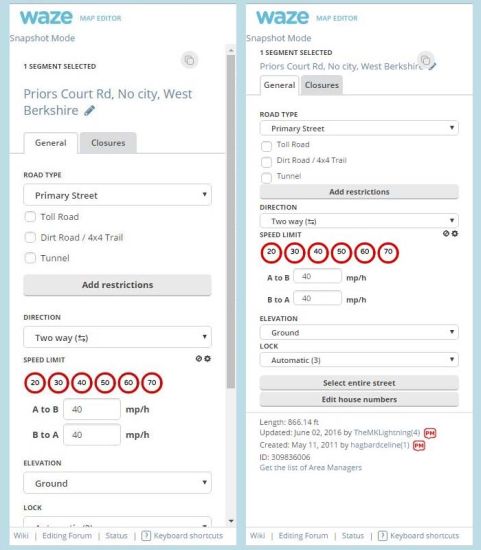
 Very few elements in the WME UI have unique identifiers, so I’m modifying a lot of class-based CSS. Obviously the comment box shares a class with something in the side panel. Shouldn’t be too hard to fix. Re-formatting URs and MPs is on my roadmap already.
 But then I’ve watched the efforts you guys have put in for years when this happens. I don’t mind if it’s my turn.